

TimeBox - TimeBox Todo & Focus
TaeHun Kim Productivity iPhoneiPadiPod touch
TimeBox - TimeBox Todo & Focus is a free Productivity app for iPhone and iPad by TaeHun Kim. Requires iOS 14.0. Updated March 25, 2026.
- Price
- Free
- on the App Store
- Size
- 38 MB
- Age 4+
- Updated
- Mar 25
- 2026 · v1.1.0
Screenshots

About TimeBox - TimeBox Todo & Focus
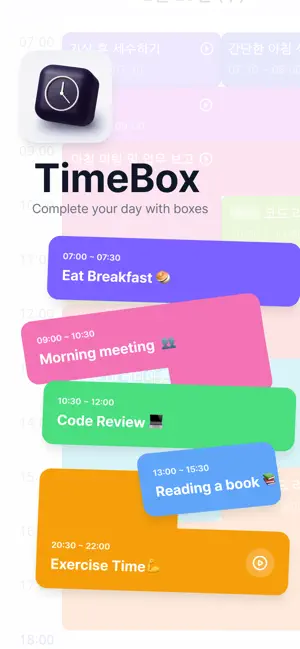
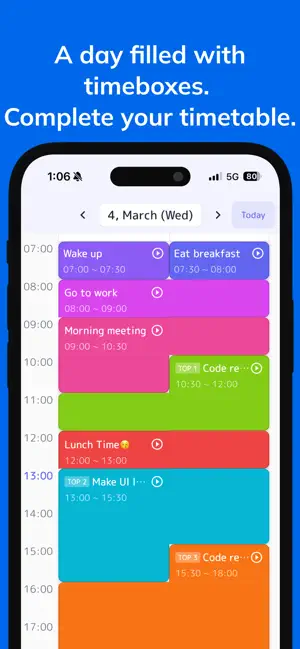
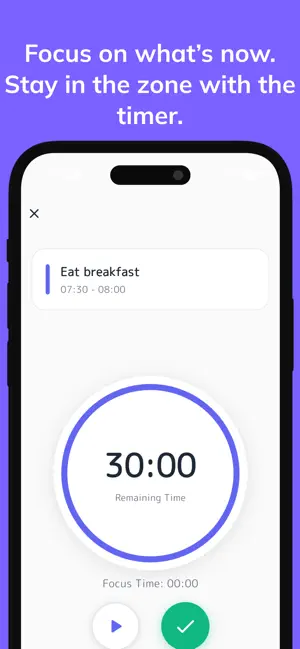
TimeBox - Harvard's #1 Productivity Method in an App Do you have many tasks but struggle to execute them? Have you felt the limitations of simple to-do apps and timer apps? TimeBox is a time management solution that brings Harvard's #1 productivity method, Time Boxing, to your mobile device. Complete your daily productivity loop from planning to execution to reflection. [Why TimeBox?] Traditional to-do apps only record "what to do," while timer apps only provide "focus." As a result, planning, execution, tracking, and reflection remain disconnected, preventing real behavioral change. TimeBox creates a complete productivity loop by forcing you to schedule tasks in time boxes, executing them instantly with the timer, and finishing with statistics and reflection. [Core Features] 1. Smart Time Allocation Schedule your tasks in 30-minute time boxes. Overlapping schedules are automatically blocked, helping you create realistic plans. We clearly show you which schedules conflict. 2. Instant Execution View all your tasks at a glance on the timetable and start the timer with one tap. Focus according to your planned time. Manage easily with play, pause, and complete buttons. 3. Progress Tracking - Daily Statistics: Check your day's performance with planned box count, completed box count, and more - Monthly Statistics: See your month's performance at a glance with streak days and monthly completion rate * Streak System: Record your daily completed boxes and challenge yourself to maintain your streak 4. Priority Management Set up to 3 Top3 priorities per day. Build the habit of tackling important tasks first. 5. Recurring Tasks Easily set up tasks that repeat daily, weekly, or monthly. Color-code them for easy identification. 6. Daily Reflection End your day by recording today's achievements and thoughts. Use reflection to make tomorrow a better day. 7. Smart Notifications Get notified 5 minutes before your scheduled tasks so you never miss a start. Toggle notifications on and off as needed. 8. Intuitive Timetable Visualize your 24-hour day in 30-minute blocks to see your schedule at a glance. Tasks are automatically placed, making time management effortless. [Who Is This App For?] - Office Workers: Those who want to efficiently use time between meetings - Students/Job Seekers: Those who need to structure study time and stay motivated for continuous learning - Freelancers: Those who want to systematically manage their flexible daily schedules - Productivity Seekers: Those who tried to-do and timer apps but saw no behavioral change [What Makes TimeBox Different] - No Time Conflicts Policy: Overlapping schedules cannot be created, forcing realistic planning - Instant Execution UX: Seamlessly connect from timetable to timer with zero friction - Streak System: Stay motivated with completion-based streak tracking - Low-Friction Experience: Start immediately without login—no barriers to entry [Additional Features] - Multi-language Support: Available in Korean, English, and Japanese - Dark Mode: Reduce eye strain with dark mode - Widget Support: Check today's tasks right from your home screen - Ad Removal: Enjoy an ad-free experience with a one-time in-app purchase [Getting Started] TimeBox works right out of the box—no complex setup required. Add your first task, schedule it in a time box, and start the timer. Your daily productivity loop begins now. Download now and make your day more meaningful! If you have questions or feedback, please contact us through the in-app customer support.
What’s new
Version 1.1.0 · Updated March 25, 2026
[Version 1.1.0 Update] 1. New Features • Tap an empty area in the timetable to quickly create a task at that time • Added a red dot indicator to highlight newly created blocks 2. Bug Fixes • Improved messages shown when ad removal purchase fails or is canceled • Fixed an issue where entered content was lost when going back during task creation
App privacy
The developer, TaeHun Kim, reported these privacy practices to Apple.
Data Used to Track You
The following data may be used to track you across apps and websites owned by other companies:
- Location: Coarse Location
- Identifiers: User ID, Device ID
- Usage Data: Product Interaction, Advertising Data, Other Usage Data
- Diagnostics: Performance Data
Data Linked to You
The following data, which may be collected and linked to your identity, may be used for the following purposes:
- Location: Coarse Location
- Identifiers: User ID, Device ID
- Usage Data: Product Interaction, Advertising Data, Other Usage Data
- Diagnostics: Performance Data, Crash Data
- Purchases: Purchase History
Used for: Third-Party Advertising, Analytics, App Functionality
Alternatives to TimeBox - TimeBox Todo & Focus
Looking for apps like TimeBox - TimeBox Todo & Focus? Here are 6 similar apps on the App Store. The highest rated is TimeBox: Plan and Execute (5.0/5), and all 6 are free to download.
-
 The timebox planner
-
 TimeBox: Plan and Execute
5.0
TimeBox: Plan and Execute
5.0
-
 Tbox: Timebox Planner
-
 TimeBox – Plan,Do,See & Habit
-
 Chrobox: AI Timebox Planner
-
 타임박싱
타임박싱
| App | Rating | Price | Last updated | Compare |
|---|---|---|---|---|
| TimeBox - TimeBox Todo & Focus | – | Free | March 25, 2026 | |
| The timebox planner | – | Free | Jun 26, 2026 | Compare |
| TimeBox: Plan and Execute | 5.0 / 5 (1) | Free | Aug 10, 2026 | Compare |
| Tbox: Timebox Planner | – | Free | Aug 7, 2026 | Compare |
| TimeBox – Plan,Do,See & Habit | – | Free | Oct 10, 2026 | Compare |
| Chrobox: AI Timebox Planner | – | Free | Oct 15, 2026 | Compare |
| 타임박싱 | – | Free | Jan 18, 2026 | Compare |