

ChatZima
Austin Taylor Productivity iPhoneiPadiPod touch
ChatZima is a free Productivity app for iPhone and iPad by Austin Taylor. Rated 4.7/5 from 25 ratings. Requires iOS 15.0. Updated October 20, 2026.
- Rating
- 4.7
- 25 ratings
- Price
- Free
- on the App Store
- Size
- 91 MB
- Age 12+
- Updated
- Oct 20
- 2026 · v1.6.15
Screenshots



About ChatZima
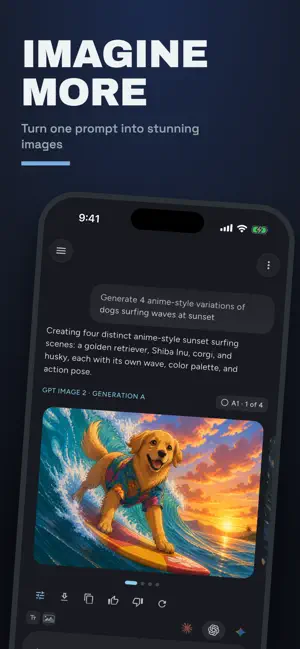
ZIMA is the all-in-one AI chat app: Claude, ChatGPT, and Gemini in one place, plus AI images, video, music, voice chat, and a Gallery of everything you create. Chat with Claude Fable 5.1 and Claude Opus 5.5 from Anthropic, GPT-6 Astra, Sol and Luna from OpenAI, and Google's Gemini 3.8 Flash and Gemini 3.1 Pro — 32 models, one subscription, one clean, fast interface. One App. Every Model. Stop juggling AI subscriptions. Pick the right model for each task — quick answers, deep research, writing, coding — switch mid-conversation without losing context, and turn on extended thinking for the hardest problems. Start free, no account needed, with Claude Sonnet 5.5, GPT-6 Luna, Gemini 3.5 Flash, and more. Upgrade to Lite, Pro or Max for every premium model and higher daily limits. AI Image Generation Create images in any chat just by asking. Choose your image model in Image Options: OpenAI's GPT Image 2.5, Google's Nano Banana 2, ByteDance's Seedream 5.0 Lite and Pro, or Black Forest Labs' FLUX.2 Max. Ask for up to 4 variations and each appears the moment it's ready. Tap an image's tag, like A2, and say what to change ("make A2 warmer"), or pick a one-tap adjustment. New image models arrive without an app update. AI Video Generation Make short videos with sound in any chat. Gemini Omni Flash is the default, or choose ByteDance's Seedance, MiniMax H3, or Google's Veo 3.1 in Video Options. Ask for up to 4 versions at once, bring a photo to life, then edit or extend any clip just by asking: "make it nighttime," "keep going." Clips play right in the chat. Music, Sound Effects & Speech Ask for a song with lyrics or an instrumental, a sound effect or looping ambience, or text read aloud in one of ten natural voices — even as a dialogue. Powered by ElevenLabs, every track plays right in the chat. Your Gallery Every image, video, and track you've made, across all your chats, in one place. Browse by date or by chat, filter by type or model, and search your prompts. Jump back to the chat where something was made, or use it as the reference for a new chat. Save, share, or delete. Voice Chat & Dictation Hold the mic and choose Voice chat for a real spoken conversation with ChatGPT or Gemini, and switch mid-call. Show it a photo or document, share your camera with Gemini, and get answers from the live web — every call is transcribed into your chat. Or tap the mic to dictate: your words fill the message box as you speak. Know When It's Ready Turn on notifications and ZIMA tells you the moment a video, song, or image set is done — or when a reply finishes after you've left. Web Search & Link Reading Answers grounded in the live web, with sources you can tap. Paste a link and ask about it, or have ZIMA pull real photos from the web into the chat. Gmail & Google Drive Connect your Google account and ZIMA can search your email and files — "what did Sarah say about the launch date?" It drafts emails for you to send yourself (ZIMA never sends) and creates Google Docs, Sheets, Slides, and Forms in your Drive. Every read shows a card in chat, so you always know what was accessed. Real Files, Created in Chat Ask for a report, spreadsheet, or deck and get a downloadable Word, PDF, Excel, PowerPoint, or CSV file right in the conversation. Preview, download, or save to Drive, then refine by asking. Upload & Ask Attach images, PDFs, Word docs, spreadsheets, and more. ZIMA reads them, answers your questions, and remembers earlier attachments even in long conversations. Always Organized Every chat is saved, searchable, and synced between iOS and the web. Edit or delete your messages anytime. Clear Privacy Your messages go to the provider of the model you pick, solely to generate your reply — never to train AI models. A plain-language "AI & Your Data" page shows exactly what ZIMA shares with AI providers, before first use and anytime in Settings. Terms of Use: https://chatzima.com/terms-of-service
Ratings & reviews
4.7
25 ratings
What’s new
Version 1.6.15 · Updated October 20, 2026
Video and music in every chat Make videos in any chat Claude, GPT, and Gemini chats can all make short videos with sound now. Gemini Omni Flash is the default, and Video Options adds ByteDance's Seedance 2.5 and 2.0 Mini, MiniMax H3, and Google's Veo 3.1. Ask for up to four versions at once, then edit or extend any clip just by asking: "make it nighttime," "keep going." Music, sound effects, and speech Ask for a song with lyrics or an instrumental, a sound effect or looping ambience, or text read aloud in one of ten voices — even a dialogue between two of them. Tracks play right in the chat. Watch and browse in style Clips play on a loop right in the chat. Tap one to watch it full screen, swipe between versions, and scrub to any moment. Images keep their true shape, and the full-screen viewer lets you pinch to zoom and tap through a set. The Gallery now holds your videos and audio too. New models Claude Opus 5.5 and GPT-6 Sol, plus two new free models for everyone: Claude Sonnet 5.5 and GPT-6 Luna. Voice, upgraded Tap the mic to dictate, or hold it to start a voice chat. ChatGPT's voice now lets you talk over it naturally, Gemini's follows you when you switch languages, and both can look at a photo or document you add mid-call. ZIMA Lite and easier upgrades Lite, our new lower-priced plan, unlocks every premium model with half of Pro's daily usage. When you hit a limit or tap a locked model, you can compare plans and subscribe right there, without leaving your chat. Notifications Leave while something is being made and ZIMA tells you when your images, video, or song are ready, or when a reply finishes. Choose what you get in Settings → Notifications. Also in this release Your last image, video, or track of the day goes through even if it costs a bit more than what's left. Chats recover from dropped connections, and uploads hold up on slow networks. A message that can't be sent goes back into the message box, just as you typed it. A thumbs-down can now tell us what went wrong. Fixed GPT chats sometimes switching to GPT-4o mini on their own. Fixed a crash when saving an image or video to Photos. Fixed a crash that could happen when cancelling the file picker. Small fixes and polish throughout.
App privacy
The developer, Austin Taylor, reported these privacy practices to Apple.
Data Linked to You
The following data, which may be collected and linked to your identity, may be used for the following purposes:
- Purchases: Purchase History
Used for: Developer’s Advertising or Marketing, App Functionality
Data Not Linked to You
The following data, which may be collected but is not linked to your identity, may be used for the following purposes:
- Location: Coarse Location
- User Content: Other User Content
- Identifiers: Device ID
- Usage Data: Product Interaction, Advertising Data
- Contact Info: Email Address
- Diagnostics: Other Diagnostic Data
Used for: Third-Party Advertising, Developer’s Advertising or Marketing, Analytics, App Functionality
Alternatives to ChatZima
Looking for apps like ChatZima? Here are 6 similar apps on the App Store. The highest rated is Mindo - AI Chat Agent (5.0/5), and all 6 are free to download.
-
 Mindo - AI Chat Agent
5.0
-
 Crompt AI - Multimodel Chatbot
3.0
-
 Fambot: AI Family Assistant
5.0
-
 Any AI: Chatbot, Image & Video
4.0
-
 OneClaw - Personal AI Buddy
5.0
-
 Aurora AI - Find anything
4.3
| App | Rating | Price | Last updated | Compare |
|---|---|---|---|---|
| ChatZima | 4.7 / 5 (25 ratings) | Free | October 20, 2026 | |
| Mindo - AI Chat Agent | 5.0 / 5 (1) | Free | Sep 21, 2026 | Compare |
| Crompt AI - Multimodel Chatbot | 3.0 / 5 (1) | Free | Sep 22, 2026 | Compare |
| Fambot: AI Family Assistant | 5.0 / 5 (13) | Free | Oct 9, 2026 | Compare |
| Any AI: Chatbot, Image & Video | 4.0 / 5 (3) | Free | Jul 18, 2026 | Compare |
| OneClaw - Personal AI Buddy | 5.0 / 5 (10) | Free | Sep 29, 2026 | Compare |
| Aurora AI - Find anything | 4.3 / 5 (6) | Free | Sep 22, 2026 | Compare |
Compare ChatZima with the top alternatives: ratings, updates, ASO score and keyword gaps →