

FastDDNS: DDNS & Network Tools
Minh Nguyen Utilities iPhoneiPadiPod touch
FastDDNS: DDNS & Network Tools is a free Utilities app for iPhone and iPad by Minh Nguyen. Requires iOS 15.0. Updated September 25, 2026.
- Price
- Free
- on the App Store
- Size
- 57 MB
- Age 4+
- Updated
- Sep 25
- 2026 · v1.1.6
Screenshots


About FastDDNS: DDNS & Network Tools
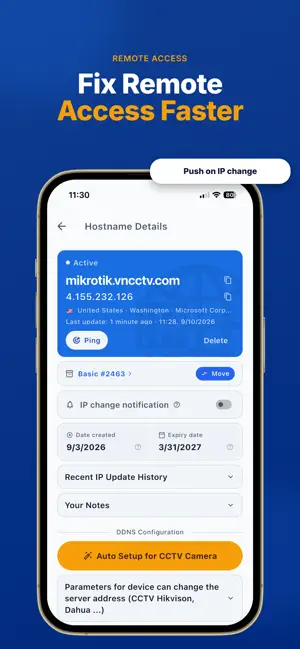
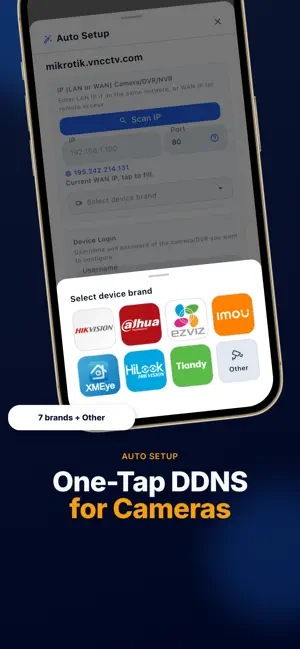
FastDDNS is a toolbox for IT technicians, network admins, CCTV installers, MSPs, and home-lab users. Manage changing IPs, configure cameras, and diagnose remote access on site. One toolbox combines DDNS, camera setup, ONVIF inspection, and internet-side checks. Why FastDDNS Plain DDNS updates a hostname. FastDDNS helps prove where a connection fails: on the device, at port forwarding, behind CGNAT, or at the ISP. DDNS hostname management • Create hostnames on FastDDNS domains or on your own domain. • See the current IP with country and ISP, last update time, expiry date, and service pack. • Copy hostname/IP, add notes, review history, and enable IP-change push notifications. • Ping a hostname, move it between service packs, or delete it. • DynDNS-compatible updates work with routers, NAS, scripts, and third-party clients. Auto Setup for CCTV Camera No more typing the DDNS server, hostname, username, and password into the camera's web UI. Enter a camera, DVR, or NVR IP on the LAN or WAN, port, and login. Tap Scan IP to pick the device straight from the LAN. Choose Hikvision, Dahua, EZVIZ, Imou, XMEye, HiLook, Tiandy, or Other. FastDDNS writes the DDNS settings and, where required, DNS or email settings. Manual DDNS Configuration covers Hikvision, Dahua, DrayTek, MikroTik, pfSense, Linux/curl, and Windows. ONVIF Camera Enter a camera IP to read manufacturer, model, firmware, serial number, hardware ID, hostname, service endpoint, ONVIF versions, and services without a password. Sign in with camera credentials to list every video stream and profile with snapshot thumbnails. Watch live video inside the app. Copy the RTSP link with or without credentials, ready for an NVR, VMS, or VLC. A tries-left counter helps avoid locking out the camera account. Network tools • LAN Scanner — Find LAN devices, identify vendors, and see open ports. • Port Checker — Test TCP/UDP ports from your phone and from the internet at once, so you know if the problem is forwarding, CGNAT, or the ISP. • Ping — Measure live latency, min/avg/max, packet loss, and standard deviation. • Traceroute — See each hop and transit delay. • CGNAT Checker — Detect ISP CGNAT and NAT loopback support. • MAC Vendor Lookup — Identify a manufacturer from a MAC address. • DNS Lookup — Query A, AAAA, CNAME, MX, TXT, and NS records. • MX Lookup — Find mail server records for a domain. • Domain Whois Lookup — View domain registration and owner details. • IP Whois Lookup — Identify the organization behind a public IP. • Storage Calculator — Estimate CCTV storage from channels, bitrate, resolution, and schedule. Compatible devices and systems Dahua, Hikvision, Imou, EZVIZ, HiLook, XMEye, Tiandy, UNV, MikroTik, pfSense, DrayTek, Windows, Linux, NAS, and DynDNS-compatible clients. Who it's for • IT technicians and network administrators • CCTV and IP-camera installers • MSP field technicians • Home-lab and self-hosting users Plans • Free 1 Hostname — one hostname, valid for one year, free. • Free with Limited Use — extra hostnames, 30 days each; reactivate to continue. • Premium Packs — more hostnames and longer validity. Keep DDNS, camera setup, and connectivity checks together on site. Terms of Use (EULA): https://www.apple.com/legal/internet-services/itunes/dev/stdeula/ Privacy Policy: https://fastddns.net/privacy
What’s new
Version 1.1.6 · Updated September 25, 2026
• Fresh new look, easier to read in light and dark mode • Choose your theme: System, Light or Dark • Faster startup • Dates and times in your language • Simpler hostname package picker • Bug fixes and improvements
App privacy
The developer, Minh Nguyen, reported these privacy practices to Apple.
Data Used to Track You
The following data may be used to track you across apps and websites owned by other companies:
- Identifiers: Device ID
- Usage Data: Product Interaction
Data Linked to You
The following data, which may be collected and linked to your identity, may be used for the following purposes:
- Identifiers: Device ID, User ID
- Usage Data: Product Interaction
- Diagnostics: Crash Data, Performance Data
- Purchases: Purchase History
- Contact Info: Email Address
Used for: Third-Party Advertising, Analytics, App Functionality
Alternatives to FastDDNS: DDNS & Network Tools
Looking for apps like FastDDNS: DDNS & Network Tools? Here are 6 similar apps on the App Store. The highest rated is AnyBridge (4.9/5), and all 6 are free to download.
-
 VpsDoc: DNS Benchmark
4.8
VpsDoc: DNS Benchmark
4.8
-
 DNS Benchmark: Speed Test
4.7
DNS Benchmark: Speed Test
4.7
-
 DNS Optimizer: Server Changer
4.7
DNS Optimizer: Server Changer
4.7
-
 AnyBridge
4.9
AnyBridge
4.9
-
 Control D Quick Setup
4.0
Control D Quick Setup
4.0
-
 Mahsa VPN
4.5
Mahsa VPN
4.5
| App | Rating | Price | Last updated | Compare |
|---|---|---|---|---|
| FastDDNS: DDNS & Network Tools | – | Free | September 25, 2026 | |
| VpsDoc: DNS Benchmark | 4.8 / 5 (21) | Free | May 14, 2026 | Compare |
| DNS Benchmark: Speed Test | 4.7 / 5 (26) | Free | Aug 19, 2026 | Compare |
| DNS Optimizer: Server Changer | 4.7 / 5 (81) | Free | Jul 16, 2025 | Compare |
| AnyBridge | 4.9 / 5 (7) | Free | Sep 16, 2025 | Compare |
| Control D Quick Setup | 4.0 / 5 (49) | Free | Oct 9, 2026 | Compare |
| Mahsa VPN | 4.5 / 5 (28) | Free | Mar 14, 2026 | Compare |