

LinkEffekt
Alexander Joannou Music iPhoneiPadiPod touch
LinkEffekt is a free Music app for iPhone and iPad by Alexander Joannou. Requires iOS 17.0. Updated October 21, 2026.
- Price
- Free
- on the App Store
- Size
- 5 MB
- Age 4+
- Updated
- Oct 21
- 2026 · v2.0.8
Screenshots


About LinkEffekt
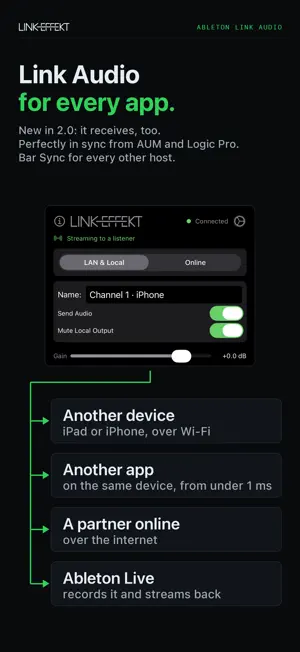
LinkEffekt brings Ableton Link Audio to every AUv3 host. New in 2.0: it receives as well as sends. Stream any track between iPad and iPhone, from app to app on one device, into Ableton Live and back, or to a friend over the internet. Your host doesn't need to support Link Audio itself. ONLY IN LINKEFFEKT • Right on the beat across devices. Other streaming plugins leave the network delay to the receiving side: either the whole receiving app plays later, or the stream arrives behind the beat. LinkEffekt Send plays its track ahead instead, by exactly the trip over the network, using the delay compensation of AUM and Logic Pro for iPad. The audio lands right on the beat on the other device, in both directions at once, from the first play, with nothing to set. • Bar Sync for every other host. With any other sending app, and with Ableton Live, incoming audio locks to your bar: one bar late, but perfectly tight. Better late than never. • Link Audio over the internet. Share a room code and jam with a friend anywhere, locked to your bars, peer-to-peer and encrypted. If the connection drops, it comes back by itself. WHAT YOU CAN DO • Jam across devices: iPad and iPhone stream to each other over Wi-Fi, both ways at once • Route audio between apps on one device: AUM into Cubasis, or track to track inside one host. No network: on this direct path LinkEffekt adds under 1 ms, plus one audio buffer when iOS runs the receiving app first. Want it right on your metronome? Switch on Bar Sync, one bar later • Record in Ableton Live: every iOS track arrives in Live 12.4 as its own input, no interface, no cables. Live sends back, too. • Record Ableton Move and Note: both stream over Link Audio, so LinkEffekt Receive plays them in any host, ready to record in Logic Pro, AUM or Cubasis. • Monitor a band: sum several channels in one Receive, or give each its own track FEATURES • Three plugins: Send, Receive as an audio effect, Receive as an instrument • Local network over Wi-Fi, or by cable with Personal Hotspot for the steadiest connection • Ableton Live 12.4 and later in both directions • Ableton Move and Note 2.0 and later as sources • Send at 48 kHz for receivers that need it, like Ableton Live • Adjustable buffer against Wi-Fi gaps • Gain, stereo pan and click-free mute on every channel • Stereo level meters • Channel names carry the device, like "Channel 1 · iPad", and update live on every receiver • Mute Local Output, so a sent track isn't heard twice • Bypass all LinkEffekt Sends with one switch: your session plays on the device instead of streaming • Live Mode for playing live on the sending device • Nudge and Link Offset for fine timing • Ableton Link settings in every plugin • iPhone and iPad FREE TO START One Send and one Receive are free with no time limit: full quality, on the beat, Bar Sync included. A single in-app purchase unlocks unlimited Sends and Receives, several channels in one Receive, and Online mode. No subscription. IMPORTANT: OPEN THE APP ONCE After installing, open the LinkEffekt app once and allow Local Network access. Without it the plugins can't find each other and stay silent. REQUIREMENTS • An AUv3 host such as AUM, Cubasis, Loopy Pro, Drambo, GarageBand or Logic Pro • iOS 17 or later • For Ableton Live, Move or Note: Live 12.4, Move 2.0 or Note 2.0 or later on the same network • For Online mode: the in-app purchase on both sides
What’s new
Version 2.0.8 · Updated October 21, 2026
New in 2.0.8: • Bar Sync with Bluetooth headphones: connect or disconnect them while playing, on the sending or the receiving device, and the stream lands back on your metronome. • Clearer timing info in the Receive status line. • Improved overall stability. LinkEffekt 2.0 receives as well as sends, and puts the audio on your beat. • New: perfectly in sync when sending from AUM or Logic Pro for iPad. The Send plays ahead by exactly the trip over the network, so the audio lands right on the beat on the other device, in both directions, from the first play. • New: Bar Sync for every other host. Incoming audio locks to your bar, one bar late but perfectly tight. • New: LinkEffekt Receive and LinkEffekt Receive Instrument. Play channels from other devices, other apps on this device or a remote partner. • New: app to app on the same device. No Wi-Fi needed. • New: Online mode. Play with a remote partner over the internet, locked to your bars, peer-to-peer and encrypted. If the connection drops, it comes back by itself. • New: channel names carry the device. • New: Live Mode on the Send, for the rare case of playing live on the sending device. • New: Bypass all LinkEffekt Sends. One switch in any Send, and your whole session plays on the device instead of streaming. • The in-app purchase now also unlocks Online mode and monitoring several channels at once. • Help in the app and plugins now covers Logic Pro.
App privacy
The developer, Alexander Joannou, reported these privacy practices to Apple.
Data Not Collected
The developer does not collect any data from this app.
Alternatives to LinkEffekt
Looking for apps like LinkEffekt? Here are 6 similar apps on the App Store. The highest rated is BeatRepeat (5.0/5), and 5 of the 6 are free to download.
-
 AudioPipeline
4.5
AudioPipeline
4.5
-
 BeatRepeat
5.0
BeatRepeat
5.0
-
 ToneNoise
2.5
ToneNoise
2.5
-
 Splitonic
5.0
Splitonic
5.0
-
 RadioMama - Radio & Sampler
4.2
RadioMama - Radio & Sampler
4.2
-
 Kombinat4
5.0
Kombinat4
5.0
| App | Rating | Price | Last updated | Compare |
|---|---|---|---|---|
| LinkEffekt | – | Free | October 21, 2026 | |
| AudioPipeline | 4.5 / 5 (17) | Free | Oct 12, 2026 | Compare |
| BeatRepeat | 5.0 / 5 (5) | Free | Apr 24, 2026 | Compare |
| ToneNoise | 2.5 / 5 (2) | Free | May 29, 2026 | Compare |
| Splitonic | 5.0 / 5 (2) | Free | Jun 6, 2026 | Compare |
| RadioMama - Radio & Sampler | 4.3 / 5 (8) | Free | Oct 19, 2026 | Compare |
| Kombinat4 | 5.0 / 5 (10) | 7.99 USD | Apr 30, 2026 | Compare |
Compare LinkEffekt with the top alternatives: ratings, updates, ASO score and keyword gaps →