

SentenceDeck: Shadowing
奇濂 任 Education iPhoneiPadiPod touch
SentenceDeck: Shadowing is a free Education app for iPhone and iPad by 奇濂 任. Requires iOS 17.0. Updated October 7, 2026.
- Price
- Free
- on the App Store
- Size
- 36 MB
- Age 4+
- Updated
- Oct 7
- 2026 · v2.0.1
Screenshots


About SentenceDeck: Shadowing
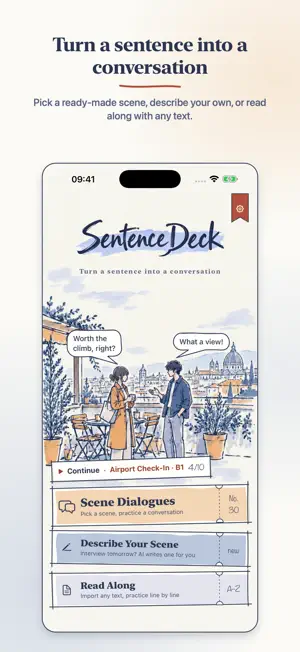
Practice the conversations you will actually have. Pick a scene — airport check-in, ordering coffee, a job interview — and SentenceDeck uses AI to write a short dialogue for your level. You say your lines; your partner's lines are played for you. It is shadowing, made real: hear each line, say it, then hear yourself back. No grades, no corrections, no leaderboards — just a calm, repeatable way to rehearse real situations out loud, in a hand-drawn sketchbook. HOW A SCENE WORKS 1. Choose from 30 everyday scenes in five categories: Travel, Daily Life, Work, Social and Emergencies 2. Pick your level (A2, B1 or B2) and a voice for each side of the dialogue 3. Practice line by line: listen to the reference, speak — recording stops when you stop speaking — then play yourself back. Play your own lines, swap to the other role, or practice both sides 4. Finish with a short recap: lines practiced, time spent and the lines you recorded again Line-by-line translations in your interface language are one tap away. A/B compare, sentence lock and playback speed (0.75× to 1.5×) are all there while you practice. A STAMP FOR EVERY SCENE Finish a scene and it is stamped into your passport, next to today's lines, your day streak and your total. My Scenes keeps every dialogue you have practiced, with all its versions, ready to search and practice again. DESCRIBE YOUR OWN SCENE Type a situation in one sentence — "Calling my landlord because the water heater is broken" — and get a dialogue written for it. Your description is sent to an AI service to write the dialogue, and the app asks for your permission before the first time. Everyday situations only; please leave out names and contact details. Any AI-written dialogue can be reported from the practice screen or the recap. READY OFFLINE 21 built-in English scenes (B1) come with audio, are free to practice and work without a connection, so you can start talking the moment you open the app. TWO WAYS TO WRITE A DIALOGUE • Standard: free, with a number of free dialogues every day • Detailed: richer context and more natural lines. Uses characters from your balance; the cost is shown before you start, and nothing is charged if writing fails TWO KINDS OF VOICE System voice: built into iOS. Free, offline, unlimited. Premium voice: natural, lifelike voices that speak each line with the mood of the scene. Premium audio is generated sentence by sentence as you practice and paid for in characters. The same sentence is cached for replay with the same voice settings; changing the voice may generate it again and use characters again. READ ALONG WITH YOUR OWN TEXT Paste an article, a script or presentation notes — or import a text file — and practice it sentence by sentence. Backup & Restore keeps the audio you generated. LANGUAGES Practice English, Chinese (Simplified and Traditional), Japanese, Korean, Spanish, French, Italian or German. The app itself speaks 10 interface languages, on iPhone and iPad, in light or dark mode. CHARACTER PACKS • 6,000 characters • 30,000 characters • 72,000 characters Characters never expire and are used for premium voice and Detailed dialogues. The App Store shows the local price for your region. Whether you are getting ready for a trip, a job interview, IELTS or TOEFL, or simply want to sound natural in everyday conversations, SentenceDeck gives you a focused speaking routine for the situations that matter to you. Terms of Use (EULA): https://www.apple.com/legal/internet-services/itunes/dev/stdeula/ Privacy Policy: https://www.kuroneko-cmd.dev/privacy/sentencedeck/
What’s new
Version 2.0.1 · Updated October 7, 2026
Fixed an issue where your character balance and Restore & Sync could fail after reinstalling the app or restoring your iPhone from a backup.
App privacy
The developer, 奇濂 任, reported these privacy practices to Apple.
Data Linked to You
The following data, which may be collected and linked to your identity, may be used for the following purposes:
- Purchases: Purchase History
- User Content: Other User Content
- Identifiers: User ID
- Diagnostics: Other Diagnostic Data
Used for: App Functionality
Alternatives to SentenceDeck: Shadowing
Looking for apps like SentenceDeck: Shadowing? Here are 6 similar apps on the App Store. The highest rated is GuavaSpeak (5.0/5), and all 6 are free to download.
-
 English Intensive Reading
-
 TOPIK II 単語・文法 周回トレーナー
-
 SpeakAccent
-
 Learn Korean: Grammar Paws
-
 GuavaSpeak
5.0
-
 Salut Coco - Learn French
| App | Rating | Price | Last updated | Compare |
|---|---|---|---|---|
| SentenceDeck: Shadowing | – | Free | October 7, 2026 | |
| English Intensive Reading | – | Free | Oct 15, 2026 | Compare |
| TOPIK II 単語・文法 周回トレーナー | – | Free | Sep 29, 2026 | Compare |
| SpeakAccent | – | Free | Jul 23, 2026 | Compare |
| Learn Korean: Grammar Paws | – | Free | Sep 24, 2026 | Compare |
| GuavaSpeak | 5.0 / 5 (2) | Free | Oct 6, 2026 | Compare |
| Salut Coco - Learn French | – | Free | Jul 9, 2026 | Compare |