

Onepilot: SSH Shell Terminal
SOFIANE EL MOKADDAM Developer Tools iPhoneiPadiPod touch
Onepilot: SSH Shell Terminal is a free Developer Tools app for iPhone and iPad by SOFIANE EL MOKADDAM. Rated 4.1/5 from 14 ratings. Requires iOS 18.6.
- Rating
- 4.1
- 14 ratings
- Price
- Free
- on the App Store
- Size
- 40 MB
- Age 4+
- Updated
- Aug 12
- 2026 · v2.2.3
Screenshots


About Onepilot: SSH Shell Terminal
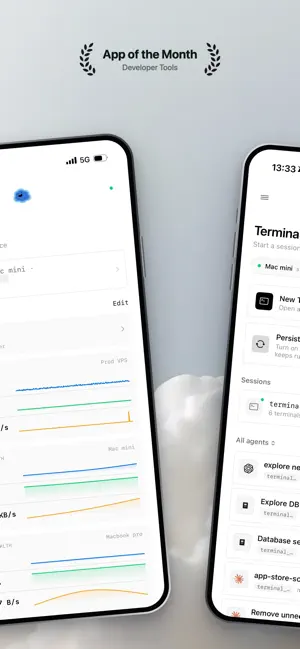
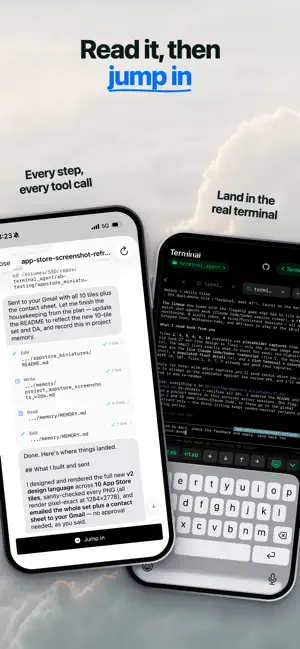
Your servers and your AI agents, in your pocket. Onepilot is the iOS app that runs your AI agents and server fleet on machines you own. Connect to any server, Mac, or VPS over SSH, then deploy, monitor, and manage agents across all of them from one place. Direct SSH to hardware you control: your keys and your code never touch the cloud. WHO IT IS FOR For developers, indie hackers, and sysadmins who run AI coding agents on remote machines and want to deploy, watch, and control them from a phone. PILLAR ONE: A REAL TERMINAL, PLUS THE TOOLS AROUND IT A full SSH terminal, not a chat box, with the modern dev workflow built in: browse and edit remote files, review git diffs, forward localhost to preview your dev server, and run terminal CLIs like Claude Code in a real session, exactly as you would on your laptop. Pair a server once with the onepilot CLI (one npm install and a QR scan) and your sessions become persistent: your shell keeps running on your own server through app closes and connection drops, and greets you with full scrollback when you return. SEE YOUR AGENTS THINK Onepilot detects the coding agent sessions running on your servers (Claude Code, Codex, OpenCode) and streams them live: follow every step as it happens, scroll the full transcript, then jump into the terminal to take over. PILLAR TWO: DEPLOY AND MANAGE AN AGENT FLEET Spin up a persistent AI agent in minutes with a guided wizard, no config files: pick a framework like OpenClaw or Hermes, choose a model, add your keys, connect a channel, and Onepilot keeps it running on your server. Watch every agent across every machine from a single view; swap the model, rotate a key, or adjust behavior anytime. KNOW WHEN SOMETHING BREAKS Fleet monitoring watches CPU, memory, disk, load, and your Docker containers on every paired host, learns each machine's normal, and sends a push notification when something drifts. Alerts are calm by design: one notification when a problem starts, spaced reminders while it lasts, and a recovery note when it heals. Drill into any container for live performance charts. RUNS WHILE YOU SLEEP Put any agent or task on a schedule with cron and let your fleet work overnight. This is automation no plain SSH client offers: your agents run even when your phone is asleep. SET UP ONCE, REUSE EVERYWHERE Store your keys and chat tokens one time, then reuse them across every agent. Give your agents new skills from a community marketplace. WHY ONEPILOT A plain SSH client connects you to a shell. Onepilot gives you that shell plus a full dev ecosystem around it, and an agent operations layer on top: deploy, monitor, alert, schedule, and manage a fleet of AI agents on your own servers. One app for every machine and every agent, not a remote control for one. Ships worldwide.
Ratings & reviews
4.1
14 ratings
What’s new
Version 2.2.3 · Updated August 12, 2026
UX and performance improvements.
App privacy
The developer, SOFIANE EL MOKADDAM, reported these privacy practices to Apple.
Data Not Collected
The developer does not collect any data from this app.
Alternatives to Onepilot: SSH Shell Terminal
Looking for apps like Onepilot: SSH Shell Terminal? Here are 6 similar apps on the App Store. The highest rated is pseudocoder (5.0/5), and 5 of the 6 are free to download.
-
 Bracket AI SSH Manager
-
 MobileClaw - Local LLM Chat
2.0
MobileClaw - Local LLM Chat
2.0
-
 pseudocoder
5.0
pseudocoder
5.0
-
 PureCode
5.0
PureCode
5.0
-
 Reqeast
5.0
Reqeast
5.0
-
 Pievra: Jules & Stitch AI
5.0
Pievra: Jules & Stitch AI
5.0
| App | Rating | Price | Last updated | Compare |
|---|---|---|---|---|
| Onepilot: SSH Shell Terminal | 4.1 / 5 (14 ratings) | Free | August 12, 2026 | |
| Bracket AI SSH Manager | – | 4.99 USD | Oct 10, 2026 | Compare |
| MobileClaw - Local LLM Chat | 2.0 / 5 (1) | Free | Mar 14, 2026 | Compare |
| pseudocoder | 5.0 / 5 (3) | Free | Mar 20, 2026 | Compare |
| PureCode | 5.0 / 5 (2) | Free | Mar 14, 2026 | Compare |
| Reqeast | 5.0 / 5 (1) | Free | Oct 22, 2026 | Compare |
| Pievra: Jules & Stitch AI | 5.0 / 5 (1) | Free | May 8, 2026 | Compare |