

Date Alarm Clock
Blesslin Shinie J Utilities iPhoneiPadiPod touch
Date Alarm Clock is a free Utilities app for iPhone and iPad by Blesslin Shinie J. Rated 4.8/5 from 16 ratings. Requires iOS 26.2.
- Rating
- 4.8
- 16 ratings
- Price
- Free
- on the App Store
- Size
- 36 MB
- Age 4+
- Updated
- Sep 20
- 2026 · v1.4
Screenshots
About Date Alarm Clock
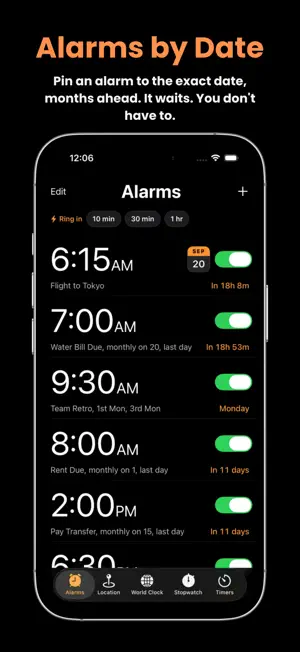
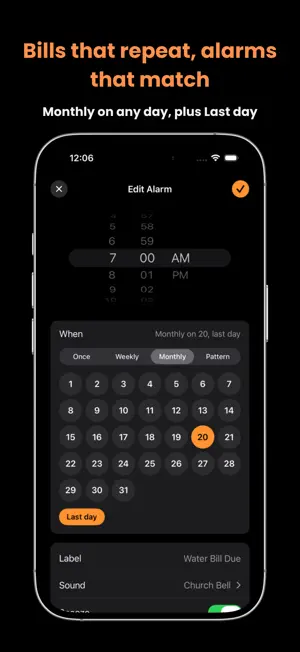
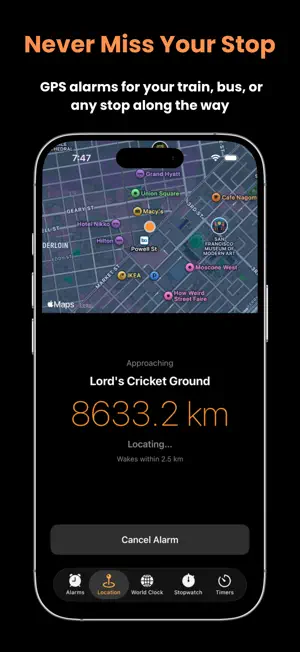
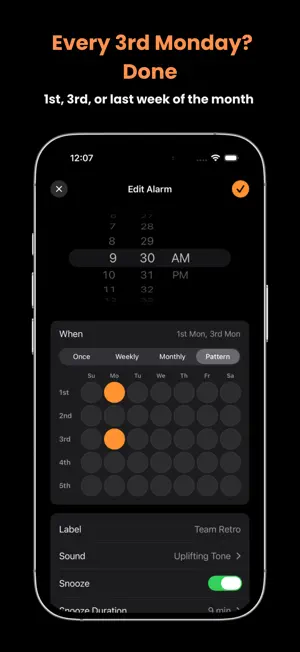
Plan Ahead. Arrive on Time. Never Miss What Matters. DateAlarm lets you schedule alarms for exact calendar dates — not just daily repeats. Set reminders for birthdays, anniversaries, exams, flights, meetings, or any important event in your life. Choose the precise day and time, even months or years in advance. Real life doesn't repeat every day, so neither do your alarms. Set one for the 1st and the last day of every month for rent and bills. Or for the 2nd Thursday for your team meeting, the 1st Monday for your book club. DateAlarm handles the awkward months for you — pick the 31st and it simply skips the months that don't have one, and "last day" always lands right whether the month ends on the 28th, 29th, 30th or 31st. And DateAlarm wakes you by place, not just time. Set a location alarm and get woken as you approach your destination — your train or bus stop, your station, or anywhere you need to get off. Perfect for commuters, travelers, and anyone who likes to nap on the way. It keeps working even when the app is closed, so you can relax and trust it to alert you in time. Follow every trip live with Live Activities on your Lock Screen and in the Dynamic Island — see your remaining distance and ETA at a glance, without ever opening the app. Your countdown timers show up there too. Keep your next alarm in sight with widgets for your Home Screen and Lock Screen, or just ask Siri — "Set a date alarm", "Turn off my Flight alarm" — without touching your phone at all. Key Features • Schedule alarms for any specific date — days, months, or years ahead • Monthly alarms on the dates that matter — the 1st, the 15th, or the last day of every month, however long that month is • Repeat by pattern — the 1st Thursday, the 2nd Monday, the 3rd Friday • Weekly alarms with one-tap Weekdays, Weekends and Every Day presets • Location alarms — get woken as you near your stop or destination • Live Activity & Dynamic Island — track distance and ETA at a glance • Home Screen and Lock Screen widgets for your next alarm • Siri and Shortcuts — create, turn on and turn off alarms by voice • Quick alarms — ring in 10 minutes, 30 minutes or an hour, in one tap • Rings through Silent mode and Focus, so you never sleep through it • 28 alarm sounds, from gentle tones to unmissable — plus a silent option that shows on screen without a sound • Custom snooze, or no snooze at all • Works in the background, even when the app is closed • Custom labels for every alarm and trip • Designed for iPhone and iPad • Clean, distraction-free interface • Built-in stopwatch with lap tracking • Beautiful countdown timers with live updates • World clock for global time tracking • Simple, fast, and reliable performance Whether you're planning months ahead, paying the rent on the last day of every month, or just trying to wake up at the right stop, DateAlarm helps you stay on time — every time. Smart alarms. Real dates. Real places. Total control.
Ratings & reviews
4.8
16 ratings
What’s new
Version 1.4 · Updated September 20, 2026
Alarms that repeat the way real life does. • Monthly — set alarms for specific dates each month, or the last day of the month whether that's the 28th, 29th, 30th or 31st. Pick the 31st and months without one are skipped automatically. • Patterns — "the 1st Thursday", "the 2nd Monday", "the 3rd Friday". For the meetings, classes and clubs that land on the same weekday every month. • Widgets — see your next alarm on your Home Screen and Lock Screen. • Redesigned for iPad, with alarms laid out across the screen instead of stretched down one column.
App privacy
The developer, Blesslin Shinie J, reported these privacy practices to Apple.
Data Not Linked to You
The following data, which may be collected but is not linked to your identity, may be used for the following purposes:
- Identifiers: Device ID
- Usage Data: Product Interaction
Used for: Third-Party Advertising
Alternatives to Date Alarm Clock
Looking for apps like Date Alarm Clock? Here are 6 similar apps on the App Store. The highest rated is AlarmIt - Calendar Alarm (5.0/5), and all 6 are free to download.
-
 Alarmate: Date Alarm Clock
4.4
Alarmate: Date Alarm Clock
4.4
-
 DateAlarm - Reminder Alarm
4.9
DateAlarm - Reminder Alarm
4.9
-
 Alarm Pro: Flexible Alarms
4.6
Alarm Pro: Flexible Alarms
4.6
-
 Clock - Alarm Clock
3.4
Clock - Alarm Clock
3.4
-
 AlarmIt - Calendar Alarm
5.0
AlarmIt - Calendar Alarm
5.0
-
 CalAlarm: Calendar Alarm
3.0
CalAlarm: Calendar Alarm
3.0
| App | Rating | Price | Last updated | Compare |
|---|---|---|---|---|
| Date Alarm Clock | 4.8 / 5 (16 ratings) | Free | September 20, 2026 | |
| Alarmate: Date Alarm Clock | 4.4 / 5 (58) | Free | Oct 21, 2026 | Compare |
| DateAlarm - Reminder Alarm | 4.9 / 5 (45) | Free | Oct 21, 2026 | Compare |
| Alarm Pro: Flexible Alarms | 4.6 / 5 (7) | Free | Oct 8, 2026 | Compare |
| Clock - Alarm Clock | 3.4 / 5 (7) | Free | Sep 24, 2026 | Compare |
| AlarmIt - Calendar Alarm | 5.0 / 5 (1) | Free | Jul 24, 2026 | Compare |
| CalAlarm: Calendar Alarm | 3.0 / 5 (2) | Free | Dec 28, 2025 | Compare |
Compare Date Alarm Clock with the top alternatives: ratings, updates, ASO score and keyword gaps →