

ScanBox: Image to Text OCR
Neha Rathore Utilities iPhoneiPadiPod touch
ScanBox: Image to Text OCR is a free Utilities app for iPhone and iPad by Neha Rathore. Requires iOS 15.0. Updated October 15, 2026.
- Price
- Free
- on the App Store
- Size
- 2 MB
- Age 4+
- Updated
- Oct 15
- 2026 · v1.3
Screenshots

About ScanBox: Image to Text OCR
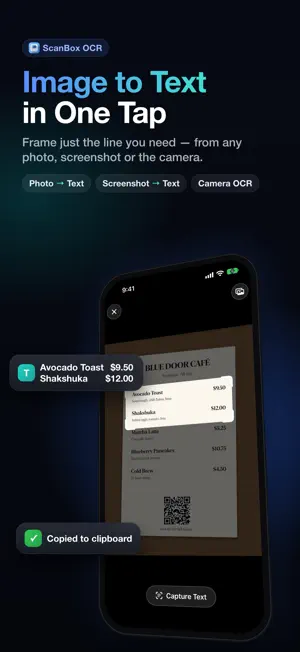
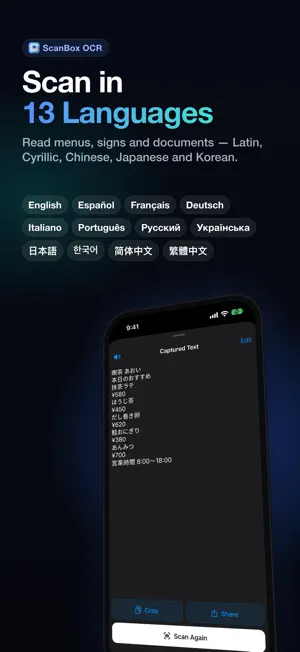
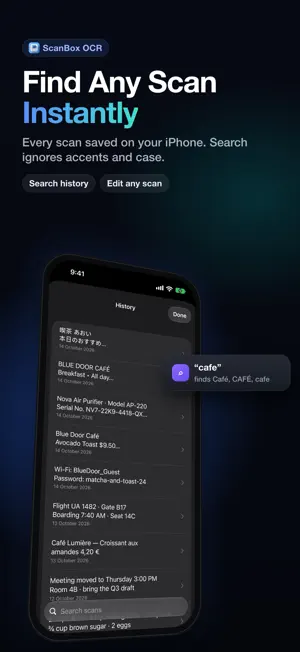
Scan only the text you want, frame it with a resizable scan box, tap once, and copy it. No wall of text to clean up. Works on camera, photos and screenshots, entirely on your iPhone. ScanBox gives you a scan box you can drag and resize. Put it over a price, a serial number, a single paragraph or a QR code, tap once, and just that is ready to use. WHAT'S NEW IN 1.3 • QR codes and barcodes: ScanBox reads codes inside the scan box, from the camera and from photos. Each code gets a Copy button, and web links get a tap-to-Open button • Search your history, ignoring case and accents • Tap phone numbers, links, addresses and dates in your results to call, open, map or add them • Edit captured text before you copy it; your edits are saved to history • Read aloud with the on-device system voice • Share sheet: choose "ScanBox" from Photos, Files or Safari images to read the text and copy it all, without opening the app. Scans from the share sheet are not saved to history • Shortcuts: the "Extract Text from Image" action (iOS 16 or later) • A simpler 3-step first-run guide TWO WAYS TO SCAN Camera: point at a menu, label, receipt, book page, sign or QR code. Move and resize the scan box to frame exactly what you need. Pinch to zoom from 1x to 6x and switch on the torch in dim light. Photos: import any picture or screenshot from your library. The same scan box appears over the image (it starts on the whole image) so you can narrow it to one line before you capture. WHY SCANBOX • Scan box: drag, resize and capture only what is inside it • Image to text from Photos and screenshots • QR code and barcode reading • Live camera scanning with torch and pinch-to-zoom (1x to 6x) • 13 OCR languages: English (US/UK), French, German, Spanish, Italian, Portuguese (Brazil), Chinese (Simplified and Traditional), Japanese, Korean, Russian and Ukrainian (these four need iOS 16 or later) • Optional auto-copy: turn it on in Settings to send text to your clipboard the moment it is read • Fast Mode for quick, everyday scans • Copy or share the result to Messages, Mail, Notes or any app • Local scan history with search, swipe to delete and Clear All • Haptics you can switch off • Tiny download - no bloat PRIVATE BY DESIGN ScanBox collects nothing. There is no account, no ads, no tracking, no analytics, no third-party SDKs and no network requests. Text is recognised on your device with Apple's Vision framework, and read aloud with the on-device system voice. Photos and camera frames are never saved or uploaded, and your history stays in the app's private storage on your iPhone. It works in airplane mode. GREAT FOR Receipts, menus, product labels, ingredient lists, serial numbers, price tags, business cards, street signs, whiteboards, book passages, neatly handwritten notes, QR codes, barcodes, and text inside screenshots - anything you would otherwise retype by hand. Free. No subscription. No sign-in.
What’s new
Version 1.3 · Updated October 15, 2026
ScanBox 1.3 reaches further than the camera. • QR codes and barcodes: read them inside the scan box, from the camera or photos. Copy any code, or tap Open on web links • Search your history, ignoring case and accents • Tap phone numbers, links, addresses and dates in your results • Edit captured text; your edits are saved to history • Read aloud with the on-device system voice • New "ScanBox" action in the share sheet: read the text in an image from Photos, Files or Safari and copy it all (not saved to history) • New Shortcuts action, "Extract Text from Image" (iOS 16 or later) • A simpler 3-step first-run guide Still 100% on-device: no account, no ads, no internet.
App privacy
The developer, Neha Rathore, reported these privacy practices to Apple.
Data Not Collected
The developer does not collect any data from this app.
Alternatives to ScanBox: Image to Text OCR
Looking for apps like ScanBox: Image to Text OCR? Here are 6 similar apps on the App Store.
-
 Scan&Send
-
 Mathmatico
-
 aTrackr
-
 Vavideo - TV Mediatheken Suche
-
 Bubble Level & Measure Toolbox
-
 Cards plus – Digital Wallet
| App | Rating | Price | Last updated | Compare |
|---|---|---|---|---|
| ScanBox: Image to Text OCR | – | Free | October 15, 2026 | |
| Scan&Send | – | Free | Sep 12, 2025 | Compare |
| Mathmatico | – | Free | Sep 13, 2025 | Compare |
| aTrackr | – | Free | Aug 12, 2026 | Compare |
| Vavideo - TV Mediatheken Suche | – | Free | Jun 6, 2026 | Compare |
| Bubble Level & Measure Toolbox | – | Free | May 30, 2026 | Compare |
| Cards plus – Digital Wallet | – | Free | Oct 16, 2026 | Compare |