

SwimGlass
Jan Zalsky Sports iPhoneiPadiPod touch
SwimGlass is a paid Sports app for iPhone and iPad by Jan Zalsky. Requires iOS 17.0. Updated May 14, 2026.
- Price
- 1.99 USD
- on the App Store
- Size
- 5 MB
- Age 4+
- Updated
- May 14
- 2026 · v2.0
Screenshots


About SwimGlass
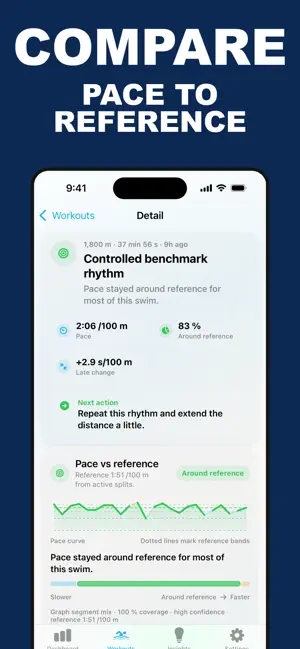
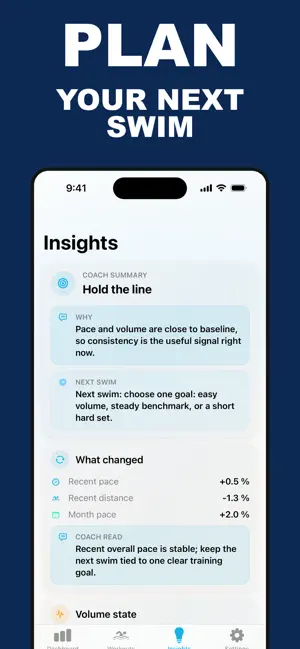
SwimGlass turns your Apple Health swim workouts into clear, useful training insight. Instead of digging through raw workout data, open SwimGlass to see what happened in your latest swim, how your pace is changing, and what your next session should focus on. Built for swimmers Track swim distance, duration, pace, calories, heart rate, stroke count, and pool context when Apple Health provides them Review your latest swim with active time, rest, pace curve, benchmark comparison, and a practical coach cue Compare recent training against previous weeks, months, and years See personal bests, streaks, training volume, pace trends, and consistency in one focused dashboard Use meters or yards, with pace shown per 100 m or per 100 yd Understand each workout SwimGlass gives every swim a detailed breakdown. Open a workout to inspect pace, heart rate, stroke rate, speed, cumulative distance, energy, stroke length, pace drift, and an estimated SWOLF view when the required data is available. For supported workouts, SwimGlass can also show: Active swimming vs rest Pace bands against your personal reference pace Stroke style distance breakdown First, middle, and final-third pacing Technique efficiency, including distance per stroke and strokes per 100 m Route maps for open-water swims with Health route data Turn stats into next steps The Insights tab highlights what changed, why it matters, and what to do next. SwimGlass looks at your recent pace, training load, benchmark pace, zone mix, technique signals, consistency, and data quality to create readable guidance instead of another wall of numbers. Home Screen widget Add the SwimGlass widget to keep your latest swim visible at a glance. Depending on widget size, it can show distance, pace, active time, rest, coach focus, reference pace, and a compact pace trend. Private by design SwimGlass reads swim workouts from Apple Health in read-only mode. It does not write workouts back to Apple Health. CSV exports are created locally and shared only when you choose to share them. If you swim with Apple Watch and want a cleaner way to understand your progress, SwimGlass gives your swim history the context it deserves.
What’s new
Version 2.0 · Updated May 14, 2026
SwimGlass 2.0 is here. Track your Apple Health swim workouts in a cleaner, more focused way: Review your latest swim with distance, pace, active time, rest, and a compact pace curve Explore detailed workout analysis with pace bands, technique signals, stroke data, and multi-metric charts Compare your progress across weeks, months, and years Get readable insights for training load, consistency, benchmark pace, and next-session focus Add the Home Screen widget to keep your latest swim visible at a glance Export swim history to CSV locally when you need your data elsewhere
App privacy
The developer, Jan Zalsky, reported these privacy practices to Apple.
Data Not Collected
The developer does not collect any data from this app.
Alternatives to SwimGlass
Looking for apps like SwimGlass? Here are 6 similar apps on the App Store. The highest rated is Maryland Athletics (4.8/5), and all 6 are free to download.
-
 oswim: open water swimming
-
 Synda
Synda
-
 English League Scores
-
 World Aquatics Events Insider
1.0
World Aquatics Events Insider
1.0
-
 Maryland Athletics
4.8
Maryland Athletics
4.8
-
 Ultimate Rugby
2.9
Ultimate Rugby
2.9
| App | Rating | Price | Last updated | Compare |
|---|---|---|---|---|
| SwimGlass | – | 1.99 USD | May 14, 2026 | |
| oswim: open water swimming | – | Free | Aug 30, 2026 | Compare |
| Synda | – | Free | Jul 28, 2026 | Compare |
| English League Scores | – | Free | Oct 26, 2026 | Compare |
| World Aquatics Events Insider | 1.0 / 5 (1) | Free | Apr 15, 2026 | Compare |
| Maryland Athletics | 4.8 / 5 (358) | Free | Oct 23, 2026 | Compare |
| Ultimate Rugby | 2.9 / 5 (102) | Free | Apr 1, 2026 | Compare |
Compare SwimGlass with the top alternatives: ratings, updates, ASO score and keyword gaps →