

TaskShot
BOTOND BELA KORMOCZI Productivity iPhoneiPadiPod touch
TaskShot is a free Productivity app for iPhone and iPad by BOTOND BELA KORMOCZI. Requires iOS 15.5. Updated October 20, 2026.
- Price
- Free
- on the App Store
- Size
- 88 MB
- Age 9+
- Updated
- Oct 20
- 2026 · v1.5.9
Screenshots



About TaskShot
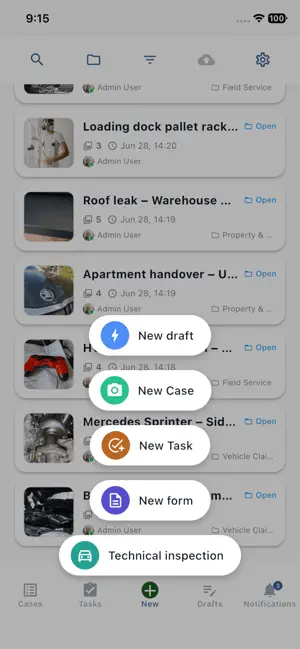
TaskShot – Visual Task & Case Management TaskShot is a modern workflow management platform designed for teams that need to document work, track tasks, and organize cases using photos and videos. It helps field teams, service companies, and operational staff keep everything in one structured, shareable system. Instead of scattered messages, emails, and folders, TaskShot centralizes your work documentation in a single secure platform. Organize Work with Cases Create cases to group related tasks, photos, videos, and files. Each case becomes a complete record of work performed, making it easy to track progress and review past activity. Document Work with Photos and Videos Capture images or upload media directly inside cases. Visual documentation helps teams verify work, provide transparency, and create clear records for customers, partners, or internal teams. Create and Assign Tasks Create tasks within cases and assign them to team members. Track status, monitor progress, and ensure nothing falls through the cracks. Real-Time Collaboration Teams can work together in real time. Updates, new media, and task changes are immediately available across devices so everyone stays informed. Secure Sharing with External Partners Share selected case information with external partners through secure share links without giving them full system access. Perfect for clients, inspectors, or collaborators who need visibility. Built for Operational Teams TaskShot is designed for teams that operate in the real world — field technicians, service teams, maintenance crews, logistics operators, and similar roles where visual documentation is critical. Key Features • Case-based workflow organization • Photo and video documentation • Task creation and assignment • Real-time updates across devices • Secure share links for external partners • Structured work history and records • Fast media browsing with thumbnails Why Teams Use TaskShot TaskShot makes it easy to prove work, track progress, and maintain clear communication between team members and partners. By combining task management with visual documentation, teams gain better transparency and accountability.
What’s new
Version 1.5.9 · Updated October 20, 2026
Scan documents and save them to a draft, a case, or a task. Move photos and files to the right case when you finish a draft. See related cases with the same name, and fill in custom case details. Trim videos from case and task screens. Add lookup values and person-hours entries while filling in forms. A home-screen widget opens the tech inspection camera faster, with more reliable photo orientation. Chat search shows media previews, and nudges are rate-limited. Uploads, drafts, and share-link access are more reliable.
App privacy
The developer, BOTOND BELA KORMOCZI, reported these privacy practices to Apple.
Data Linked to You
The following data, which may be collected and linked to your identity, may be used for the following purposes:
- Contact Info: Email Address
Used for: App Functionality
Data Not Linked to You
The following data, which may be collected but is not linked to your identity, may be used for the following purposes:
- User Content: Photos or Videos, Other User Content
- Identifiers: User ID
Used for: App Functionality
Alternatives to TaskShot
Looking for apps like TaskShot? Here are 6 similar apps on the App Store. The highest rated is Cossi: AI Chief of Staff (5.0/5), and all 6 are free to download.
-
 Cossi: AI Chief of Staff
5.0
-
 kept · Document Organizer
-
 Belltron HM
-
 CoreAI: AI Models & Chat
-
 Docs24 - Organize documents
-
 JustDoo
5.0
| App | Rating | Price | Last updated | Compare |
|---|---|---|---|---|
| TaskShot | – | Free | October 20, 2026 | |
| Cossi: AI Chief of Staff | 5.0 / 5 (3) | Free | Sep 30, 2026 | Compare |
| kept · Document Organizer | – | Free | Sep 24, 2026 | Compare |
| Belltron HM | – | Free | Aug 28, 2026 | Compare |
| CoreAI: AI Models & Chat | – | Free | Jul 7, 2026 | Compare |
| Docs24 - Organize documents | – | Free | May 19, 2025 | Compare |
| JustDoo | 5.0 / 5 (1) | Free | Jul 17, 2026 | Compare |
Compare TaskShot with the top alternatives: ratings, updates, ASO score and keyword gaps →