

Redactly - Screenshot Blur
茂华 樊 Utilities iPhoneiPadiPod touch
Redactly - Screenshot Blur is a free Utilities app for iPhone and iPad by 茂华 樊. Rated 5.0/5 from 1 ratings. Requires iOS 18.3. Updated September 8, 2026.
- Rating
- 5.0
- 1 ratings
- Price
- Free
- on the App Store
- Size
- 15 MB
- Age 17+
- Updated
- Sep 8
- 2026 · v1.1.3
Screenshots



About Redactly - Screenshot Blur
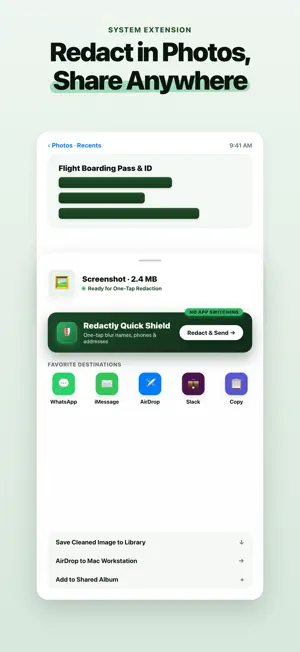
Your screenshots contain more than you think. Phone numbers. Email addresses. Faces. Bank details. Every screenshot, photo, or document you share could expose sensitive information without you even realizing it. Redactly uses Apple's on-device AI to automatically detect and categorize sensitive data in your photos, screenshots, and PDFs — so you can redact exactly what matters, in one tap. SMART DETECTION • Auto-detect phone numbers, emails, URLs, faces, addresses, names, monetary amounts, and ID numbers • Each category is color-coded for instant visual recognition • Toggle entire categories on or off with a single tap • Fine-tune by selecting or deselecting individual items PRECISE CONTROL • Tap any text line to redact it instantly • Only the matched sensitive text is redacted — the rest stays readable • Review every detected item before you share PDF WORKFLOW • Import PDF documents directly from Files • Review and redact each page individually • Export a clean, redacted PDF ready to share MULTIPLE REDACTION STYLES • Gaussian blur with adjustable intensity • Classic pixelation with configurable block size • Solid fill for complete blackout • Plus exclusive Pro styles: pattern fill, emoji stamp, gradient blur PRIVACY FIRST • 100% on-device processing — your photos never leave your phone • No internet connection required for any feature • No accounts, no tracking, no data collection whatsoever • Optional EXIF metadata stripping to remove hidden location data PRO FEATURES • Unlimited daily image processing • Batch redact up to 20 images at once • 6 professional redaction styles • Full edit history with re-editable projects • Custom redaction presets • PDF import and export Redactly is built for anyone who shares screenshots — whether you're a professional handling sensitive invoices, a social media user protecting personal details, or simply someone who values digital privacy. Download Redactly and share safely. One tap. All private. SUBSCRIPTION INFO • Redactly Pro is available as a weekly or annual auto-renewable subscription • Payment is charged to your Apple ID account at confirmation of purchase • Subscription automatically renews unless canceled at least 24 hours before the end of the current period • You can manage or cancel your subscription in your device's Settings > Apple ID > Subscriptions • Free trial: if offered, any unused portion of a free trial is forfeited upon purchasing a subscription LEGAL Terms of Use: https://llsean.github.io/app-legal/redactly/terms.html Privacy Policy: https://llsean.github.io/app-legal/redactly/privacy.html
What’s new
Version 1.1.3 · Updated September 8, 2026
• Universal Two-Finger Zoom: Pinch-to-zoom and pan are now seamlessly supported across Rectangle and Brush modes, with smart touch isolation to prevent accidental marks. • Zero-Latency Panning: Completely removed dragging delay for buttery-smooth, instantaneous 1:1 image panning. • Live Mask Handle Feedback: Resizing rectangle redaction boxes now provides real-time 120fps live boundary previews as you drag, making precision adjustments effortless.
App privacy
The developer, 茂华 樊, reported these privacy practices to Apple.
Data Not Linked to You
The following data, which may be collected but is not linked to your identity, may be used for the following purposes:
- Identifiers: Device ID
- Usage Data: Product Interaction
- Diagnostics: Other Diagnostic Data
- Financial Info: Payment Info
- User Content: Photos or Videos
Used for: Analytics, App Functionality
Alternatives to Redactly - Screenshot Blur
Looking for apps like Redactly - Screenshot Blur? Here are 6 similar apps on the App Store.


| App | Rating | Price | Last updated | Compare |
|---|---|---|---|---|
| Redactly - Screenshot Blur | 5.0 / 5 (1 rating) | Free | September 8, 2026 | |
| Blurio: Photo Blur & Mosaic | – | Free | Oct 5, 2026 | Compare |
| 可视AI音箱 | – | Free | Sep 18, 2026 | Compare |
| CleanPII | – | 0.99 USD | Mar 23, 2026 | Compare |
| AI防欺凌 | – | Free | Apr 13, 2026 | Compare |
| Anonymisierer | – | 9.99 USD | Sep 16, 2026 | Compare |
| EXIF Studio LITE | – | Free | Oct 22, 2026 | Compare |