

Deadline Editor
Ronin Group Inc. Photo & Video iPhoneiPadiPod touchMac
Deadline Editor is a free Photo & Video app for iPhone and iPad by Ronin Group Inc. Requires iOS 17.0. Updated October 27, 2026.
- Price
- Free
- on the App Store
- Size
- 41 MB
- Age 4+
- Updated
- Oct 27
- 2026 · v1.0.111
Screenshots


About Deadline Editor
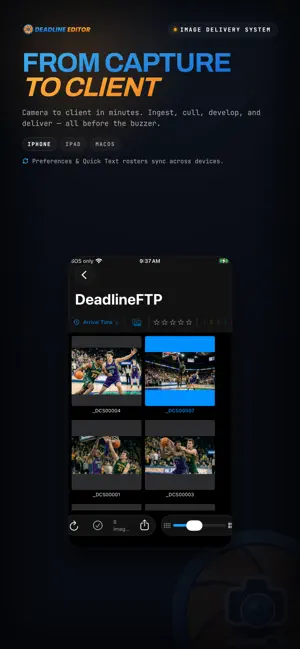
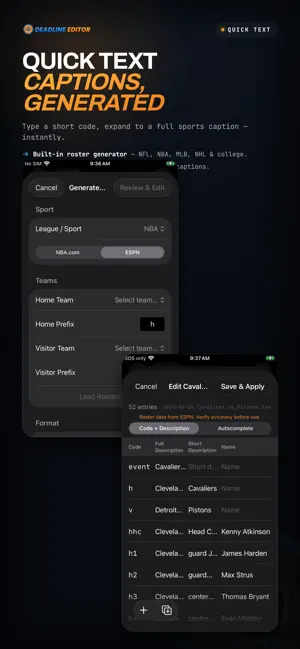
Deadline Editor is a professional photo management and editing app for photographers working under pressure — in sports, events, and editorial photography. Browse & Organize Browse thousands of images in a fast, GPU-accelerated thumbnail grid. Filter by star rating, color code, or favorite status. Pair RAW+JPEG automatically and view them together or separately. Edit JPEG/RAW Files Non-Destructively Process 15+ RAW formats with a full suite of professional adjustments — exposure, contrast, highlights, shadows, white balance, clarity, texture, dehaze, sharpening, noise reduction, vignette, and film grain. All edits are stored as XMP metadata, so your original files are never modified. Shoot Track Record where you have been working. Your route appears on a map with a pin for every photograph, and each frame is written with the position it was taken at — RAW included, through its XMP sidecar. Frames imported from a card later are placed by their own capture time. Export a session as a GPX file for Lightroom or Photo Mechanic, or share a picture of the map. Tracks stay on your iPad, are never uploaded, and are deleted on a schedule you set. Voice Tags & Transcription Attach voice memos and have them transcribed on device. Transcriptions flow into your chosen metadata field — field notes, player IDs, or scene descriptions without typing. Sports Photography Workflows Build game rosters by fetching live data for 20+ professional and college leagues, or paste roster data from any source. In Batch Mode, type a jersey number and the app expands it to the player's full name and position using Quick Text. Auto-advance moves you to the next image after each tag. Quick Text Automation Load TSV/CSV files with shorthand-to-caption mappings. Type a trigger key and it expands to full text. Combine sources and see live match previews as you type. Import From Anywhere Tether to a Wi-Fi camera over FTP and receive frames as you shoot. Import from card readers with verified checksums and automatic rollback on failure. Sync from FTP servers on a schedule. Connect to DeadlineFTP.com for real-time file delivery. Apply XMP metadata templates during any import. Comprehensive Metadata Editing Edit 66+ XMP and IPTC fields organized into categories — description, creator, content, people, location, rights, workflow, and camera info. Choose which fields are visible, pin your most-used, and reorder everything. Edit across multiple images at once. Deliver Fast Export to JPEG, PNG, TIFF, or HEIC with quality control, optional resizing, and metadata handling. Upload directly to FTP, FTPS or SFTP with batch support and progress tracking. Save delivery presets for one-click repeat workflows. Rename on export using pattern-based naming with EXIF date, metadata fields, and sequence variables. Built for Professionals Extensive hardware keyboard shortcuts let you rate, color-code, protect, navigate, filter, and tag without touching the screen. A dedicated photographer database stores contact information for embedding in image metadata. Use the iPad as a read-only client display for a photographer working on a Mac — no subscription needed. Supports JPEG, PNG, TIFF, HEIC, WebP, and RAW formats from Canon, Nikon, Sony, Fujifilm, Olympus, Panasonic, Pentax, and Samsung. Requires iPadOS 17.0 or later. Subscription 7-day free trial, then Deadline Editor Monthly at $9.99/month or Deadline Editor Annual at $79.99/year. Payment is charged to your Apple Account at confirmation of purchase. Subscriptions renew automatically unless cancelled at least 24 hours before the end of the period. Manage or cancel in Settings > your Apple Account > Subscriptions. Works with an existing Deadline subscription — sign in to activate. Privacy Policy: https://deadlineftp.com/privacy.html Terms of Use (EULA): https://deadlineftp.com/terms.html
What’s new
Version 1.0.111 · Updated October 27, 2026
- **Zoom shows the photo's real pixels, up to 500%.** Zoom in past 100% and the part of the frame on screen sharpens to the photograph's own detail a moment after you stop moving. A sharpness check at 400% or 500% judges your file. - **The photo follows the slider as you drag.** Exposure, Contrast and every other Tone slider update the picture continuously while your finger is on the handle. The full-quality frame arrives when you lift. With the crop tool open, the photo under the crop box brightens and darkens as you move a slider. - **Status badges can wear their names.** Settings ▸ General ▸ Status Badges offers Icons, Large icons or Labeled pills, so Edited, FTP'd, Exported and the rest read at a glance on every thumbnail. - **Switch FTP servers on and off from Deliver.** A gear beside the Server menu opens a list of your servers with a switch each. The Server menu lists active servers only. A hidden server still delivers for a preset that uses it. - **Update the preset you are working in from its menu.** The Preset menu offers Update "name" whenever a preset is active. Apply metadata template travels with the preset, so an update from the iPad keeps a choice saved on the Mac. - **Each preset keeps its own transmission reference prefix.** Switching presets switches the prefix and the next number with it. - **A frame's voice tag travels with it.** Turn on Include voice tag in Deliver's Options and the recording is delivered alongside the frame. - **Choose what leaves in a delivered file.** Deliver's metadata menu is "Remove from delivered files", with Location (GPS), Voice transcript and All metadata. - **Deliver's options sit where the Mac has them.** Include edit history is in the Metadata template section. - **Quick Text.** - A code replaces the code you typed. Type `02` ahead of a caption that holds "2026" and the `02` becomes the phrase, so the year stays. - A code that exists as a rule and as a plain autocomplete entry lists once. - Up and Down walk the suggestion list on a hardware keyboard, then Tab or Return inserts. - A single `h` or `v` offers the team line right away. - **Rename and delete a keyword set from the Sets menu.** Delete asks before it removes the set. Keywords already filed on photos stay as they are. - **The whole gallery filter list is reachable.** The filter button opens a scrolling list, so FTP Uploaded, FTP Failed, PS Uploaded, Has Batch ID, Batch ID Issues, Selected Only, Find Results and Separate by Camera are all one scroll away. JPEG and RAW filters are offered beside videos. - **Folders of edited photos open smoothly.** Edited tiles fill in nearest-first and the app stays well inside its memory budget. Each thumbnail loads once. - **Accessibility.** Rating stars, color filters, color-code dots and the card-import volume cards read as buttons in VoiceOver.
App privacy
The developer, Ronin Group Inc., reported these privacy practices to Apple.
Data Linked to You
The following data, which may be collected and linked to your identity, may be used for the following purposes:
- Purchases: Purchase History
- Contact Info: Email Address, Name
- User Content: Customer Support, Other User Content
- Identifiers: User ID, Device ID
- Diagnostics: Other Diagnostic Data
Used for: App Functionality, Other Purposes
Data Not Linked to You
The following data, which may be collected but is not linked to your identity, may be used for the following purposes:
- Location: Precise Location
- User Content: Photos or Videos
Used for: App Functionality
Alternatives to Deadline Editor
Looking for apps like Deadline Editor? Here are 6 similar apps on the App Store.
-
 Sideline Local
-
 Sportfolios
-
 IPTCPhotoSender
-
 Fast Sports Photo Editor
-
 Meta Truth EL Metadata Editor
-
 CataImage
| App | Rating | Price | Last updated | Compare |
|---|---|---|---|---|
| Deadline Editor | – | Free | October 27, 2026 | |
| Sideline Local | – | Free | Apr 30, 2026 | Compare |
| Sportfolios | – | Free | Oct 18, 2026 | Compare |
| IPTCPhotoSender | – | Free | Oct 19, 2026 | Compare |
| Fast Sports Photo Editor | – | Free | Oct 29, 2026 | Compare |
| Meta Truth EL Metadata Editor | – | Free | Sep 18, 2025 | Compare |
| CataImage | – | Free | Oct 14, 2026 | Compare |
Compare Deadline Editor with the top alternatives: ratings, updates, ASO score and keyword gaps →