

No Contact AI: Stop Texting Ex
Asif Safarov Health & Fitness iPhoneiPadiPod touch
No Contact AI: Stop Texting Ex is a free Health & Fitness app for iPhone and iPad by Asif Safarov. Requires iOS 15.1. Updated October 10, 2026.
- Price
- Free
- on the App Store
- Size
- 33 MB
- Age 12+
- Updated
- Oct 10
- 2026 · v1.1
Screenshots


About No Contact AI: Stop Texting Ex
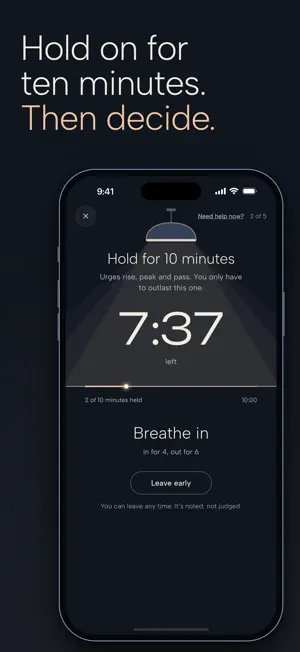
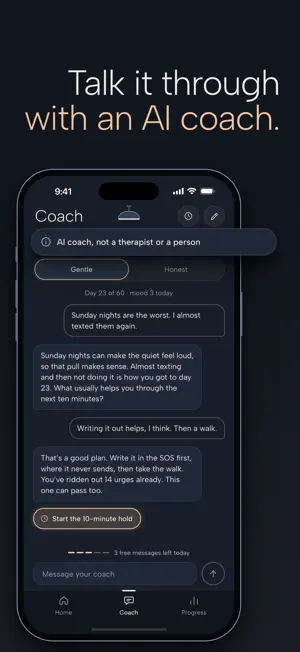
No Contact AI is built for the moment you want to text your ex. Tap "I want to text them" and the SOS walks you through it: • Write it here. Say exactly what you would send. Nothing you write there can reach them. • Hold for 10 minutes, breathing in for 4 and out for 6. You can leave early at any time. • Read your reasons: the one to three lines you wrote when you started, in your own words. • Talk it through with the AI coach, if you want to. It reads what you wrote first. • Say how it ended. "I didn't text" counts an urge resisted. "I texted" opens the slip log, without judgement. A COUNTER FROM YOUR LAST CONTACT • Days since last contact, counted from the day you choose, toward a 30, 60 or 90-day goal. • Your best streak, total no-contact days and urges resisted. • A slip restarts days since last contact. Your total days, best streak and urges resisted stay. CHECK-INS AND A WEEKLY RECAP • A daily check-in: your mood from 1 to 5, and one word if you like, with an optional daily reminder. • A weekly recap worked out on your phone, without AI: days without contact, urges and how many you resisted, when urges came, and your mood against the week before. THE AI COACH • Pick its tone: Gentle or Honest. • The app sends it your days, your goal and today's mood, and, unless you turn it off, your reasons, so the reply fits where you are. • It keeps a short memory card of your story, so it remembers between conversations. Read, edit or delete it in Settings. • The coach is an AI, not a person and not a counselor, and it can be wrong. Each coach session opens with a reminder that you are talking to an AI. • Nothing goes to the coach until you allow it. Before your first message the app lists what is sent. After you tap Allow, your coach messages go through our server to OpenAI to write each reply. Our server does not keep them; OpenAI may keep them for up to 30 days to monitor for abuse. You can turn this off at any time in Settings. IF YOU ARE IN CRISIS The coach checks every message for words about suicide, self-harm or hurting someone, and shows free crisis lines when it finds them: in the US, call or text 988, or text HOME to 741741; elsewhere, findahelpline.com lists free lines in your country. It can miss things. If you or someone else is in danger, call 911 or your local emergency number. FREE • The counter and your goal • SOS: what you write, the hold, your reasons • Check-ins and the weekly recap • The slip log, reminders and export • 5 coach messages a day, plus a free coach reply in up to 3 SOS sessions a day PRO • Unlimited coach messages • Your patterns: when urges come, what led to slips, and how your mood moves with them YOUR DATA • No account, no sign-up. • Export everything as JSON and text, or delete everything, from Settings. • Anonymous usage statistics (event names and counts, never what you write) can be turned off in Settings. SUBSCRIPTIONS Pro is a weekly or yearly subscription, or a one-time lifetime purchase. The price, and any free trial your Apple ID is eligible for, are shown in the app before you buy. Payment is charged to your Apple ID at confirmation of purchase. A subscription renews automatically unless it is turned off at least 24 hours before the end of the current period; the renewal is charged within 24 hours before the period ends. Manage or cancel it in your App Store account settings. Deleting the app does not cancel a subscription. Terms of Use: https://nocontact-ex-app.vercel.app/terms Privacy Policy: https://nocontact-ex-app.vercel.app/privacy
What’s new
Version 1.1 · Updated October 10, 2026
No Contact AI 1.1 is rebuilt around the moment you want to text them. • SOS: write what you would send, where it can never reach them, hold for 10 minutes while the lamp dims, read your own reasons, then talk it through with the coach if you like. • The counter starts from your last contact. If you used 1.0, check the date in Settings, Last contact. • A slip no longer wipes your progress. Your total days, best streak and urges resisted stay. • A daily check-in and a weekly recap, worked out on your phone. • The AI coach has two tones, Gentle and Honest, and a memory card you can read, edit or delete. It asks your permission before your first message. • Free: the counter, SOS, check-ins, the weekly recap, the slip log, reminders, export, and 5 coach messages a day. Pro adds unlimited coach messages and your patterns. • Export your data, or delete all of it, from Settings. Usage statistics can be turned off there too. • Badges and levels are gone. Active Pro purchases, including 1.0's monthly plan, carry over.
App privacy
The developer, Asif Safarov, reported these privacy practices to Apple.
Data Not Collected
The developer does not collect any data from this app.
Alternatives to No Contact AI: Stop Texting Ex
Looking for apps like No Contact AI: Stop Texting Ex? Here are 6 similar apps on the App Store. The highest rated is No Contact. Breakup Healing (5.0/5), and all 6 are free to download.
-
 Text Here Instead: No Contact
-
 Heal: No Contact & Breakup
1.0
-
 Me Time: AI Guided Meditation
-
 No Contact. Breakup Healing
5.0
-
 No Contact: Heal After Breakup
-
 Choose Me: No Contact Tracker
5.0
| App | Rating | Price | Last updated | Compare |
|---|---|---|---|---|
| No Contact AI: Stop Texting Ex | – | Free | October 10, 2026 | |
| Text Here Instead: No Contact | – | Free | Oct 25, 2026 | Compare |
| Heal: No Contact & Breakup | 1.0 / 5 (1) | Free | Jul 7, 2026 | Compare |
| Me Time: AI Guided Meditation | – | Free | Oct 11, 2026 | Compare |
| No Contact. Breakup Healing | 5.0 / 5 (1) | Free | Sep 14, 2026 | Compare |
| No Contact: Heal After Breakup | – | Free | Sep 25, 2026 | Compare |
| Choose Me: No Contact Tracker | 5.0 / 5 (1) | Free | Oct 9, 2026 | Compare |