

AxioBusiness
Hazel Taniegra Business iPhoneiPadiPod touch
AxioBusiness is a free Business app for iPhone and iPad by Hazel Taniegra. Requires iOS 16.0. Updated November 4, 2026.
- Price
- Free
- on the App Store
- Size
- 20 MB
- Age 4+
- Updated
- Nov 4
- 2026 · v2.2.1
Screenshots



About AxioBusiness
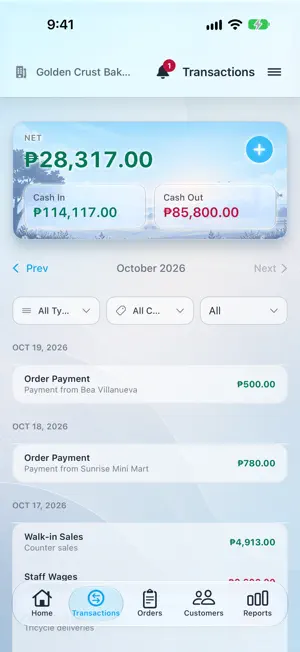
AxioFlow Business is a simple, private bookkeeping and business management app for small business owners. Track income and expenses, manage orders and customers, keep stock, price your products, and see the reports that tell you whether you actually made money — all on your device. Built for the owner-operator: farm and poultry sellers, home bakers and food makers, resellers, service providers, and rental businesses. YOUR BOOKS, YOUR DEVICE All your business data stays on your device. We run no servers and cannot see your records. Enable iCloud Sync and your data goes to your own iCloud account, never to us. FIVE BUSINESS TYPES Set up your business as Producer, Maker, Reseller, Service, or Rental. The app adjusts to how you actually work — a farm records production, a baker records finished goods, a reseller records stock purchases. MULTIPLE BUSINESSES Run more than one business from a single app. Each keeps its own transactions, categories, customers, products, and reports, with nothing bleeding between them. CASH IN, CASH OUT, PROFIT One clear financial model. Cash In is what you received, Cash Out is what you paid, Revenue counts the full value of the orders you booked, and Net Profit is Revenue minus Cash Out. Every screen uses the same definitions. TRANSACTIONS Log income and expenses with a built-in calculator, browse month by month, and filter by type and category. Add your own custom transaction types when income and expense are not enough. ORDERS & DELIVERY Take customer orders, add line items from your price list, and track them through pending, delivered, paid, and cancelled. Mark an order for pickup or delivery, add a delivery fee, and set a delivery address for that order without changing the customer's saved one. CUSTOMERS & BALANCES Keep customer contacts, addresses, and map locations. See who owes you what, record full or partial payments, note how the money arrived, and settle several orders at once. INVENTORY Track stock across multiple locations, transfer between them, and set up unit conversions so a tray of 30 and a single piece stay in step. Orders and sales deduct stock automatically. PRICE LIST Set a cost and selling price per product, with quantity price breaks for bulk buyers. See gross profit, margin, and markup as you type — each named correctly, so you are never reading one and thinking it is the other. REPORTS Revenue, Cash In, Cash Out, and Net Profit by week, month, or year, with income and expense breakdowns. Product Profitability shows which products actually make money. Customer Activity shows who buys and who keeps coming back. Producers also get Production Output and Cost Per Item. SCHEDULED TRANSACTIONS Set up recurring income and expenses — daily, weekly, monthly, or yearly — and post them when they come due. SHARE A RECEIPT Send a customer a clean receipt image with your logo and order details. Add your own payment card images so buyers know exactly how to pay you. EXPORT Download a monthly summary as an Excel spreadsheet for your accountant or your own records. HOME SCREEN WIDGET See today's and this month's income, expenses, and net on your iPhone Home Screen without opening the app. MULTI-CURRENCY & THEMES Choose your currency and pick Light, Dark, or System appearance. FREE TO USE The free Starter plan is a complete financial ledger for one business: unlimited transactions, unlimited scheduled items, categories, and core reports. It is supported by ads. Upgrade to Pro for unlimited businesses, orders, customers, price list, inventory, advanced reports, iCloud Sync, Excel export, and an ad-free app. PRO OPTIONS • Monthly — ₱99/month, with a 7-day free trial • Yearly — ₱899/year, save ₱289, with a 7-day free trial • Lifetime — ₱1,290 once, no recurring charges Privacy Policy: https://github.com/jchtaniegra17/axioflow-privacy Terms of Use: https://github.com/jchtaniegra17/axioflow-terms
What’s new
Version 2.2.1 · Updated November 4, 2026
Payment and delivery, tracked separately • Each order now shows whether it is Unpaid, Partially Paid or Paid, and whether it is Pending Delivery or Delivered. Tap either badge to change it. • An order can be paid before it is delivered, and marking it delivered never records a payment. • When adding an order, you can record how much was paid and the date it was received. • Filter Orders by delivery or payment. A paid order still waiting for delivery stays in Pending. Customer credit and tips • When a customer pays more than they owe, choose whether the extra is a tip or credit for their next order. • Use a customer's credit when recording a payment, so they pay only the rest. • Shared receipts and pending orders show the customer's Available Credit and a clear Amount to Pay. • An order looks the same on screen as on the receipt you send, so you and your customer see the same figures. Payments made easier • Choose the date a payment was received, for one you forgot to record at the time. • Pay several orders at once and pick which orders a payment covers. • Record a payment someone else received for you. It counts as cash once they hand it over, and you'll get a reminder if it's late. • One payment that covered several orders now shows as one entry in Transactions. Tap it to see where it went. • Choose the date when posting a scheduled transaction. Customer statements • Share a new Order & Payment Statement listing each order, its items and the payments made on it, with the balance still owed. • A customer's balance and credit now show as soon as you open them. Fixes • Stock adjustments no longer count as money on Home, Transactions or Reports. • Unpaid purchases count as Cash Out only once you've paid, in the month you paid them. • Category totals, the month recap and the Excel export now agree with your reports. • Editing or deleting a payment updates the customer and the order right away. • The app icon badge updates at midnight when something falls due. • Charts shared in dark mode now have readable labels.
App privacy
The developer, Hazel Taniegra, reported these privacy practices to Apple.
Data Used to Track You
The following data may be used to track you across apps and websites owned by other companies:
- Identifiers: Device ID
- Usage Data: Advertising Data
Data Linked to You
The following data, which may be collected and linked to your identity, may be used for the following purposes:
- Identifiers: Device ID
- Usage Data: Advertising Data
Used for: Third-Party Advertising
Alternatives to AxioBusiness
Looking for apps like AxioBusiness? Here are 6 similar apps on the App Store.


| App | Rating | Price | Last updated | Compare |
|---|---|---|---|---|
| AxioBusiness | – | Free | November 4, 2026 | |
| Yur Receipts | – | Free | Sep 30, 2026 | Compare |
| Trakio: Budget & Expenses | – | Free | Feb 24, 2026 | Compare |
| FARM - Expense tracker | – | Free | Oct 16, 2026 | Compare |
| Sunrise Widgets | – | Free | May 13, 2024 | Compare |
| Expedite GPS | – | Free | Apr 15, 2026 | Compare |
| SB Diary | – | Free | Nov 1, 2026 | Compare |
Compare AxioBusiness with the top alternatives: ratings, updates, ASO score and keyword gaps →