

Keeper: Photo Assistant
Nicholas Madeira Photo & Video iPhoneiPadiPod touch
Keeper: Photo Assistant is a free Photo & Video app for iPhone and iPad by Nicholas Madeira. Rated 5.0/5 from 3 ratings. Requires iOS 18.6.
- Rating
- 5.0
- 3 ratings
- Price
- Free
- on the App Store
- Size
- 3 MB
- Age 4+
- Updated
- Jun 21
- 2026 · v1.2
Screenshots



About Keeper: Photo Assistant
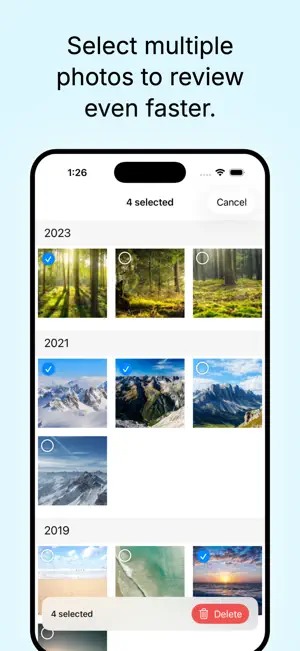
Your photo library grew while you weren't looking. Thousands of screenshots, duplicates, and forgotten moments piling up with no easy way to sort through them. Keeper changes that. Keeper helps you declutter your photo library through a simple daily ritual. Each day, it surfaces photos from today's date across all your past years — so you can relive old memories while deciding what to keep and what to let go. HOW IT WORKS Open Keeper, see your photos from this day in history, and swipe through them. Keep the ones that matter. Delete the ones that don't. That's it. - Browse photos grouped by year for any date - Navigate between dates with swipe gestures or a calendar picker - Delete photos with a tap — they go to Apple's Recently Deleted, so you have 30 days to change your mind - Long press to select multiple photos and delete in bulk - Add favorites to albums or share them with friends YOUR LIBRARY, YOUR PACE Keeper is designed for a few minutes a day, not an overwhelming marathon. Set a daily reminder, review a handful of photos, and watch your library get tidier over time. - Track how many days you've reviewed on a visual calendar - See your total photos deleted and library progress - Pick up right where you left off, every day WORKS WITH APPLE PHOTOS Keeper doesn't duplicate or store your photos. Everything stays in your Apple Photos library. Deletions use Apple's built-in Recently Deleted album with a 30-day safety net.
What’s new
Version 1.2 · Updated June 21, 2026
Pinch to zoom while you review Get a closer look before you decide. You can now pinch to zoom in on any photo during review, double-tap to zoom in and back out, and pan around while zoomed. Swiping to the next photo is paused while you're zoomed in, so panning moves within the photo instead of skipping to the next one. Crisper zoomed-in photos The photo you're reviewing now loads at a higher resolution, so it stays sharp even when you zoom all the way in. Paging between photos stays fast, and zoom always resets to a clean fit when a new photo appears. Video sound plays even on silent Videos in review and "On This Day" now play their audio even when your phone's Ring/Silent switch is set to silent — just like the built-in Photos app. Any background audio you interrupted resumes once playback stops. Refreshed reviewed-day color Reviewed days in the calendar and the reviewed dot on the date pill now use iOS system blue instead of green, adapting automatically for light and dark mode.
App privacy
The developer, Nicholas Madeira, reported these privacy practices to Apple.
Data Not Collected
The developer does not collect any data from this app.
Alternatives to Keeper: Photo Assistant
Looking for apps like Keeper: Photo Assistant? Here are 6 similar apps on the App Store. The highest rated is My Picture Gallery (5.0/5), and all 6 are free to download.
-
 Keepers: Photo Moments Album
-
 TidyPic - Photo Swipe Cleaner
-
 My Picture Gallery
5.0
My Picture Gallery
5.0
-
 Albumify - Smart Photo Albums
-
 Photo Assistant V7
5.0
Photo Assistant V7
5.0
-
 Popix - AI Photo Generator
4.8
Popix - AI Photo Generator
4.8
| App | Rating | Price | Last updated | Compare |
|---|---|---|---|---|
| Keeper: Photo Assistant | 5.0 / 5 (3 ratings) | Free | June 21, 2026 | |
| Keepers: Photo Moments Album | – | Free | Sep 25, 2026 | Compare |
| TidyPic - Photo Swipe Cleaner | – | Free | Mar 11, 2026 | Compare |
| My Picture Gallery | 5.0 / 5 (2) | Free | Oct 14, 2026 | Compare |
| Albumify - Smart Photo Albums | – | Free | Jun 17, 2026 | Compare |
| Photo Assistant V7 | 5.0 / 5 (2) | Free | Oct 14, 2026 | Compare |
| Popix - AI Photo Generator | 4.8 / 5 (55) | Free | Nov 1, 2025 | Compare |