

Zchedule
Alan Lopez Business iPhoneiPadiPod touch
Zchedule is a free Business app for iPhone and iPad by Alan Lopez. Rated 5.0/5 from 1 ratings. Requires iOS 15.1. Updated August 28, 2026.
- Rating
- 5.0
- 1 ratings
- Price
- Free
- on the App Store
- Size
- 41 MB
- Age 4+
- Updated
- Aug 28
- 2026 · v1.0.4
Screenshots


About Zchedule
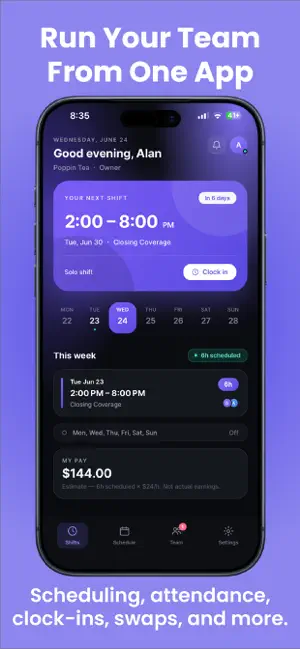
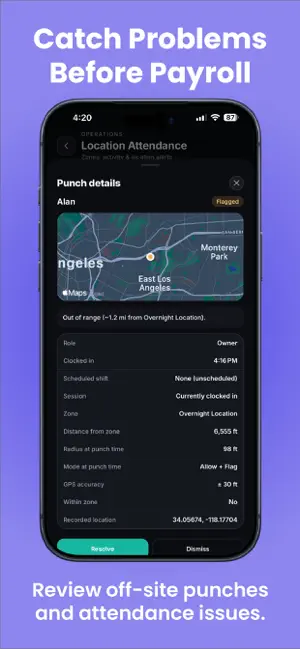
Scheduling your team shouldn’t be complicated. Zchedule gives managers and employees one place to handle schedules, attendance, shift changes, availability, and team communication. Build and publish schedules, track clock-ins with location-based attendance, handle coverage requests, and keep your team updated from anywhere. For Managers -Create, edit, and publish employee schedules -Generate schedules based on your team’s availability and staffing needs -Set GPS clock-in locations for job sites and workplaces -Review off-site or flagged clock-ins -Approve attendance and clock-in requests -Manage shift coverage and swap requests -View team availability and scheduling conflicts -Send announcements to your team For Employees -View upcoming shifts and your weekly schedule -Clock in and out from approved work locations -Submit availability and blackout dates -Request shift coverage or swap shifts with coworkers -Receive schedule changes, announcements, and important updates -Keep work schedules organized in one place Whether you manage a restaurant, cleaning crew, security team, retail staff, or another hourly workforce, Zchedule helps keep everyone on the same page. Less time managing schedules. More time running your team. Terms of Use: https://zchedule.app/terms Privacy Policy: https://zchedule.app/privacy
What’s new
Version 1.0.4 · Updated August 28, 2026
Zchedule has received a major upgrade. -GPS Clock-In — Clock in and out from assigned work locations with location verification. -Location Attendance — Managers can review clock activity, flagged punches, and attendance issues from one place. -Smarter Schedule Generation — Build schedules around employee availability, staffing requirements, and scheduling conflicts. -Improved Department Schedule — A cleaner schedule experience with easier week navigation and shift management. -Clock-In Approvals — Managers can review and approve clock-in requests when location restrictions require it. -Google Sign-In — A faster way to access your Zchedule account. -Improved Preferences — Better support for time zones, week start preferences, and time formats. -UI and Performance Improvements — Numerous design improvements, bug fixes, and reliability updates throughout the app.
App privacy
The developer, Alan Lopez, reported these privacy practices to Apple.
Data Linked to You
The following data, which may be collected and linked to your identity, may be used for the following purposes:
- Purchases: Purchase History
- Contact Info: Email Address, Name
- User Content: Other User Content
- Identifiers: User ID, Device ID
Used for: App Functionality
Alternatives to Zchedule
Looking for apps like Zchedule? Here are 6 similar apps on the App Store. The highest rated is Stitch VA: Comp-to-Draft (5.0/5), and all 6 are free to download.
-
 Stitch VA: Comp-to-Draft
5.0
Stitch VA: Comp-to-Draft
5.0
-
 SureDone
-
 Capricho Pro
3.0
Capricho Pro
3.0
-
 ListBanana
-
 Matino
5.0
Matino
5.0
-
 Rostr: Team Management
5.0
Rostr: Team Management
5.0
| App | Rating | Price | Last updated | Compare |
|---|---|---|---|---|
| Zchedule | 5.0 / 5 (1 rating) | Free | August 28, 2026 | |
| Stitch VA: Comp-to-Draft | 5.0 / 5 (1) | Free | Jul 19, 2026 | Compare |
| SureDone | – | Free | May 13, 2026 | Compare |
| Capricho Pro | 3.0 / 5 (2) | Free | Oct 1, 2026 | Compare |
| ListBanana | – | Free | Sep 8, 2026 | Compare |
| Matino | 5.0 / 5 (3) | Free | Oct 1, 2026 | Compare |
| Rostr: Team Management | 5.0 / 5 (13) | Free | Aug 8, 2026 | Compare |
Compare Zchedule with the top alternatives: ratings, updates, ASO score and keyword gaps →