

AutoWeb: Automation Browser
Haeseong Jung Utilities iPhoneiPadiPod touch
AutoWeb: Automation Browser is a free Utilities app for iPhone and iPad by Haeseong Jung. Requires iOS 17.0. Updated July 28, 2026.
- Price
- Free
- on the App Store
- Size
- 7 MB
- Age 4+
- Updated
- Jul 28
- 2026 · v1.0.4
Screenshots


About AutoWeb: Automation Browser
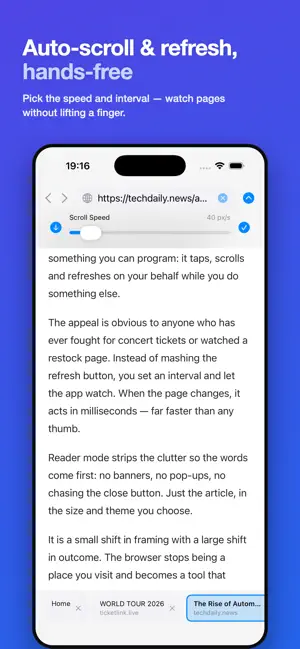
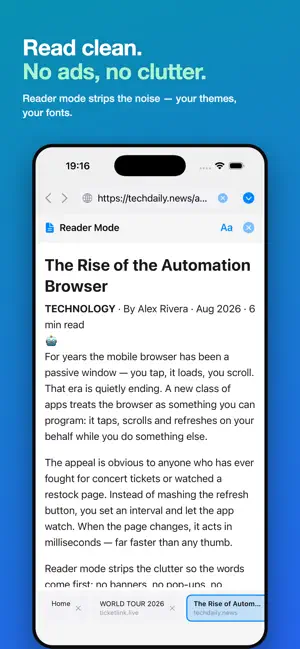
AutoWeb turns your iPhone into a browser that works for you — not the other way around. Most browsers wait for you to tap, scroll, and refresh. AutoWeb does it for you. Set up automation once, then let it run while you do something else: watch a page for restocks, keep scrolling through a long feed, or refresh a booking page without lifting a finger. AUTOMATION THAT ACTUALLY AUTOMATES • Auto-Tap — pick one or more elements on any page and let AutoWeb click them for you, in sequence or all at once • Auto-Scroll — set a speed and AutoWeb scrolls hands-free, perfect for long articles, feeds, or monitoring • Auto-Refresh — set an interval and AutoWeb reloads the page automatically, so you never miss a change READ WITHOUT THE NOISE Reader Mode strips banners, pop-ups, and clutter, leaving just the article — in the font, size, and theme you choose (Light, Sepia, Dark, or AMOLED — Sepia/Dark/AMOLED with Pro). BUILT LIKE A REAL BROWSER Multiple tabs, bookmarks, and browsing history, all in one clean interface. Switch tabs instantly, bookmark your favorite sites, and pick up where you left off. GO PRO FOR THE FULL EXPERIENCE The free version lets you try every feature with sensible limits (3 tabs, 2 bookmarks, 1 auto-tap target, preset automation speed). Upgrade to AutoWeb Pro for: • Multiple auto-tap targets with sequential or simultaneous mode • Custom scroll speed and refresh interval • Unlimited tabs and bookmarks • Up to 100 saved history items • Custom reader themes and fonts • No in-app ads AutoWeb Pro is offered as an auto-renewing subscription (monthly or annual); a free trial may be offered to new subscribers where available. Payment is charged to your Apple ID. Subscriptions renew automatically unless canceled at least 24 hours before the end of the current period, and can be managed anytime in your Apple ID account settings. Privacy Policy: https://sites.google.com/view/app0private/홈 Terms of Use: https://sites.google.com/view/paid-application-terms-of-use/홈 Contact: [email protected]
What’s new
Version 1.0.4 · Updated July 28, 2026
This update makes automation more powerful and the free tier fairer: • Auto-Tap now supports multiple targets with sequential or simultaneous mode (Pro) • Custom scroll speed and refresh interval (Pro) • New reader themes — Sepia, Dark, and AMOLED — plus custom fonts (Pro) • History storage increased: up to 100 items (Pro), 10 items (Free) • Fewer interstitial ads for free users • Lower annual subscription price Thanks for using AutoWeb — let us know what you'd like to see next.
App privacy
The developer, Haeseong Jung, reported these privacy practices to Apple.
Data Used to Track You
The following data may be used to track you across apps and websites owned by other companies:
- Usage Data: Advertising Data
Data Not Linked to You
The following data, which may be collected but is not linked to your identity, may be used for the following purposes:
- Usage Data: Advertising Data
Used for: Third-Party Advertising
Alternatives to AutoWeb: Automation Browser
Looking for apps like AutoWeb: Automation Browser? Here are 6 similar apps on the App Store. The highest rated is Continuous Scroll Speed App (5.0/5), and 4 of the 6 are free to download.
-
 AutoScroll
-
 WatchTab - Auto Page Refresh
-
 Scrolly - Auto Web Scroller
-
 ScreenScroll - web and image
-
 Continuous Scroll Speed App
5.0
Continuous Scroll Speed App
5.0
-
 AutoScroll Browser Reader
| App | Rating | Price | Last updated | Compare |
|---|---|---|---|---|
| AutoWeb: Automation Browser | – | Free | July 28, 2026 | |
| AutoScroll | – | Free | Sep 4, 2026 | Compare |
| WatchTab - Auto Page Refresh | – | Free | May 12, 2026 | Compare |
| Scrolly - Auto Web Scroller | – | 0.99 USD | Jun 17, 2026 | Compare |
| ScreenScroll - web and image | – | Free | May 30, 2026 | Compare |
| Continuous Scroll Speed App | 5.0 / 5 (1) | Free | Feb 1, 2026 | Compare |
| AutoScroll Browser Reader | – | 0.29 USD | Oct 15, 2026 | Compare |