

SewMate
Saku Studio Utilities iPhoneiPadiPod touch
SewMate is a free Utilities app for iPhone and iPad by Saku Studio. Requires iOS 26.0. Updated October 6, 2026.
- Price
- Free
- on the App Store
- Size
- 47 MB
- Age 4+
- Updated
- Oct 6
- 2026 · v1.5
Screenshots


About SewMate
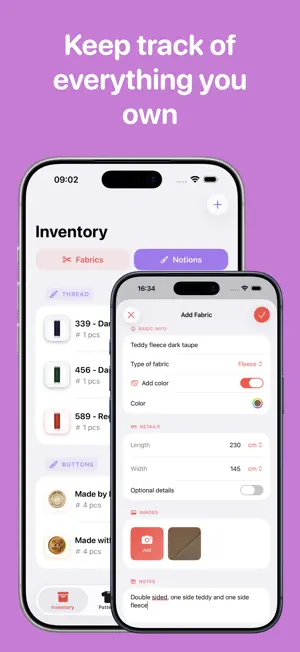
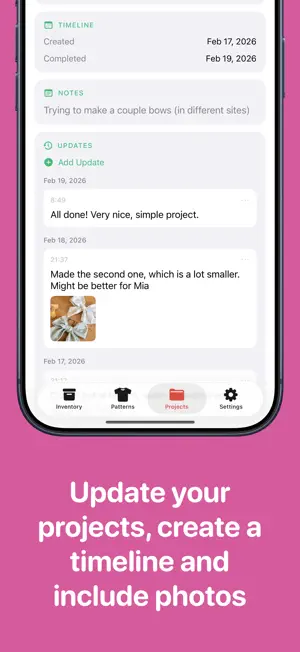
Turn scattered sewing notes and supplies into one calm, organized workflow. SewMate takes you from your first idea to your finished make, so you spend less time searching and more time sewing. Organize your fabric stash • Save fabrics with photos, color, type, brand, measurements, price, and notes. • Track notions such as thread, zippers, buttons, elastic, and interfacing. • See how much material remains as you assign and use it in projects. • Archive scraps and fabrics without losing their details. Keep every pattern close • Save patterns by name and category with multiple photos, and choose their cover by reordering photos. • Attach a PDF from your device or link to the pattern online. • Store the designer, recommended fabric, required materials, and your own notes. • Open a pattern directly from its related project. Plan projects you can finish • Link each project to a pattern, fabrics, and notions. • Record material use per item and avoid guessing what is left in your stash. • Convert between different length units automatically. • Track every project as Planned, In Progress, Completed, or Abandoned. • Reorder planned projects to choose what to sew next. • Keep fit and alteration notes, sizes, and measurement snapshots with each project. Log real progress Add updates with text and photos. Your day-by-day timeline becomes a useful sewing journal for remembering adjustments, reviewing past makes, and planning future projects. Know your sewing time Start a timer from any project, follow it in a Live Activity, and stop it to save your session. When you have tracked time, Pro Insights shows your total sewing time, time this month, saved sessions, and top projects. See what your stash can become Discover which fabrics suit a pattern and which patterns work with a fabric. SewMate Pro Insights gives you a clear view of your stash value, inventory, material use, project progress, and recent costs. Quick overview, anytime Home Screen widgets keep your in-progress projects visible and open them with a tap. Find your items in Spotlight, or use Shortcuts to start a project, mark it complete, or add a progress update. Why SewMate? • Finish more projects with less friction. • Keep your creative process calm and focused. • Avoid duplicate purchases. • Keep notes, patterns, supplies, and progress together. • Always know how much fabric and how many notions you have left. SewMate is made by a passionate sewist for garment makers, quilters, hobby sewists, pattern collectors, and anyone who wants more structure in their creative process. Whether you are starting your first project or have years of experience, SewMate helps you stay organized, focused, and excited about every make. Download SewMate and turn your sewing process into a clear, inspiring, well-organized system.
What’s new
Version 1.5 · Updated October 6, 2026
• Track sewing time for each project with a timer, quick controls, and a Live Activity. • See total sewing time, time this month, saved sessions, and top projects in Insights (Pro), only when you have tracked time. • Keep fit and alteration notes, sizes, and measurement snapshots with your projects. • Add multiple pattern photos and reorder photos for patterns, fabrics, and notions to choose their cover. • Add text and photos to your project journal, and reorder photos within each update. • Tap anywhere on a fabric or notion thumbnail to open its photos, with a clearer magnifier badge. • Browse photos in a consistent gallery across fabrics, notions, patterns, and project updates. Swipe between photos, see photo counts, and open directly on the selected photo without an initially blank view. • Updated Dutch and German accessibility hints for photo galleries. • Reorder planned projects to choose what to sew next. • Find your items with Spotlight and use Shortcuts to start, complete, or update a project. • Improved timer recovery and saving, including when a project is unavailable.
App privacy
The developer, Saku Studio, reported these privacy practices to Apple.
Data Linked to You
The following data, which may be collected and linked to your identity, may be used for the following purposes:
- Purchases: Purchase History
Used for: Analytics, App Functionality
Alternatives to SewMate
Looking for apps like SewMate? Here are 6 similar apps on the App Store.
-
 Sewganizer
-
 My Couture | Inventory stash
-
 Cellular Tower : 5G Signal Map
-
 SeamSmart
-
 EasyPatterns
-
 QR Zee: Smart QR Platform
| App | Rating | Price | Last updated | Compare |
|---|---|---|---|---|
| SewMate | – | Free | October 6, 2026 | |
| Sewganizer | – | Free | Aug 13, 2026 | Compare |
| My Couture | Inventory stash | – | Free | Sep 17, 2026 | Compare |
| Cellular Tower : 5G Signal Map | – | Free | Sep 1, 2026 | Compare |
| SeamSmart | – | Free | May 14, 2024 | Compare |
| EasyPatterns | – | Free | May 20, 2026 | Compare |
| QR Zee: Smart QR Platform | – | Free | Oct 6, 2026 | Compare |
Compare SewMate with the top alternatives: ratings, updates, ASO score and keyword gaps →