

StartGO
Start Group Bv Travel iPhoneiPadiPod touch
StartGO is a free Travel app for iPhone and iPad by Start Group Bv. Requires iOS 15.1. Updated July 27, 2026.
- Price
- Free
- on the App Store
- Size
- 109 MB
- Age 4+
- Updated
- Jul 27
- 2026 · v2.1.4
Screenshots


About StartGO
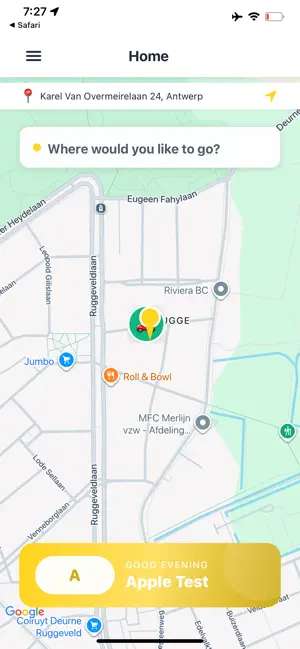
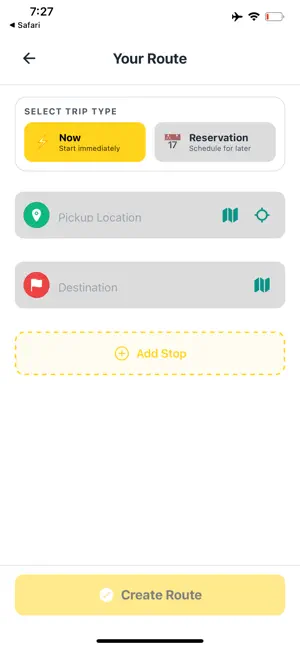
Two Apps, Real-Time Synchronized Our product consists of **two real-time, synchronized apps** that are designed to work together: 1. **StartGO** (this app) – rider / passenger app 2. **StartGO Driver** – driver app They share the same backend and update in real time. **The two apps must be tested together in sync;** otherwise you will not be able to proceed past certain screens (see below). --- ## Why “GO Select and Pay” Is Greyed Out – and How It Becomes Active In **StartGO** (this app), the **“GO Select and Pay”** button stays **greyed out (inactive)** until at least one driver is **online** in the **StartGO Driver** app. This is by design: we only allow booking when a driver is available to accept the trip. - **If you only open StartGO (rider app):** No driver is online → the button stays greyed out → you cannot continue to payment and the rest of the flow. - **When it becomes active:** As soon as a driver is **online** in **StartGO Driver** (after tapping **Go** on the offline screen and granting location), that driver appears as “available” in our system. The rider app then receives this in real time and **activates** the **“GO Select and Pay”** button. You can then tap it and move on to payment selection and all following screens. **Important:** Screen transitions (booking → payment → trip status → completion) only work when both apps are used in sync: **driver online first**, then **rider requests a ride**. Please follow the steps below in order so you can see the full flow in both apps. - ## How to Test (Step-by-Step) ### Step 1 – Driver app (StartGO Driver) - Install **StartGO Driver** on a second device (or simulator + physical device). - Log in with this **test driver** account: - **Email: [email protected]]` - **Password: Qwert*09 - When prompted, **allow location access** (required for the driver to go online and receive trips). - You will see the **offline** screen. Tap the **Go** button to go **online**. This test driver is configured with a global service area, so they will appear available to riders from your location. ### Step 2 – Rider app (StartGO – this app) - On your review device (e.g. iPad), open **StartGO** (this app). - Log in with this **test rider** account: - **Email: [email protected] - **Password: qwert*09 - Allow **location** when prompted. - Enter a **pickup** and **dropoff** address (any valid addresses; the test driver’s area is set globally). - Select a **vehicle type**. - The **"GO Select and Pay"** button will now be **active** (no longer greyed out) because the driver from Step 1 is online. If it is still greyed out, ensure the driver app is open and the driver has tapped **Go** to go online and has granted location. - Tap **"GO Select and Pay"** and choose **in-vehicle payment** (pay to the driver at the end of the trip) so you can test the full flow without entering card details. Then confirm. - You can then follow the same trip in the **driver app** (accept trip, navigate, complete) and see all corresponding screens in the **rider app** (driver location, status, payment, completion). ### Step 3 – What you can verify - All booking and payment screens in the rider app. - **In-vehicle payment** option and full trip flow. - Real-time sync: actions in the driver app (accept, start, complete) reflect immediately in the rider app. - Trip completion and, if applicable, rating/receipt screens. ## Summary - **StartGO** and **StartGO Driver** run in real time and must be **used together**: driver online first, then rider. Without this, **“GO Select and Pay”** stays greyed out and the flow cannot continue. **Design (Guideline 4):** This app is designed and optimized for **iPhone** only. It is not optimized for tablet layout; on iPad it runs in iPhone compatibility mode. We ask that design and usability be evaluated on **iPhone** devices. Thank you for testing StartGO.
What’s new
Version 2.1.4 · Updated July 27, 2026
This update improves reliability and adds new features: We have updated the microphone permission purpose string (NSMicrophoneUsageDescription) to clearly explain why access is needed. • Added in-app voice calling with your driver while tracking your ride • Fixed a rare crash that could occur when cancelling a trip • Improved trip cancellation reliability and clearer error messages • More accurate driver arrival tracking on the map • General bug fixes and performance improvements
App privacy
The developer, Start Group Bv, reported these privacy practices to Apple.
Data Used to Track You
The following data may be used to track you across apps and websites owned by other companies:
- Identifiers: Device ID
Data Linked to You
The following data, which may be collected and linked to your identity, may be used for the following purposes:
- Contact Info: Email Address, Name, Phone Number
- User Content: Customer Support, Other User Content, Photos or Videos
- Location: Precise Location
- Purchases: Purchase History
- Financial Info: Payment Info
- Identifiers: Device ID
- Usage Data: Product Interaction
- Body: Hands
Used for: Developer’s Advertising or Marketing, Analytics, App Functionality
Data Not Linked to You
The following data, which may be collected but is not linked to your identity, may be used for the following purposes:
- Identifiers: Device ID, User ID
Used for: Third-Party Advertising, Analytics, App Functionality
Alternatives to StartGO
Looking for apps like StartGO? Here are 6 similar apps on the App Store.


| App | Rating | Price | Last updated | Compare |
|---|---|---|---|---|
| StartGO | – | Free | July 27, 2026 | |
| Eagles Taxi Driver | – | Free | Aug 20, 2026 | Compare |
| Olah Driver | – | Free | Jun 23, 2025 | Compare |
| Antwerp-Tax | – | Free | Jan 30, 2026 | Compare |
| Taxi Gustave Driver app | – | Free | Jan 27, 2026 | Compare |
| Cabme Drive | – | Free | Sep 22, 2026 | Compare |
| CabMe Rider | – | Free | May 23, 2026 | Compare |
Compare StartGO with the top alternatives: ratings, updates, ASO score and keyword gaps →