

Mintaka: Personal Finance
Jesus Santa Olalla Finance iPhoneiPadiPod touch
Mintaka: Personal Finance is a free Finance app for iPhone and iPad by Jesus Santa Olalla. Requires iOS 26.0. Updated April 21, 2026.
- Price
- Free
- on the App Store
- Size
- 13 MB
- Age 4+
- Updated
- Apr 21
- 2026 · v1.0.3
Screenshots



About Mintaka: Personal Finance
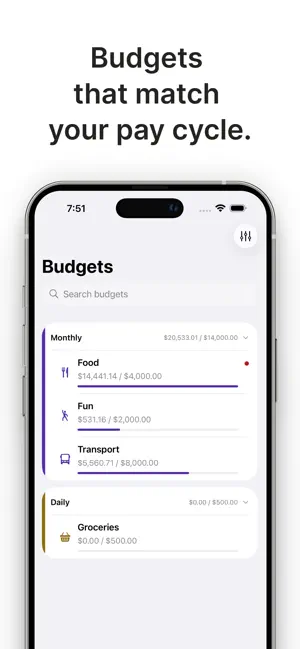
Mintaka is a personal finance app built for people who want real control over their money — without giving up their data. Track your income, expenses, and account balances in one place. Set budgets that match your real pay cycle, not arbitrary calendar dates. Schedule recurring transactions so your finances stay up to date automatically. Everything syncs privately through iCloud. No sign-up. No external servers. No ads. Your financial data never leaves your devices. WHAT YOU GET: - Expense and income tracking - Budgets with flexible date ranges - Scheduled and recurring transactions - Tags for organizing transactions - Home dashboard with spending insights (1M & 3M) - Import transactions from any finance app via CSV - iCloud sync across your Apple devices MINTAKA PRO: - Multiple currencies with automatic conversion - Cash flow forecast - Full reports (6M, 12M, and custom) - Investment tracking with live quotes and stock splits - Transaction rules for automatic categorization - Advanced filters and reconciliation - File attachments on transactions - CSV export Migrating from MoneyWiz, YNAB, Copilot, or Monarch? Import your full transaction history in seconds. Mintaka reads CSV files from any source — bank exports included. Built by an independent team. No venture capital. No data monetization. Just a finance app that respects your privacy and earns your trust. Mintaka Pro is available as a monthly or annual subscription. Payment is charged to your Apple ID. Subscriptions renew automatically unless cancelled at least 24 hours before the end of the current period. Manage or cancel anytime in Settings. Privacy Policy: https://mintaka.money/privacy-policy Terms: https://mintaka.money/terms-of-service
What’s new
Version 1.0.3 · Updated April 21, 2026
This release brings local notifications for daily check-ins and upcoming scheduled transactions, a fresh Savings Rate card in Reporting, and Cash, Liabilities and Net Worth surfaced right at the top of Accounts. You can finally drag categories into the order you want, merge tags with confirmation, and open .mintaka backups straight from Files. We also added dividends for investment transactions and account-level auto-reconcile for Pro. Plenty of polish elsewhere — visible sync progress, cleaner budget rows, smoother scrolling, and a handful of fixes so scheduled transactions, pagination and budgets all behave the way you'd expect.
App privacy
The developer, Jesus Santa Olalla, reported these privacy practices to Apple.
Data Not Linked to You
The following data, which may be collected but is not linked to your identity, may be used for the following purposes:
- Financial Info: Other Financial Info
- Usage Data: Product Interaction
- Diagnostics: Crash Data, Performance Data
Used for: Analytics
Alternatives to Mintaka: Personal Finance
Looking for apps like Mintaka: Personal Finance? Here are 6 similar apps on the App Store. The highest rated is Expense Tracker: SpendSense (5.0/5), and 5 of the 6 are free to download.
-
 Lightning Personal Accounting
-
 TrackaExpense: Expense Tracker
-
 Expense Tracker: SpendSense
5.0
Expense Tracker: SpendSense
5.0
-
 Finlynq
-
 Pelican: Weekly Budget & Money
5.0
Pelican: Weekly Budget & Money
5.0
-
 Ledge Personal Finance
| App | Rating | Price | Last updated | Compare |
|---|---|---|---|---|
| Mintaka: Personal Finance | – | Free | April 21, 2026 | |
| Lightning Personal Accounting | – | 0.99 USD | Sep 26, 2026 | Compare |
| TrackaExpense: Expense Tracker | – | Free | Jun 24, 2026 | Compare |
| Expense Tracker: SpendSense | 5.0 / 5 (1) | Free | Sep 10, 2026 | Compare |
| Finlynq | – | Free | Oct 16, 2026 | Compare |
| Pelican: Weekly Budget & Money | 5.0 / 5 (3) | Free | Oct 10, 2026 | Compare |
| Ledge Personal Finance | – | Free | May 11, 2026 | Compare |