

Family Journal: Stay In Touch
David Medawar Social Networking iPhoneiPadiPod touch
Family Journal: Stay In Touch is a free Social Networking app for iPhone and iPad by David Medawar. Rated 5.0/5 from 1 ratings. Requires iOS 17.0.
- Rating
- 5.0
- 1 ratings
- Price
- Free
- on the App Store
- Size
- 33 MB
- Age 4+
- Updated
- Oct 6
- 2026 · v1.4.0
Screenshots


About Family Journal: Stay In Touch
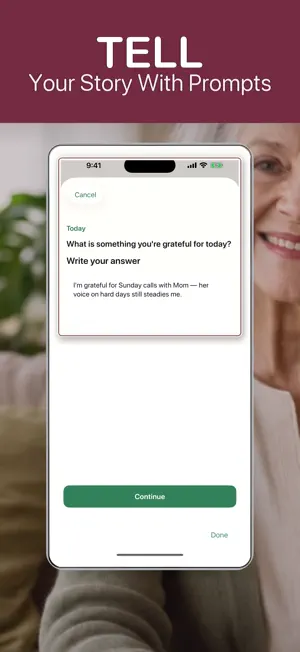
Family Journal: Stay In Touch Texting is fine for logistics. It’s not built for the slow, meaningful stuff — mom’s voice on a hard day, a photo from dad, a gentle daily check-in with your parents or grandparents, or the moments you want to keep as family legacy. Family Journal is a private family journal for your inner circle: the loved ones you actually want to stay in touch with — not your whole contact list. Why this isn’t just iMessage (or another sharing app) • A place for memories, not a chat thread. You receive moments in a dedicated inbox, save what matters, and send back voice, photo, or text — with guided prompts so you don’t stare at a blank screen. • Bidirectional, not broadcast. It’s for back-and-forth between family — not posting to a feed or building a photo album. • Gentle daily rhythm. Check in with guided prompts and gratitude-style questions — warm connection, not a safety-app “life alert.” • Memory keeper for your circle. Parents, grandparents, mom, dad, and the people who matter get a living journal of moments and keepsakes — not a scrapbook you print, and not a generic cloud drive folder. • Reach-out nudges. Friendly reminders when you haven’t heard from someone in a while — a chance to reconnect, not a panic notification. • Private by design. Memories stay on your device and your personal iCloud. We don’t host your family’s moments on our servers. Who it’s for Adult children staying in touch with aging parents or grandparents. Families spread across cities who want daily moments without another group chat. Anyone building a small, private legacy of heirloom memories with people they trust. What you can do • Receive daily moments from loved ones in your inbox • Check in with guided prompts — voice, photo, or note • Share moments back and relive grandparents’ stories anytime • Journal what you’ve sent — your family journal over time • Pin your inner circle in Contacts and add people by private code FREE (Basic) — always free • Unlimited text and photo memories • Up to 1 minute of voice per day (total) • Access to the last 30 days of memories • No video • No pinned favorite contacts • No per-contact message hub Basic is enough to try the rhythm and stay in touch with guided prompts — without paying. PRO — why upgrade Pro is for families who want the full memory keeper experience: richer media, unlimited history, and tools that make a small circle feel close. Pro Monthly includes a 7-day free trial when you’re eligible (no credit card required to start the trial in the app): • Unlimited memories — full legacy archive, not just recent days • Up to 30 minutes of voice and video messages per day • Pin up to 2 favorite contacts (Monthly) • Contact message hub — view everything from one person in one place • Family Pro sharing — your paid plan can unlock Pro for everyone you’re connected with Pro Annual (best value): • Everything in Pro Monthly • Pin up to 4 favorite contacts • Schedule memories for a future date and time (Annual only) • Charged at signup — not a trial If someone in your circle already pays for Pro, you may get Pro features through Family Pro sharing — one subscription can cover the whole inner circle. Subscriptions & legal Subscriptions auto-renew unless canceled at least 24 hours before the end of the current period. Manage or cancel in your Apple ID Account Settings. Privacy Policy: https://davidmedawar.app/privacy/family-journal Terms of Use (EULA): https://www.apple.com/legal/internet-services/itunes/dev/stdeula/
What’s new
Version 1.4.0 · Updated October 6, 2026
New: your family's month, on a poster. Every day someone in your family answers the question, a square fills in. Photos make the best squares. Keep it going all month and you can download the poster and print it. Free to share on your phone, and Pro gets the full 8x10 print file. Your whole family still gets the same question every day, and you only see their answers after you answer yours. Plus a bunch of smaller stuff: the app is faster and smoother, notifications don't spoil anyone's answer anymore, a nicer memory jar, and bug fixes.
App privacy
The developer, David Medawar, reported these privacy practices to Apple.
Data Linked to You
The following data, which may be collected and linked to your identity, may be used for the following purposes:
- Purchases: Purchase History
- Contact Info: Name
- Identifiers: Device ID
- User Content: Photos or Videos, Audio Data
Used for: Analytics, App Functionality
Data Not Linked to You
The following data, which may be collected but is not linked to your identity, may be used for the following purposes:
- Usage Data: Product Interaction
- Diagnostics: Crash Data, Performance Data, Other Diagnostic Data
Used for: Analytics, App Functionality