

FocusCat: Cat Pomodoro Timer
Forward Tecnologia Productivity iPhoneiPadiPod touch
FocusCat: Cat Pomodoro Timer is a free Productivity app for iPhone and iPad by Forward Tecnologia. Rated 5.0/5 from 3 ratings. Requires iOS 16.0.
- Rating
- 5.0
- 3 ratings
- Price
- Free
- on the App Store
- Size
- 66 MB
- Age 4+
- Updated
- Sep 8
- 2026 · v1.4.0
Screenshots



About FocusCat: Cat Pomodoro Timer
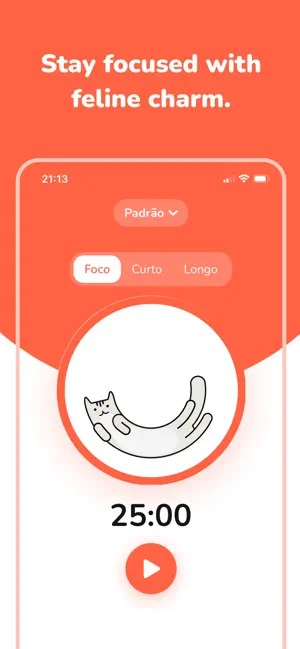
A Pomodoro timer with a cat that keeps you company while you study or work. FocusCat is a simple Pomodoro timer: you press play, the kitten wakes up and moves along with your focus session. When the time is up, you both rest. WHY FOCUSCAT - Starts in one tap Open the app, press play, and your focus session begins. An account is optional, so you can try the timer before deciding anything. - Block the apps that pull you away Choose which apps to block during a session and FocusCat holds the line for you. No willpower needed to ignore a notification you never receive. The block lasts as long as the Pomodoro, then everything comes back on its own. - A cat for company The cat animation follows the timer. It is a gentle way to feel that the session is running, with no aggressive alarms and no guilt trips. - Study with friends in real time See who is in a session right now and let them see you. Studying alone is harder than studying next to someone, even when that someone is a name on a screen. Add friends and run your Pomodoro sessions together. - Earn XP for every session you finish Each completed block gives you XP and moves your level forward. Your progress comes from the time you actually focused, not from paying. - Your focus, your intervals Set the length of your focus block, your short break, and your long break. The classic Pomodoro is 25 and 5, but you can run 50 and 10 if that suits you better. - Categories that separate your work Create categories like University, Exam Prep, Work, or Reading, and see how much time went into each one. - Statistics that show the pattern Daily focus chart, study time per day, total time per category, session completion rate, focus vs break, and recent history. WHO IT IS FOR - Students preparing for exams who need a study timer they can trust - University students in the middle of a thesis, a paper, or finals - Study groups who want to focus together without being in the same room - Remote workers who reach the end of the day with no idea where the time went - Anyone who struggles with concentration and studies better in short blocks - Anyone who tried a productivity app before and quit because it was too much HOW THE POMODORO TECHNIQUE WORKS 1. Pick one task 2. Start the 25 minute Pomodoro timer 3. Work without switching tabs until the time is up 4. Take a 5 minute break 5. After four cycles, take a longer break The Pomodoro cycle is short on purpose. Starting is easier when you only have to hold out for 25 minutes, and the FocusCat kitten exists to make those 25 minutes less dry. Download FocusCat, open the Pomodoro timer, and turn your study time into a routine you can actually keep. ____________________________________ Subscription Information and Legal Terms Subscriptions automatically renew unless canceled at least 24 hours before the end of the current period. Payment will be charged to your iTunes account at confirmation of purchase. You can manage or cancel your subscription in your Account Settings after purchase. Privacy Policy: https://docs.google.com/document/d/159KLO0Wz2Y6tor39p5OC5wzgTnxxN71FrvvkCuKtLp8/edit?usp=sharing Terms of Use (EULA): https://www.apple.com/legal/internet-services/itunes/dev/stdeula/
What’s new
Version 1.4.0 · Updated September 8, 2026
What's new? - Bug Fixes - Invite friends - Joint focus sessions - App blocking during focus sessions - Gamification with XP and levels
App privacy
The developer, Forward Tecnologia, reported these privacy practices to Apple.
Data Used to Track You
The following data may be used to track you across apps and websites owned by other companies:
- Usage Data: Product Interaction, Advertising Data, Other Usage Data
- Diagnostics: Crash Data, Performance Data, Other Diagnostic Data
Data Not Linked to You
The following data, which may be collected but is not linked to your identity, may be used for the following purposes:
- Usage Data: Product Interaction, Advertising Data, Other Usage Data
- Diagnostics: Crash Data, Performance Data, Other Diagnostic Data
Used for: Third-Party Advertising, Developer’s Advertising or Marketing, Analytics, Product Personalization, App Functionality
Alternatives to FocusCat: Cat Pomodoro Timer
Looking for apps like FocusCat: Cat Pomodoro Timer? Here are 6 similar apps on the App Store. The highest rated is Study Kitty: Pomodoro Timer (4.3/5), and all 6 are free to download.
-
 Pomochi
-
 Task & To-Do List - Focus Pet
-
 Tomodoro: Focus & Study Timer
-
 Pomofish: Pomodoro Timer
-
 Focus Cat: Earn Screen Time
4.0
Focus Cat: Earn Screen Time
4.0
-
 Study Kitty: Pomodoro Timer
4.2
Study Kitty: Pomodoro Timer
4.2
| App | Rating | Price | Last updated | Compare |
|---|---|---|---|---|
| FocusCat: Cat Pomodoro Timer | 5.0 / 5 (3 ratings) | Free | September 8, 2026 | |
| Pomochi | – | Free | Apr 2, 2026 | Compare |
| Task & To-Do List - Focus Pet | – | Free | Sep 8, 2026 | Compare |
| Tomodoro: Focus & Study Timer | – | Free | Aug 20, 2026 | Compare |
| Pomofish: Pomodoro Timer | – | Free | Apr 1, 2026 | Compare |
| Focus Cat: Earn Screen Time | 4.0 / 5 (2) | Free | Aug 12, 2026 | Compare |
| Study Kitty: Pomodoro Timer | 4.3 / 5 (4) | Free | Mar 20, 2026 | Compare |