

One Question a Day Journal
Waseef Akhtar Lifestyle iPhoneiPadiPod touchApple Watch
One Question a Day Journal is a free Lifestyle app for iPhone and iPad by Waseef Akhtar. Requires iOS 26.2. Updated November 22, 2026.
- Price
- Free
- on the App Store
- Size
- 23 MB
- Age 4+
- Updated
- Nov 22
- 2026 · v1.10
Screenshots
Save to Pinterest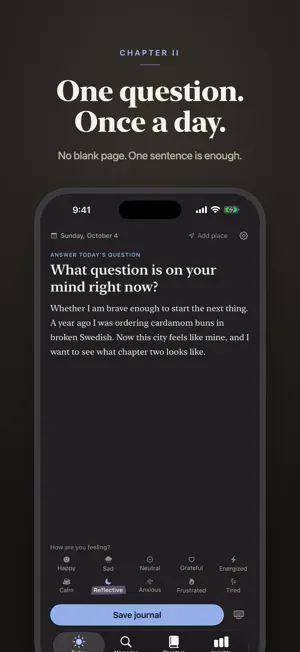


About One Question a Day Journal
One question a day. In time, the chapters of your life. Every day, a single question appears. You answer it once, then it's sealed. No editing. No rewriting. No polishing. One honest sentence is enough. Written on paper, not on a screen. Serif type, warm ink, a page with grain. The question is the title and the rest of the page is yours. YOUR LIFE, IN CHAPTERS Keep writing and One Question starts to see the stretches your life fell into: a town you lived in, a summer away, something you kept at, a person who filled your days, a season. Each one becomes a chapter, named and dated, opening with your own first line. • Where it happened and how it began • A cover for every chapter, painted on your device by Image Playground • With Pro: how it felt, moments you might have forgotten, what changed, and then and now, side by side • With Pro: what the whole stretch meant, told back to you by Apple Intelligence Chapters wait until there's enough behind them to be true. BRING YOUR YEARS WITH YOU Already keep a journal? From Day One, every entry comes with its time and place; from Apple's Journal app, with its title and the mood you logged. Journey, Daylio and your own JSON, CSV, Markdown, text or PDF files work too. It's all read on your device, not by a server, so your timeline, chapters and On This Day are full from your first day. Photos don't come across yet. EVERY DAY • A new question every day, and a reminder at the hour you actually write • Sealed the moment you save • Mark how you felt, or leave it blank • Keep the place you wrote from, if you want to • A few words back after you write, drawn from the days behind your entry LOOKING BACK • Memories: search every entry by words, places or people • On This Day: what you wrote a week, a month, a year ago • Rediscover: a past day worth finding again • Journal Map: every place you've written from, coloured by how you felt • Last week and last month, looked back on, with a line of your own from each • Insights: streaks, mood patterns, and Year in Review, the whole year as a calendar of moods WHEREVER YOU WRITE • iPhone Duo: a two-page spread when folded like a book, a writing desk when stood up like a laptop • iPad at any window size, and Apple Vision Pro • Apple Watch, with dictation, mood logging and complications • Home Screen and Lock Screen widgets • Apple Health, if you turn it on: the time you spent writing as Mindful Minutes, and your mood as State of Mind • In English, Chinese (Simplified), Hindi, Spanish, Arabic and French PRIVATE BY DESIGN Your entries live on your device and sync only through your own iCloud account. Analytics never include your words. Chapters, reflections and cover paintings are made on your device, and your writing is never sent anywhere to be read. Apple Health receives your mood and what the day was about, like Work or Family, never your words. Export everything as plain text whenever you like. ONE QUESTION PRO Writing, moods, places, the map, Memories, Insights and your list of chapters are free. Pro opens what's inside each chapter: how it felt, the moments worth finding again, what changed, then and now, and what it all meant. It also opens place chapters, every town month by month, and the rest of Rediscover. Pro is a monthly or yearly auto-renewing subscription. Payment is charged to your Apple Account when you confirm your purchase. It renews automatically unless cancelled at least 24 hours before the end of the current period. Manage or cancel it anytime in your App Store account settings. Apple Intelligence features need a compatible device with Apple Intelligence turned on, in a language it supports. Without it, chapters and reflections are written plainly, from the facts of your entries. Open the app. Answer. Close. Come back tomorrow. Terms of Use (EULA): https://www.apple.com/legal/internet-services/itunes/dev/stdeula/ Privacy Policy: https://theonequestionapp.com/privacy/
What’s new
Version 1.10 · Updated November 22, 2026
Share today's question, give a friend a month of Pro, and two new languages. Today's question, as a story Turn the day's question into a card made for Instagram Stories, or share it anywhere else. Your answer only goes on the card if you add it, each time. Give a friend a month of Pro After a few entries, you can send a friend a month of Pro, free. It's one link, from you. Now in Japanese and German One Question now speaks eight languages, on every screen, in notifications and widgets, and on Apple Watch. Chapters in every language Journals written in Spanish, French, Arabic, Chinese, Hindi, Japanese and German are now read by their own grammar, so chapters are found more accurately and named more naturally. Also: rate One Question any time from Settings, Settings now follow your text size, and the privacy policy opens on our website.
App privacy
The developer, Waseef Akhtar, reported these privacy practices to Apple.
Data Not Linked to You
The following data, which may be collected but is not linked to your identity, may be used for the following purposes:
- Purchases: Purchase History
- Usage Data: Product Interaction, Advertising Data
- Diagnostics: Crash Data, Performance Data, Other Diagnostic Data
Used for: Analytics
Alternatives to One Question a Day Journal
Looking for apps like One Question a Day Journal? Here are 6 similar apps on the App Store. The highest rated is Hero's Path OS (5.0/5), and all 6 are free to download.
-
 Debrief: Daily Voice Journal
-
 ShadowWrite
-
 Auraboard
-
 OneQ: One Question a Day
-
 Hero's Path OS
5.0
-
 OneQuestion - Daily Reflection
5.0
| App | Rating | Price | Last updated | Compare |
|---|---|---|---|---|
| One Question a Day Journal | – | Free | November 22, 2026 | |
| Debrief: Daily Voice Journal | – | Free | Nov 16, 2026 | Compare |
| ShadowWrite | – | Free | Jul 21, 2026 | Compare |
| Auraboard | – | Free | Aug 18, 2026 | Compare |
| OneQ: One Question a Day | – | Free | Nov 5, 2026 | Compare |
| Hero's Path OS | 5.0 / 5 (3) | Free | Jul 24, 2026 | Compare |
| OneQuestion - Daily Reflection | 5.0 / 5 (1) | Free | Nov 15, 2026 | Compare |