

Snapsift: AI Photo Cleaner
Anh Phong Photo & Video iPhoneiPadiPod touch
Snapsift: AI Photo Cleaner is a free Photo & Video app for iPhone and iPad by Anh Phong. Requires iOS 17.0. Updated October 28, 2026.
- Price
- Free
- on the App Store
- Size
- 19 MB
- Age 4+
- Updated
- Oct 28
- 2026 · v1.4.2
Screenshots


About Snapsift: AI Photo Cleaner
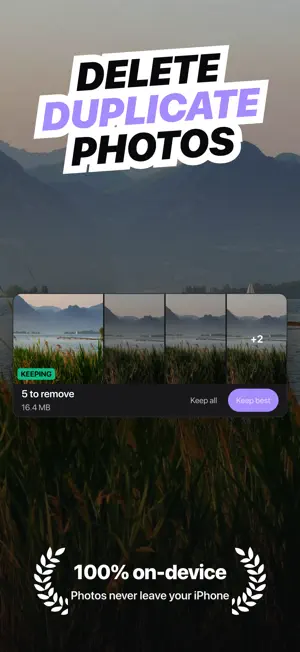
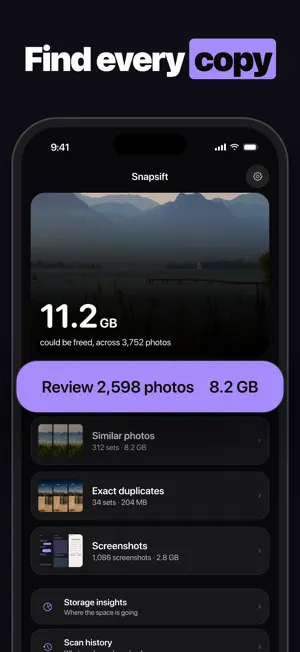
You probably have thousands of nearly identical photos taking up space right now. Snapsift scans your library, groups similar shots together, and helps you keep only the best ones. Most duplicate finders only catch exact copies. Snapsift uses on-device AI to spot photos that look alike but aren't pixel-perfect matches. Think: 10 shots of the same sunset, a dozen selfie attempts, or burst photos you forgot to clean up. How it works: - Scan your full photo library - See similar photos grouped side by side - AI picks the sharpest, best-composed shot in each group - Every decision collects in one tray and deletes together, after a single confirmation - Changed your mind? Undo works until the tray is emptied What Snapsift catches: - Near-identical photos from the same moment - Old screenshots cluttering your camera roll - Burst photos and rapid-fire shots - Forgotten duplicates spread across albums Know where your storage actually went: Storage insights weighs your whole library, not just what a scan found. See what your photos and videos hold, how that compares with the space still free on your iPhone, and the twenty heaviest items. The Photos app cannot sort by size, so a single large video stays invisible until you happen to scroll past it. Anything on that list can go straight into the same tray. Your privacy matters: Every photo stays on your iPhone. Snapsift processes everything locally using the Vision framework. No uploads, no cloud. We literally never see your photos. Get started for free: Scan your entire library at no cost. Free users can delete up to 15 photos per month. Upgrade to Snapsift Pro for unlimited cleanup and storage insights, with annual, monthly, or lifetime options. Works with iPhone running iOS 17 and later. Have a question? Reach us at [email protected] Snapsift Pro Subscription: - Annual (7-day free trial) - Monthly - Lifetime (one-time purchase) Prices are shown in the app and vary by region. Payment will be charged to your Apple ID account at the confirmation of purchase. Subscriptions automatically renew unless canceled at least 24 hours before the end of the current period. Your account will be charged for renewal within 24 hours prior to the end of the current period. You can manage and cancel your subscriptions in your Account Settings on the App Store after purchase. Terms of Use (EULA): https://www.apple.com/legal/internet-services/itunes/dev/stdeula/ Privacy Policy: https://github.com/heocoi/privacy-policy/blob/main/snapsift.md
What’s new
Version 1.4.2 · Updated October 28, 2026
Fixed an issue where the paywall could show an incorrect price if it loaded before pricing was ready. Also, the app now asks for a review after your first successful cleanup, not before.
App privacy
The developer, Anh Phong, reported these privacy practices to Apple.
Data Not Linked to You
The following data, which may be collected but is not linked to your identity, may be used for the following purposes:
- Identifiers: Device ID
- Usage Data: Product Interaction
Used for: Analytics
Alternatives to Snapsift: AI Photo Cleaner
Looking for apps like Snapsift: AI Photo Cleaner? Here are 6 similar apps on the App Store. The highest rated is First Pick: AI Photo Sorter (5.0/5), and all 6 are free to download.
-
 SnapSift
-
 First Pick: AI Photo Sorter
5.0
First Pick: AI Photo Sorter
5.0
-
 Dupie
5.0
Dupie
5.0
-
 ShotSift Photo & Video Cleaner
-
 AI Cleaner: Duplicates Photo
5.0
AI Cleaner: Duplicates Photo
5.0
-
 Zoom Compare: Pick Best Photos
| App | Rating | Price | Last updated | Compare |
|---|---|---|---|---|
| Snapsift: AI Photo Cleaner | – | Free | October 28, 2026 | |
| SnapSift | – | Free | May 10, 2026 | Compare |
| First Pick: AI Photo Sorter | 5.0 / 5 (1) | Free | Feb 18, 2026 | Compare |
| Dupie | 5.0 / 5 (2) | Free | Apr 23, 2026 | Compare |
| ShotSift Photo & Video Cleaner | – | Free | Oct 25, 2026 | Compare |
| AI Cleaner: Duplicates Photo | 5.0 / 5 (1) | Free | May 5, 2026 | Compare |
| Zoom Compare: Pick Best Photos | – | Free | Jun 2, 2026 | Compare |