

WUW IPTV Player - Smart M3U TV
Okan Yucel Entertainment iPhoneiPadiPod touch
WUW IPTV Player - Smart M3U TV is a free Entertainment app for iPhone and iPad by Okan Yucel. Rated 5.0/5 from 1 ratings. Requires iOS 26.0.
- Rating
- 5.0
- 1 ratings
- Price
- Free
- on the App Store
- Size
- 202 MB
- Age 12+
- Updated
- Oct 14
- 2026 · v1.1.15
Screenshots

About WUW IPTV Player - Smart M3U TV
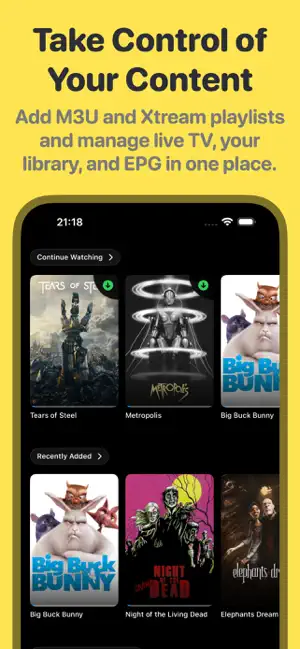
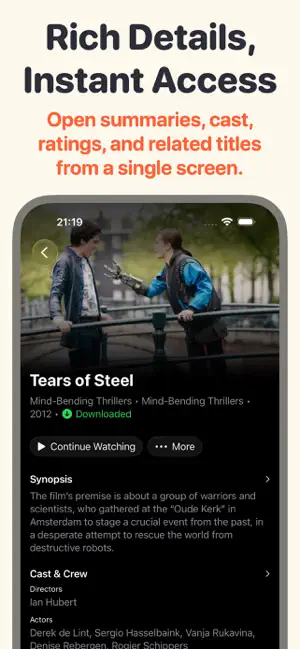
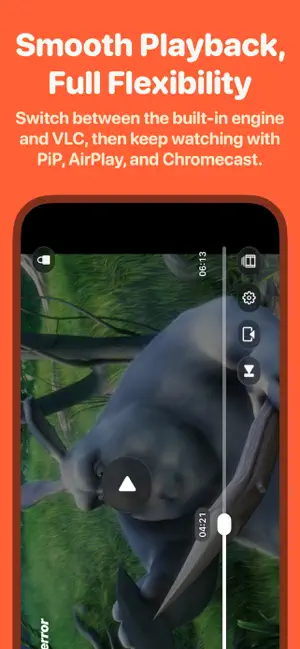
WUW is an IPTV player for live TV, movies and series from your own M3U and Xtream playlists. YOUR PLAYLISTS, YOUR LIBRARY • Add M3U URLs, local M3U/M3U8 files or Xtream Codes. Search your library and explore available content details. • Organize favorites, a watchlist, history and Continue Watching. • Hide/reorder categories; customize tab order, startup tab, layouts and card sizes. • Add your own EPG source and set playlist and guide update intervals. PLAYBACK THAT FITS YOUR CONTENT • Select audio tracks, import subtitles or display two subtitle languages together on supported content. • Picture in Picture with subtitle support for live TV, movies and series on compatible devices. • Play MKV, MP4, WebM, AVI and MPEG-TS, including H.264, HEVC, AV1 and VP9 video. • SRT, ASS/SSA and VTT subtitle import; embedded text, bitmap and teletext subtitles where available. • Adjust playback speed, aspect ratio, audio/subtitle timing, and subtitle font, size and color. • Jump to chapters and use seek previews when available. TAKE CONTROL OF YOUR VIEWING • Enjoy redesigned playback controls, organized settings and a timeline with program guide information. • On iPhone and iPad, swipe for volume and brightness, double-tap to seek 10 seconds, or hold for temporary 2× playback. Use landscape orientation lock. • Remember audio and subtitle choices for your content, with series preferences carried into subsequent episodes. WATCH ON YOUR TV • Stream compatible live TV, movies and series from your iPhone or iPad to supported TVs and receivers. • Use AirPlay to watch on Apple TV or AirPlay-compatible smart TVs. • Choose a device on the same Wi-Fi network. Support depends on the content and receiver. PICTURE & SOUND • 4K, Dolby Vision, HDR10, HDR10+ and HLG with compatible sources and displays. • Dolby Atmos via Dolby Digital Plus (E-AC-3/JOC) on supported audio outputs. FLAC/ALAC and TrueHD/DTS playback, with 5.1 surround or up to 7.1 lossless conversion options. Conversion does not preserve Atmos objects. • Deinterlacing for supported interlaced video. LIVE TV, WITH ROOM TO REWIND • Pause and rewind compatible live streams, then return to live with one tap. • Record supported live channels on your device to watch later, where you have permission to record. • Browse, play and manage recordings in a dedicated Recordings screen. CONTINUE ON APPLE DEVICES Sync supported playlists, favorites and viewing progress via iCloud across iPhone, iPad, Mac, Apple TV and Apple Vision Pro. Local-file playlists and downloaded videos do not sync. WATCH OFFLINE Download compatible movies and episodes. Pause/resume downloads, use Wi-Fi-only downloading and manage stored files. COMPATIBILITY & ACCESS Live rewind covers the available buffer from your current viewing session; its length depends on the stream and free storage. Recording also requires a compatible stream and sufficient space. Offline downloads support compatible movie and episode files. HLS/DASH and DRM-protected content cannot be downloaded. Recordings stay on the device; Apple TV may clear local downloads and recordings to reclaim space. Features vary by device, playback mode and content. Some features require a subscription. Subtitle presentation in PiP and AirPlay depends on the subtitle format and playback mode. Important: WUW is a media player. It does not provide, include, host, or sell channels, playlists, movies, series, live streams, or EPG data. You must provide your own legal playlists and content. WUW is not affiliated with third-party content providers and does not endorse streaming copyright-protected content without permission. Privacy Policy: https://www.wuwtv.app/privacy/ Terms of Use: https://www.wuwtv.app/terms/ Support: https://www.wuwtv.app/support/ Contact: https://www.wuwtv.app/contact/
What’s new
Version 1.1.15 · Updated October 14, 2026
We continue to improve WUW TV for you with performance enhancements and stability fixes for a smoother experience.
App privacy
The developer, Okan Yucel, reported these privacy practices to Apple.
Data Not Linked to You
The following data, which may be collected but is not linked to your identity, may be used for the following purposes:
- Purchases: Purchase History
- Identifiers: Device ID
- Usage Data: Product Interaction
- Diagnostics: Performance Data, Other Diagnostic Data, Crash Data
- User Content: Customer Support
Used for: Analytics, App Functionality
Alternatives to WUW IPTV Player - Smart M3U TV
Looking for apps like WUW IPTV Player - Smart M3U TV? Here are 6 similar apps on the App Store. The highest rated is PlayMe IPTV (5.0/5), and 5 of the 6 are free to download.
-
 PlayMe IPTV
5.0
-
 Plivot - Universal IPTV Player
-
 VOZZA IPTV Player
5.0
-
 EasyIpTv
-
 IPTV Ultimate – Your Online TV
5.0
-
 ClawTV: IPTV Player
5.0
| App | Rating | Price | Last updated | Compare |
|---|---|---|---|---|
| WUW IPTV Player - Smart M3U TV | 5.0 / 5 (1 rating) | Free | October 14, 2026 | |
| PlayMe IPTV | 5.0 / 5 (1) | Free | Oct 6, 2026 | Compare |
| Plivot - Universal IPTV Player | – | Free | Sep 28, 2026 | Compare |
| VOZZA IPTV Player | 5.0 / 5 (1) | Free | May 26, 2026 | Compare |
| EasyIpTv | – | Free | Apr 4, 2026 | Compare |
| IPTV Ultimate – Your Online TV | 5.0 / 5 (1) | Free | Jul 8, 2026 | Compare |
| ClawTV: IPTV Player | 5.0 / 5 (2) | 4.99 USD | Aug 11, 2026 | Compare |