

MindWoods
wu zhaodong Productivity iPhoneiPadiPod touch
MindWoods is a free Productivity app for iPhone and iPad by wu zhaodong. Rated 2.0/5 from 1 ratings. Requires iOS 17.0. Updated October 21, 2026.
- Rating
- 2.0
- 1 ratings
- Price
- Free
- on the App Store
- Size
- 18 MB
- Age 4+
- Updated
- Oct 21
- 2026 · v1.2.1
Screenshots



About MindWoods
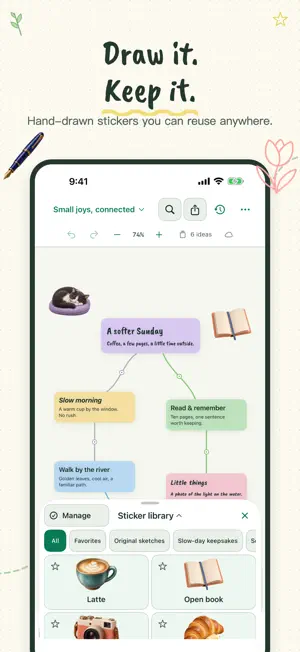
Give your ideas room to grow with MindWoods. Make a mind map, keep an illustrated journal, plan a project, or collect sketches and inspiration in a garden of connected ideas. WRITE, READ, AND CONNECT Start with a title, then add notes and images. Arrange idea cards on the canvas, connect them with named relationships, and return to the full text when you want to read or edit. Batch entry helps you capture several ideas at once. MAKE THE CANVAS YOURS Combine notes with photo and hand-drawn stickers. Reuse creations from your personal sticker library, pair stickers with ideas, group objects, and organize their stacking order. Choose a theme and customize the toolbar around the tools you use most. Style each idea with classic or handwritten fonts, bold, italic, card colors and three levels, then let Auto Layout tidy up or arrange the garden by level. KEEP ORGANIZING Search your ideas, start from a template, and use garden history and the recycle bin to revisit earlier versions or recover content. EXPORT YOUR WORK Share a canvas as PNG, export a PDF with a canvas overview and complete notes, or use Markdown and JSON exports to take your work with you. START FREE, ADD PRO WHEN YOU NEED IT Free creation includes one garden with up to 10 ideas and selected templates. All themes, export formats, and basic iCloud features are included. MindWoods Pro is a one-time in-app purchase, with no subscription. It adds unlimited gardens and ideas, all templates, unlimited drawing (3 drawings are free), Markdown import, and on-device model summaries on supported devices. No MindWoods account is required. iCloud features require signing in to iCloud and enabling iCloud Drive in system settings. Model summaries also depend on the system version, device, region, language, and Apple Intelligence availability.
What’s new
Version 1.2.1 · Updated October 21, 2026
More ways to start, organize and connect your ideas. • Explore 28 templates in 7 categories, now with visual previews. Learning Notes and Brainstorming remain free; other templates require Pro. • Add 21 new stickers in two styles. Organize with favorites and folders, pair stickers with ideas, arrange layers and resize from any corner. • Select an idea, then press Tab or tap “New connected idea” to add a new idea and its connection. • A new pencil case for drawing: pick a pen, color and width, and every drawing becomes a sticker. Resume unfinished drawings, with fixes for occasional freezes. Draw 3 for free; unlimited with Pro. • Style each idea: classic or handwritten fonts, bold, italic, card colors and three levels. Drag a level, a color or the format painter onto any card. Auto Layout can now tidy up, arrange by level or spread by connections. • Improved readability at low brightness, layouts and zoom across screen sizes, plus a new introduction to the latest features.
App privacy
The developer, wu zhaodong, reported these privacy practices to Apple.
Data Not Collected
The developer does not collect any data from this app.
Alternatives to MindWoods
Looking for apps like MindWoods? Here are 6 similar apps on the App Store.


| App | Rating | Price | Last updated | Compare |
|---|---|---|---|---|
| MindWoods | 2.0 / 5 (1 rating) | Free | October 21, 2026 | |
| Tendril Mindmap | – | Free | Jun 7, 2026 | Compare |
| Sealed: Predictions | – | Free | Aug 14, 2026 | Compare |
| Silmari: Mindmap | – | 12.99 USD | Aug 14, 2026 | Compare |
| Sprint Board Planner | – | Free | May 26, 2026 | Compare |
| kaerumemo | – | Free | Mar 28, 2026 | Compare |
| ScruMe | – | Free | Jan 20, 2026 | Compare |
Compare MindWoods with the top alternatives: ratings, updates, ASO score and keyword gaps →