

Annovate
Nelson Taruc Productivity iPhoneiPadiPod touch
Annovate is a free Productivity app for iPhone and iPad by Nelson Taruc. Requires iOS 26.2. Updated May 6, 2026.
- Price
- Free
- on the App Store
- Size
- 4 MB
- Age 4+
- Updated
- May 6
- 2026 · v2.0
Screenshots


About Annovate
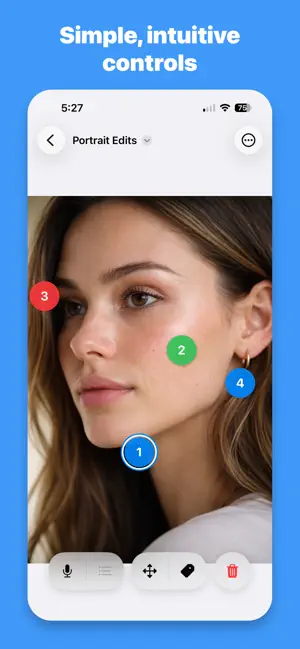
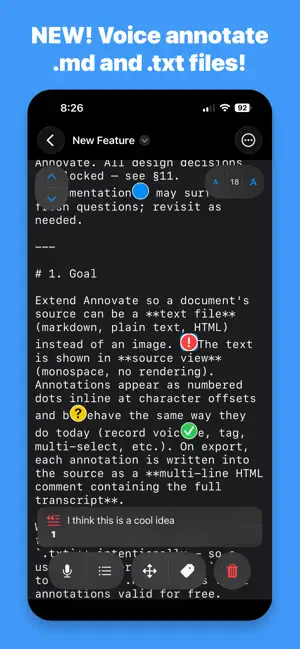
Annovate lets you add voice or text annotations directly to any image or markdown/plain text file (.md or .txt). Tap to place a numbered marker, record your thoughts, and share annotated images with easily editable voice-to-text transcripts. I built Annovate to give design feedback on my phone without having to type, and to easily edit before sharing with others. With the new 2.0 version, I can now review markdown and plain text files on the go, without needing to type. The annotations save into the text as inline comments. Export your text into a new file for later review. While other annotation apps are loaded with features and are difficult to use while mobile, Annovate is optimized for quick annotations, anytime and anywhere. How It Works 1. Import any image from your photo library or files OR a markdown or plain text file (.md or .txt) 2. Tap anywhere to place a numbered annotation 3. Tap the record button to capture multiple voice notes (up to 60 seconds per note) 4. On-device speech recognition automatically transcribes your audio 5. Easily edit your transcript and listen to voice notes 6. Share your Annovate document with other users, or export as PDF if an image 7. For text-based Annovate documents, you can export your text with your annotations embedded as inline comments Use Cases - Give design feedback on mockups and wireframes - Mark up markdown files while on the go, then export and share with others - Mark up photos to document feedback for edits or issues - Annotate photos from your photo library or files - Provide critique and revision notes for any image or plain text file - Take a screen shot of a map, then annotate image for step by step direction - Take a picture of a paper checklist, then annotate image with completion checkmarks Key Features - Voice recording with automatic transcription - On-device speech recognition for complete privacy - Unlimited audio clips per annotation - Smart move mode allows for precise placement of markers - Tag annotations as alert, resolved, or question - PDF export with numbered transcript list - Native document format with AirDrop sharing - Smooth pinch-to-zoom and pan navigation Pricing All features are available in the free version, with up to 3 annotations per document. Upgrade with one-time purchases, only when you need more annotations. Basic: 10 annotations per document Pro: 99 annotations per document
What’s new
Version 2.0 · Updated May 6, 2026
NEW FOR 2.0: You can now annotate plain text files (.md or .txt)!
App privacy
The developer, Nelson Taruc, reported these privacy practices to Apple.
Data Not Collected
The developer does not collect any data from this app.
Alternatives to Annovate
Looking for apps like Annovate? Here are 6 similar apps on the App Store. The highest rated is InstaPDF Scanner (5.0/5), and all 6 are free to download.
-
 InstaPDF Scanner
5.0
-
 NoteLens: Photo & Voice Memos
-
 Journal & Memories: TraveLog
5.0
-
 MarkUp - Word, Markdown, LaTeX
5.0
-
 PhotoReport — Photo Reports
5.0
-
 MRU4u
| App | Rating | Price | Last updated | Compare |
|---|---|---|---|---|
| Annovate | – | Free | May 6, 2026 | |
| InstaPDF Scanner | 5.0 / 5 (1) | Free | Sep 24, 2025 | Compare |
| NoteLens: Photo & Voice Memos | – | Free | Aug 8, 2026 | Compare |
| Journal & Memories: TraveLog | 5.0 / 5 (1) | Free | Aug 26, 2026 | Compare |
| MarkUp - Word, Markdown, LaTeX | 5.0 / 5 (3) | Free | Oct 20, 2026 | Compare |
| PhotoReport — Photo Reports | 5.0 / 5 (4) | Free | Oct 3, 2026 | Compare |
| MRU4u | – | Free | Sep 29, 2026 | Compare |
Compare Annovate with the top alternatives: ratings, updates, ASO score and keyword gaps →