

60d Memo
Genta Awaya Productivity iPhoneiPadiPod touchMac
60d Memo is a free Productivity app for iPhone and iPad by Genta Awaya. Requires iOS 17.0. Updated October 24, 2026.
- Price
- Free
- on the App Store
- Size
- 5 MB
- Age 4+
- Updated
- Oct 24
- 2026 · v1.7.0
Screenshots


About 60d Memo
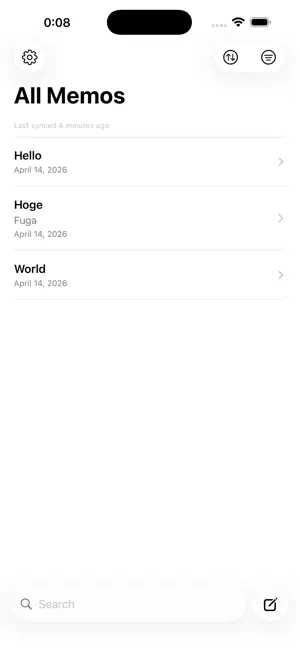
60d Memo is a simple memo app that stores your notes on your device and in your own Google Drive. Available on iPhone, iPad, and Mac. Google Sign-In is optional, so you can create and edit memos locally without an account. ■ You Own Your Data Your own Google Drive is the optional sync destination. Memo content is never sent to a proprietary server operated by the developer. Memos created by the app are stored as JSON files in a visible "60dMemo" folder on Google Drive, where you can inspect and manage your data. ■ Made for iPhone, iPad, and Mac On iPad and Mac, a three-column layout places the sidebar, memo list, and editor side by side, so you can browse while reading or editing a memo. On Mac, keyboard-friendly navigation includes Command-N for a new memo, Command-F for search, and Up/Down navigation through the memo list. ■ Essential Organization - Create, edit, delete, and duplicate memos - Search titles and memo content - Organize and filter with tags - Archive memos - Sort by updated date, created date, or title - Export in JSON or Markdown format - System, Light, and Dark appearances - Home Screen widgets on iPhone and iPad ■ Optional Google Drive Sync - Sign in with Google to start syncing - Automatic sync when the app opens - Manual Sync Now action in Settings - Uses the drive.file scope and only accesses files created by the app - When changing accounts, choose whether to upload local memos or replace them with the selected account's Drive data ■ Privacy First - No ads - No tracking - No developer-operated behavioral analytics - No proprietary memo-storage server The Google Sign-In SDK may process information for authentication, fraud prevention and analytics. See our Privacy Policy for details. 60d Memo is for people who want direct control over their memo data and optional synchronization across devices through Google Drive. Developed by Rokujudo Design (60d.dev).
What’s new
Version 1.7.0 · Updated October 24, 2026
• Control title checkboxes directly from Home Screen widgets, hide completed memos per widget, and choose whether tapping a title opens it for viewing or editing. • Small and medium widgets can show up to five items at standard text sizes. Improved spacing and centered empty-state messages; fewer items are shown when more space is needed. • Improved title-to-body editing and preserved edits when navigating through Settings. Checkbox symbols are now consistent in lists and archives. • Improved iPad Settings and narrow-window layouts, and fixed a crash when sharing JSON or Markdown files. • Improved retention of pending sync changes across app restarts. • Checkbox Mode remains a free beta. Plus purchases are not enabled.
App privacy
The developer, Genta Awaya, reported these privacy practices to Apple.
Data Linked to You
The following data, which may be collected and linked to your identity, may be used for the following purposes:
- Identifiers: User ID, Device ID
- Usage Data: Other Usage Data
- Other Data: Other Data Types
- Location: Coarse Location
- Contact Info: Email Address, Name, Phone Number
Used for: Analytics, App Functionality
Alternatives to 60d Memo
Looking for apps like 60d Memo? Here are 6 similar apps on the App Store. The highest rated is Kindling Spark – ADHD Focus (5.0/5), and all 6 are free to download.
-
 Present Past
-
 Stay On Track: Focus
-
 Kindling Spark – ADHD Focus
5.0
-
 PomoLock: AppBlocker
-
 Daybrick: Daily Time Blocks
-
 Don't Forget: ADHD Task Timer
| App | Rating | Price | Last updated | Compare |
|---|---|---|---|---|
| 60d Memo | – | Free | October 24, 2026 | |
| Present Past | – | Free | Apr 12, 2026 | Compare |
| Stay On Track: Focus | – | Free | Mar 3, 2026 | Compare |
| Kindling Spark – ADHD Focus | 5.0 / 5 (1) | Free | Apr 2, 2026 | Compare |
| PomoLock: AppBlocker | – | Free | Apr 21, 2026 | Compare |
| Daybrick: Daily Time Blocks | – | Free | Jul 6, 2026 | Compare |
| Don't Forget: ADHD Task Timer | – | Free | Oct 22, 2026 | Compare |
Compare 60d Memo with the top alternatives: ratings, updates, ASO score and keyword gaps →