

mytripnote: Travel Journal
Kentaro Hori Travel iPhoneiPadiPod touch
mytripnote: Travel Journal is a free Travel app for iPhone and iPad by Kentaro Hori. Rated 1.0/5 from 1 ratings. Requires iOS 15.5. Updated May 9, 2026.
- Rating
- 1.0
- 1 ratings
- Price
- Free
- on the App Store
- Size
- 101 MB
- Age 17+
- Updated
- May 9
- 2026 · v1.0.2
Screenshots


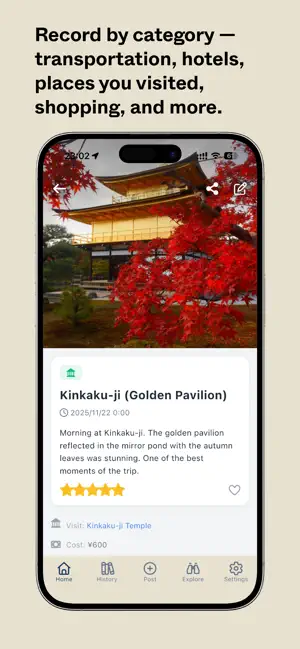

About mytripnote: Travel Journal
Record your trips the simple way. mytripnote lets you log meals, places you visited, where you stayed, and more—with photos and short notes—so you can look back on every journey without the fuss. Log by category — Add entries by type: transportation, accommodation, meals, places you visited, shopping, or other. Pick a category, add a photo and a note, and you're done. No long forms or complicated steps. Easy input means you'll keep recording, trip after trip. Your route on a map — Every trip you log is saved. Open a trip and see your stops on a map, connected in the order you visited. One glance shows where you've been and how the journey unfolded. Passport-style stamps — Visit a country and get a stamp for it. Build a collection of countries you've been to—like a passport of your travels—and see your progress at a glance. Share or keep it private — Publish posts so other travelers can see your notes and photos, or leave everything private as your own diary. You choose what's public and what stays personal. Discover other travelers' notes — Browse other users' travel records by place. Look up a hotel, a sight, or a restaurant and see real notes and photos from people who've been there. Use their experiences to plan or simply get inspired. One app for the whole trip — Keep all your memories in one place: photos, notes, costs, and ratings. Multiple currencies and exchange rates are supported, so you can log spending in local currency. The app is available in 13 languages, so you can use it in your preferred language wherever you go. Optional premium — Use mytripnote for free with ads. With a premium subscription, you can remove ads and unlock extra features to make the most of your travel journal. Subscription & how to cancel — Payment for premium is charged to your Apple ID account. You can cancel your subscription at any time. To cancel: 1) Open the Settings app on your iPhone or iPad. 2) Tap your name at the top, then tap Subscriptions. 3) Select mytripnote from the list. 4) Tap Cancel Subscription (or Turn Off Auto-Renewal). Confirm when prompted. After you cancel, you keep premium access until the end of the current billing period. No further charges will be made. Refunds are not given for the unused part of a period. If you don't see mytripnote under Subscriptions, make sure you're signed in with the same Apple ID you used when you subscribed. To manage or cancel subscriptions on a Mac or other device, go to Apple ID account settings (appleid.apple.com) and sign in, then open Subscriptions. If you reinstall the app or switch to a new device, tap "Restore purchases" in the app (under Settings or the premium screen) while signed in with the same Apple ID to restore your premium status. For more help with subscriptions, see Apple's support: https://support.apple.com/en-us/HT202039 Whether you're planning your next trip, reliving a past one, or sharing tips with others, mytripnote keeps everything simple: record by category, view your route on a map, collect country stamps, and browse or share—all in one app. Download and start recording your trips today. Terms of Use & Privacy Policy — By using mytripnote, you agree to our Terms of Use and Privacy Policy. You can read them anytime at: Terms of Use: https://mytripnote.app/terms Privacy Policy: https://mytripnote.app/privacy These links are also available in the app under Settings and on our website.
What’s new
Version 1.0.2 · Updated May 9, 2026
- Fixed login issues (Google, X, and email sign-in) - Improved stability and responsiveness of place search - Enhanced push notification performance - Other minor improvements and bug fixes
App privacy
The developer, Kentaro Hori, reported these privacy practices to Apple.
Data Not Linked to You
The following data, which may be collected but is not linked to your identity, may be used for the following purposes:
- Usage Data: Advertising Data, Product Interaction, Other Usage Data
- Location: Coarse Location
- User Content: Photos or Videos
- Diagnostics: Crash Data, Performance Data
Used for: Third-Party Advertising, Analytics, Product Personalization, App Functionality
Alternatives to mytripnote: Travel Journal
Looking for apps like mytripnote: Travel Journal? Here are 6 similar apps on the App Store. The highest rated is Mul: Travel Diary & Map (5.0/5), and all 6 are free to download.
-
 VoyageLog: Travel Journal
-
 Waymark: Walking Stories
-
 Trip Journal: Travel Stories
-
 Mul: Travel Diary & Map
5.0
Mul: Travel Diary & Map
5.0
-
 Memory Travel | Trip Journal
5.0
Memory Travel | Trip Journal
5.0
-
 Your Travel Journal
| App | Rating | Price | Last updated | Compare |
|---|---|---|---|---|
| mytripnote: Travel Journal | 1.0 / 5 (1 rating) | Free | May 9, 2026 | |
| VoyageLog: Travel Journal | – | Free | Oct 19, 2026 | Compare |
| Waymark: Walking Stories | – | Free | Oct 11, 2026 | Compare |
| Trip Journal: Travel Stories | – | Free | Sep 7, 2026 | Compare |
| Mul: Travel Diary & Map | 5.0 / 5 (1) | Free | Jul 21, 2026 | Compare |
| Memory Travel | Trip Journal | 5.0 / 5 (3) | Free | Oct 6, 2026 | Compare |
| Your Travel Journal | – | Free | Oct 7, 2025 | Compare |