

Document Scanner App
Jose Gerardo Palma Duran Utilities iPhoneiPadiPod touch
Document Scanner App is a free Utilities app for iPhone and iPad by Jose Gerardo Palma Duran. Requires iOS 17.0. Updated July 14, 2026.
- Price
- Free
- on the App Store
- Size
- 8 MB
- Age 4+
- Updated
- Jul 14
- 2026 · v1.1
Screenshots

About Document Scanner App
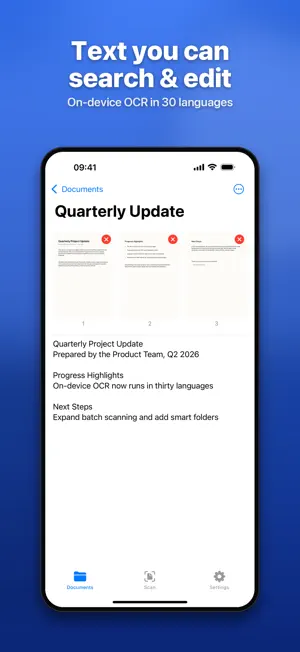
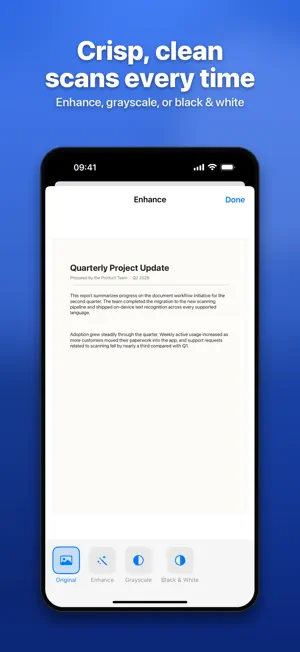
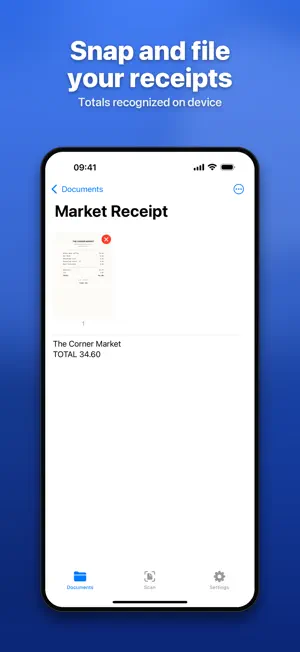
Doc Scanner turns your iPhone and iPad into a document scanner. Point the camera at a page and the app captures it, cleans it up, and reads the text with Apple's on-device Vision engine. Scanning and text recognition run entirely on your device. SCAN - Multi-page scans with automatic edge detection - Reorder, rescan, and delete pages - Enhance filters: Original, Enhance, Grayscale, and Black & White READ TEXT (OCR) - Recognized text is searchable, selectable, and editable - Copy text from any page - Works with the languages your device supports BUILD PDFs - Export PDFs with an embedded, searchable text layer - Add images, text boxes, and signatures on top of a page - Crop, rotate, and arrange items - ID Card layout places the front and back on a single page ORGANIZE - Group scans into folders - Mark each document as Document, Receipt, or ID Card, and filter by type EXPORT AND SHARE - Password-protect a PDF before you share it - Print over AirPrint - Share through the system share sheet SHORTCUTS - Start a scan with Siri or the Shortcuts app: "Scan Document" Doc Scanner is localized in 30 languages.
What’s new
Version 1.1 · Updated July 14, 2026
Version 1.1 adds: - Enhance filters: Original, Enhance, Grayscale, and Black & White - Signatures: sign a page with your finger or Apple Pencil - ID Card layout: place the front and back on one page - Document types: mark scans as Document, Receipt, or ID Card, and filter by type - Password-protected PDF export - Print over AirPrint - Siri shortcut to start a scan: "Scan Document" - Full localization in 30 languages - Fixed a crash when editing large scans, plus other stability improvements Thanks for using Doc Scanner.
App privacy
The developer, Jose Gerardo Palma Duran, reported these privacy practices to Apple.
Data Used to Track You
The following data may be used to track you across apps and websites owned by other companies:
- Location: Coarse Location
- Identifiers: Device ID
- Usage Data: Product Interaction, Advertising Data
- Diagnostics: Crash Data, Performance Data
Data Linked to You
The following data, which may be collected and linked to your identity, may be used for the following purposes:
- Location: Coarse Location
- Identifiers: Device ID
- Usage Data: Product Interaction, Advertising Data
- Diagnostics: Performance Data
Used for: Third-Party Advertising, Analytics
Data Not Linked to You
The following data, which may be collected but is not linked to your identity, may be used for the following purposes:
- Diagnostics: Crash Data
Used for: Third-Party Advertising, Analytics
Alternatives to Document Scanner App
Looking for apps like Document Scanner App? Here are 6 similar apps on the App Store. The highest rated is Ringy Alarm (5.0/5), and all 6 are free to download.
-
 Solia: SunSafe UV Index & Tan
-
 PDF Converter - Scan
-
 Business Calculator +
-
 Ringy Alarm
5.0
-
 Hoglt Parent
-
 Powergas - Gas & Luce
| App | Rating | Price | Last updated | Compare |
|---|---|---|---|---|
| Document Scanner App | – | Free | July 14, 2026 | |
| Solia: SunSafe UV Index & Tan | – | Free | Jun 24, 2026 | Compare |
| PDF Converter - Scan | – | Free | Nov 7, 2025 | Compare |
| Business Calculator + | – | Free | Sep 16, 2025 | Compare |
| Ringy Alarm | 5.0 / 5 (9) | Free | Sep 1, 2026 | Compare |
| Hoglt Parent | – | Free | Oct 29, 2026 | Compare |
| Powergas - Gas & Luce | – | Free | Mar 10, 2026 | Compare |