

Enveloop: Envelope Budget
Steven Knauss Finance iPhoneiPadiPod touch
Enveloop: Envelope Budget is a free Finance app for iPhone and iPad by Steven Knauss. Rated 5.0/5 from 5 ratings. Requires iOS 18.1.
- Rating
- 5.0
- 5 ratings
- Price
- Free
- on the App Store
- Size
- 6 MB
- Age 4+
- Updated
- Oct 15
- 2026 · v1.8.2
Screenshots

About Enveloop: Envelope Budget
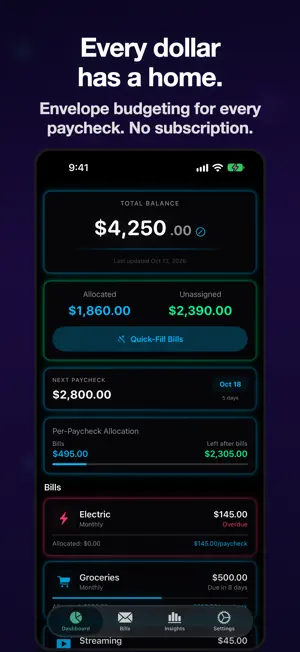
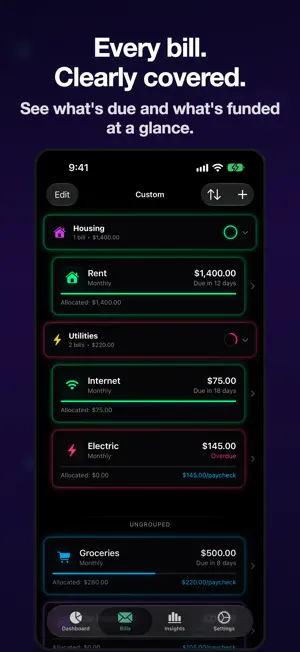
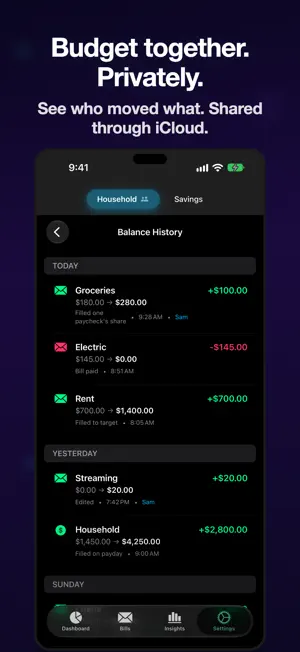
Ditch subscription budgets. With Enveloop, every bill gets its own envelope on your phone. Fill them up each payday, and see at a glance which bills are covered, which are short, and which are past due. EVERY DOLLAR HAS A HOME Drop your bills into envelopes. Color-coded lights show which ones are covered, almost there, past due, or still empty. No spreadsheets. No guessing. PAYCHECK IN. BILLS HANDLED. Tell Enveloop when your paycheck lands. Each payday, it tops up every envelope based on what that bill needs. Set it up once, then forget about it. SEE EVERYTHING AT A GLANCE Got more than one account? Flip between them, or see a running total of your balance and what's left across all of them. BUDGET TOGETHER. PRIVATELY. Share a budget with anyone in your family. Everyone sees the same bills, and balances stay in sync. No extra sign-ups, no extra servers — it all goes through your iCloud. STAY ORGANIZED YOUR WAY Group bills into folders — Utilities, Subscriptions, Home — with your own icons and colors. Sort by what's due next, by size, or drag them into whatever order feels right. EVERY CHANGE. LOGGED. Every move is saved automatically. You can always look back and see what changed, when, and who did it. Withdrawals still waiting to clear the bank stay visible so nothing goes missing. YOUR DATA. YOUR DEVICE. Enveloop stores your budget on your device and, when iCloud is on, syncs it through your private iCloud account. Sharing goes through iCloud too. No middlemen, no tracking, no ads. Your money is your business. TRY FREE. UNLOCK FOREVER. Start with a 2-week free trial — everything's unlocked, no strings. After two weeks, keep Enveloop forever for $4.99. One-time. No subscriptions, no ads, no auto-renew surprises. Built for iPhone and iPad — looks sharp in dark mode, light mode, or both. Privacy Policy: https://kynossstudios.com/enveloop-privacy.html Support URL: https://kynossstudios.com/enveloop-support.html Marketing URL: https://kynossstudios.com/enveloop/ Terms of Use (EULA): https://www.apple.com/legal/internet-services/itunes/dev/stdeula/
Ratings & reviews
5.0
5 ratings
What’s new
Version 1.8.2 · Updated October 15, 2026
Easier to start, easier to read. - Setup fits every iPhone. The Finish button stays on screen, even on smaller phones and at the largest text sizes. - The price and Unlock button are on the first screen of the upgrade page. - Large text wraps whole words instead of breaking them, on iPhone and iPad. - A new budget with no bills shows Add Your First Bill right on the Dashboard. - When a paycheck lands, your balance counts up to the new total. Reduce Motion skips the animation. - Clearer buttons on each bill, better contrast on Quick-Fill in light mode, and the Insights balance chart no longer dips below your real balance.
App privacy
The developer, Steven Knauss, reported these privacy practices to Apple.
Data Not Collected
The developer does not collect any data from this app.