

Ai Assistant for open claw
DIGITALSTALK PRIVATE LIMITED Productivity iPhoneiPadiPod touch
Ai Assistant for open claw is a paid Productivity app for iPhone and iPad by DIGITALSTALK PRIVATE LIMITED. Requires iOS 15.1. Updated February 20, 2026.
- Price
- 5.99 USD
- on the App Store
- Size
- 39 MB
- Age 4+
- Updated
- Feb 20
- 2026 · v1.0
Screenshots

About Ai Assistant for open claw
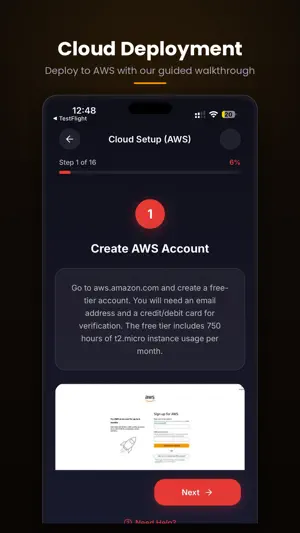
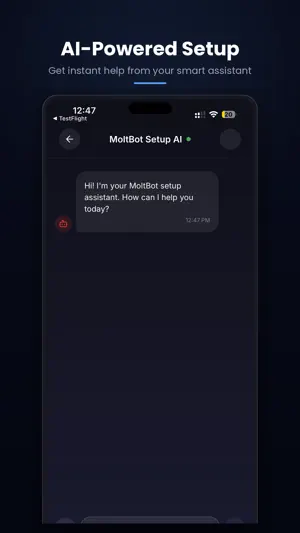
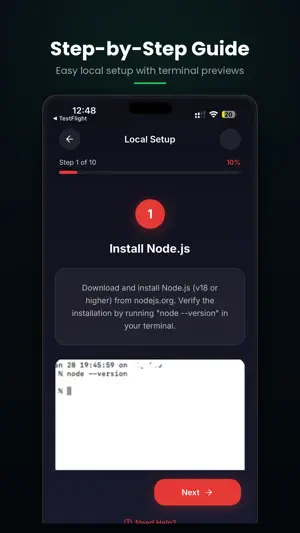
OpenClaw / MoltBot Setup AI Assistant — Easy Setup Steps + Live AI Support Setting up OpenClaw (formerly MoltBot / Clawdbot) can be overwhelming. Installation, API keys, environment configuration, terminal commands, and connecting your favorite messaging platforms often require deep technical knowledge. This app makes the entire process simple. Follow clear, visual step-by-step tutorials or chat with an AI assistant trained specifically on OpenClaw setup and troubleshooting. Upload screenshots of your terminal errors and get instant, actionable fixes. No complex documentation. No guessing. Just clear guidance and smart help. Whether you’re deploying OpenClaw on your local machine or a cloud server — this app guides you through every step from start to finish. WHAT YOU CAN DO ▸ STEP-BY-STEP TUTORIALS Guided walkthroughs for runtime installation, repository setup, environment variables, API key configuration, and messaging platform integration. Visual progress tracking shows exactly where you are in the process. ▸ AI SETUP ASSISTANT A dedicated AI chat assistant trained on OpenClaw documentation, common errors, configuration patterns, and troubleshooting. Ask anything about your setup — get answers instantly. ▸ SCREENSHOT & PHOTO HELP Upload images of your terminal output, error messages, or configuration screens. The AI analyzes them and provides visual guidance to fix issues fast. ▸ LOCAL & CLOUD DEPLOYMENT Choose your path: set up OpenClaw on your own computer or deploy to a cloud server with our comprehensive guide including free-tier setup instructions. ▸ TROUBLESHOOTING & ERROR FIXING Solve installation failures, dependency conflicts, webhook issues, port configuration problems, and messaging integration errors with targeted help. ▸ BEGINNER & ADVANCED GUIDES Start with the basics or dive into advanced customization, skill installation, remote access setup, and multi-platform integration. WHY THIS APP? • Clean, simple dark interface designed for developers • Visual setup guides with real terminal previews • Fast AI responses powered by advanced language models • Works for both local and cloud installations • Continuously updated for the latest OpenClaw versions • Lightweight and easy to use OpenClaw is the popular open-source AI personal assistant that connects to all your favorite messaging apps and chat platforms. It has a thriving community of developers and users worldwide. Get your AI assistant running correctly the first time. Save time. Avoid errors. Start your OpenClaw setup today. Support: [email protected] Privacy Url :https://statuesque-wax-bd4.notion.site/Privacy-Policy-3089c548869880728e1ff9c776db6c70?pvs=73 Terms and conditions:
App privacy
The developer, DIGITALSTALK PRIVATE LIMITED, reported these privacy practices to Apple.
Data Not Collected
The developer does not collect any data from this app.
Alternatives to Ai Assistant for open claw
Looking for apps like Ai Assistant for open claw? Here are 6 similar apps on the App Store. The highest rated is X41: Skip the Feed on X.com (5.0/5), and 5 of the 6 are free to download.




| App | Rating | Price | Last updated | Compare |
|---|---|---|---|---|
| Ai Assistant for open claw | – | 5.99 USD | February 20, 2026 | |
| voxa | – | 1.99 USD | Mar 17, 2026 | Compare |
| Prompkey – AI Prompt Enhancer | – | Free | Jan 27, 2026 | Compare |
| edge talk | – | Free | Jun 16, 2026 | Compare |
| n8remote | – | Free | Feb 8, 2026 | Compare |
| Skill Atlas | – | Free | Mar 4, 2026 | Compare |
| X41: Skip the Feed on X.com | 5.0 / 5 (1) | Free | Jan 19, 2026 | Compare |