

Foveate
Rahul Kadyan Productivity iPhoneiPadiPod touchMac
Foveate is a free Productivity app for iPhone and iPad by Rahul Kadyan. Requires iOS 26.2. Updated March 17, 2026.
- Price
- Free
- on the App Store
- Size
- 3 MB
- Age 4+
- Updated
- Mar 17
- 2026 · v1.1
Screenshots



About Foveate
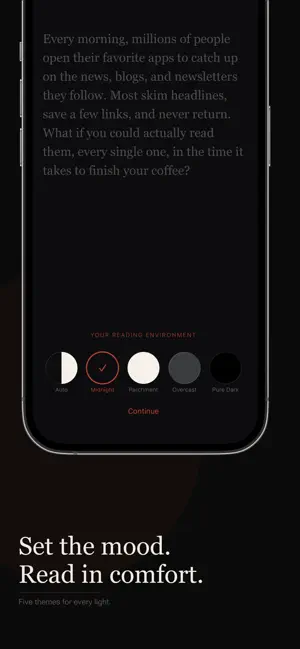
The world moves fast. Foveate helps you keep up. Subscribe to the blogs, news sites, and publications you care about. Foveate fetches your feeds, generates daily and weekly summaries using Apple Intelligence, and lets you speed-read articles using rapid serial visual presentation. Instead of scanning lines of text, you read one word at a time at a fixed point on the screen. Each word is positioned for quick recognition, and the pacing adapts automatically, slowing down for longer or less common words and pausing at the end of sentences. Most people read at around two hundred and fifty words per minute. With Foveate, you can comfortably reach three hundred to six hundred words per minute while still understanding what you read. Subscribe to any RSS or Atom feed. Articles appear in a clean timeline grouped by day. Apple Intelligence creates daily and weekly digests so you can catch up fast. You can filter by feed, search across all your articles, pull to refresh, and save articles for offline reading. The speed reader anchors each word at its optimal recognition point and adjusts timing for punctuation, word length, and word frequency. Choose from three pace profiles. Cruise holds a steady speed. Flow adapts dynamically as you read. Training starts slow and gradually ramps up. Every session opens with a short countdown and ends with your reading statistics. You can turn on haptic feedback at sentence boundaries if you like. Foveate comes with four reading themes. Midnight is a warm charcoal background with a cinnabar red accent. Parchment uses a cream background with deep brick red. Overcast is a cool gray with soft scarlet. Pure Dark is true black for OLED screens. You can also set it to follow your system appearance automatically. There is a built-in article reader that strips away ads, navigation, and clutter so you see just the text. You can adjust the font size, and it matches whichever theme you have selected. There are no ads, no tracking, and no analytics. There are no subscriptions. You pay once and get full access. Your data syncs across iPhone and iPad with iCloud, and Apple Intelligence processes everything on your device. The world moves fast. Read faster. One purchase. Full access. No compromises.
What’s new
Version 1.1 · Updated March 17, 2026
iPad Split-Column Layout: Foveate now adapts to iPad with a two-column layout in landscape that collapses to single-column in slide-over and compact windows. Speed Read on iPhone and iPad: The RSVP speed reader is no longer Mac-only. Tap the bolt icon on any article to launch it on any device. Smarter Catch-Up Summaries: Daily and weekly AI summaries are more concise and use your reading budget more efficiently. Swipe to Dismiss: Clear catch-up cards (Today, Yesterday, This Week) with a quick swipe to keep your feed tidy.
App privacy
The developer, Rahul Kadyan, reported these privacy practices to Apple.
Data Not Collected
The developer does not collect any data from this app.
Alternatives to Foveate
Looking for apps like Foveate? Here are 6 similar apps on the App Store. The highest rated is ONarrator: Offline Read Aloud (5.0/5), and all 6 are free to download.
-
 ONarrator: Offline Read Aloud
5.0
-
 NextDate Timeline
-
 Speedy Reader - RSVP
5.0
-
 Voira Note:AI Note Taker
1.0
-
 Kin: AI Advisors & Journal
4.5
-
 Book Writer - Novel Writing
3.9
| App | Rating | Price | Last updated | Compare |
|---|---|---|---|---|
| Foveate | – | Free | March 17, 2026 | |
| ONarrator: Offline Read Aloud | 5.0 / 5 (1) | Free | Oct 24, 2026 | Compare |
| NextDate Timeline | – | Free | Jul 11, 2026 | Compare |
| Speedy Reader - RSVP | 5.0 / 5 (4) | Free | Sep 14, 2026 | Compare |
| Voira Note:AI Note Taker | 1.0 / 5 (1) | Free | Oct 10, 2026 | Compare |
| Kin: AI Advisors & Journal | 4.5 / 5 (187) | Free | Oct 12, 2026 | Compare |
| Book Writer - Novel Writing | 3.9 / 5 (79) | Free | Oct 17, 2026 | Compare |
Compare Foveate with the top alternatives: ratings, updates, ASO score and keyword gaps →