

FluentCue Teleprompter
SANDRO PAGLIALUNGA Photo & Video iPhoneiPadiPod touchApple Watch
FluentCue Teleprompter is a free Photo & Video app for iPhone and iPad by SANDRO PAGLIALUNGA. Rated 3.8/5 from 6 ratings. Requires iOS 17.6.
- Rating
- 3.8
- 6 ratings
- Price
- Free
- on the App Store
- Size
- 8 MB
- Age 4+
- Updated
- May 19
- 2026 · v1.7
Screenshots


About FluentCue Teleprompter
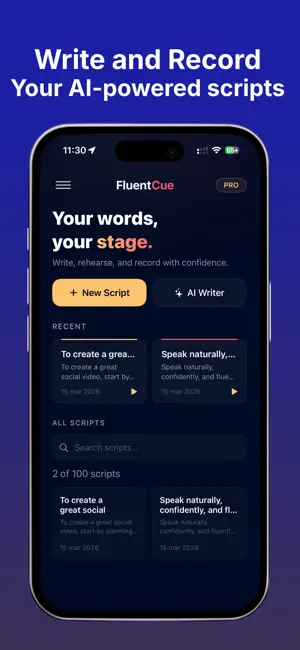
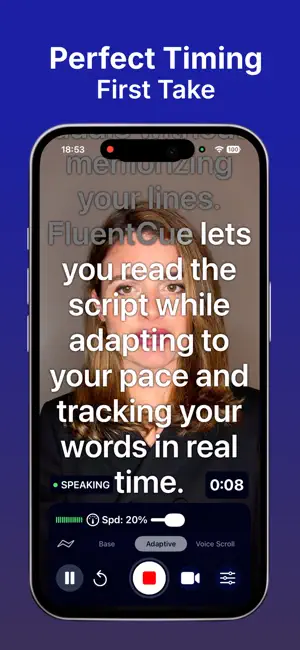
FluentCue is the professional teleprompter for those who demand precision. Content creators, speakers, journalists — FluentCue puts your script right where you need it: in front of the lens. FOUR INTELLIGENT SCROLL MODES Not every delivery is the same. FluentCue gives you full control over how your script moves: • Manual Scroll — Set your speed, hit record, and read at a steady pace. Simple and reliable. • Voice-Adaptive — The scroll speed responds to your voice in real time. Speak faster, it speeds up. Pause, and it waits. Choose from Soft, Balanced, or Aggressive profiles, or fine-tune to your exact style. • Word Tracking — Speech recognition follows your voice line by line, highlighting where you are and scrolling automatically. Perfect when you need to improvise or skip ahead. • Word-by-Word — The most precise mode. Every word is tracked individually as you speak. The cursor moves only when you do. Ideal for practice and exact delivery. BUILT-IN VIDEO RECORDER No need to switch between apps. FluentCue records Full HD portrait video with the front camera while you read. See yourself behind the text with the live camera preview — so you always maintain eye contact with your audience. Pause and resume without losing continuity. Set a countdown timer. Use a target time to let the app pace your script automatically. CUSTOMIZABLE PROMPTER Make the prompter yours: • Adjust font size, text width, line spacing, and alignment — or pinch to zoom text on the fly • Choose white or black text for any background • Apply semi-transparent overlays for readability • Drag the reading line to your preferred position • Toggle the safe zone grid for framing • Monitor your voice with the real-time audio wave indicator SCRIPT EDITOR WITH AUTO-SAVE Write directly in the app or paste your text. FluentCue auto-saves as you type, counts words and characters, and estimates your reading time. Manage your scripts in a searchable library. MULTI-LANGUAGE SUPPORT Interface and speech recognition available in English, Spanish, and Italian. Set the recognition language independently from the UI. AUDIO TELEPROMPTER MODE Not every session needs video. With Audio Teleprompter mode, you can read your script and record audio only — no camera, no distractions. Perfect for podcasts, voiceovers, narration, and audio practice sessions. AI SCRIPT WRITER Let AI write your scripts. Describe your topic and FluentCue generates a complete script tailored to your profile — role, audience, tone, and language. Rewrite, shorten, extend, or change tone with one tap. Uses Apple Intelligence on supported devices (iPhone 15 Pro+, iPad/Mac with M1+). On other iPhones with 6 GB+ RAM, runs a local AI model on-device — no internet, privacy first. ONLINE RESEARCH FOR SMARTER SCRIPTS Need up-to-date info? Enable Online Research and FluentCue searches the web for relevant data, weaving it into your script. Only topic and language are sent — no personal data. Toggle it anytime. SMART MICROPHONE MANAGEMENT FluentCue automatically detects and prioritizes the best microphone available — wired, Bluetooth, or built-in — and seamlessly switches when your audio setup changes. REMOTE CONTROL Pair a Bluetooth remote or use the Apple Watch companion app to start, pause, and stop recording without touching your iPhone. Perfect when your device is on a tripod or across the room. FREE & PRO Start free with access to all features. Upgrade to FluentCue Pro for unlimited recording duration, no watermark, maximum export quality, and unlimited saves. Available as monthly, quarterly, or yearly subscription. Family Sharing supported. FluentCue. Your script. Your pace. Your best take. Terms of Use (EULA): https://www.apple.com/legal/internet-services/itunes/dev/stdeula/
Ratings & reviews
3.8
6 ratings
What’s new
Version 1.7 · Updated May 19, 2026
What’s New What’s new in FluentCue 1.7: • Import Scripts — Import text files directly from your iPhone or iCloud into your script library. • Enhanced Video Protection — Strengthened save safeguards to prevent video loss during recording sessions. • Minor improvements and bug fixes.
App privacy
The developer, SANDRO PAGLIALUNGA, reported these privacy practices to Apple.
Data Not Collected
The developer does not collect any data from this app.
Alternatives to FluentCue Teleprompter
Looking for apps like FluentCue Teleprompter? Here are 6 similar apps on the App Store. The highest rated is Teleprompter Automatic (4.7/5), and all 6 are free to download.
-
 Teleprompter: Floating Script
3.8
-
 PromptSmart+
4.5
-
 CueCam: AI Video Teleprompter
4.5
-
 Teleprompter TikCue
3.5
-
 Telepromter for Video
4.4
-
 Teleprompter Automatic
4.7
| App | Rating | Price | Last updated | Compare |
|---|---|---|---|---|
| FluentCue Teleprompter | 3.8 / 5 (6 ratings) | Free | May 19, 2026 | |
| Teleprompter: Floating Script | 3.8 / 5 (9) | Free | Oct 23, 2026 | Compare |
| PromptSmart+ | 4.5 / 5 (579) | Free | Oct 30, 2026 | Compare |
| CueCam: AI Video Teleprompter | 4.5 / 5 (40) | Free | Oct 31, 2026 | Compare |
| Teleprompter TikCue | 3.5 / 5 (24) | Free | Nov 8, 2026 | Compare |
| Telepromter for Video | 4.4 / 5 (138) | Free | Jul 22, 2026 | Compare |
| Teleprompter Automatic | 4.7 / 5 (288) | Free | Nov 8, 2026 | Compare |