

Futures Journal
Tyler Easson Finance iPhoneiPadiPod touch
Futures Journal is a free Finance app for iPhone and iPad by Tyler Easson. Rated 3.7/5 from 3 ratings. Requires iOS 17.6. Updated March 22, 2026.
- Rating
- 3.7
- 3 ratings
- Price
- Free
- on the App Store
- Size
- 8 MB
- Age 4+
- Updated
- Mar 22
- 2026 · v1.0.4
Screenshots


About Futures Journal
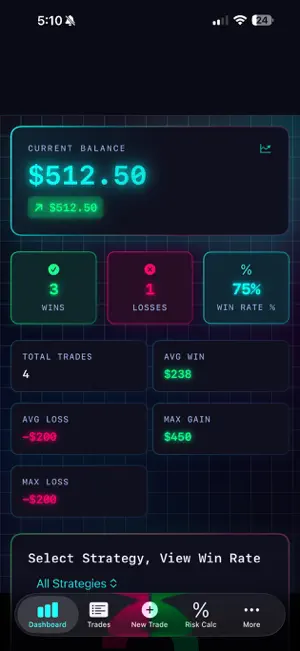
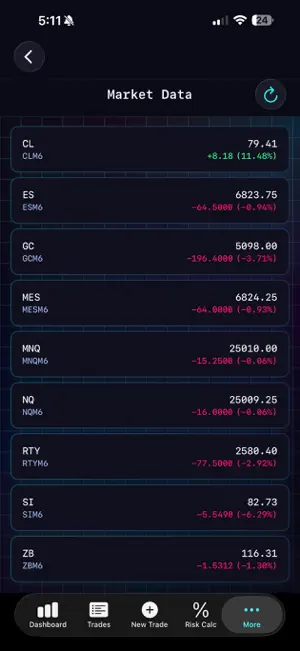
Futures Journal — The trading journal built for futures traders. Stop tracking trades in spreadsheets. Futures Journal helps you log trades, analyze performance, and manage risk in one powerful iPhone app designed specifically for futures markets. Whether you trade ES, NQ, CL, GC, or micro futures, Futures Journal gives you the tools to review your performance and improve your edge. Track Every Trade Log trades in seconds with a clean, streamlined interface. Record entry and exit prices, symbol, strategy, stop loss, risk-to-reward ratio, and notes so every trade is documented. Keep a complete searchable trade history and quickly edit or delete entries when needed. Performance Dashboard See how your trading is performing at a glance. Track: • Current account balance • Total profit & loss • Win rate • Win / loss counts • Average win and average loss • Maximum gain and loss A cumulative P&L chart helps you visualize your performance over time so you can identify trends and refine your strategy. Auto-Close Trade Tracking Automatically close journal entries when the delayed market price reaches your stop loss or profit target. This helps keep your journal accurate without manually updating trades. Important: Futures Journal is a journal only. It does not connect to your broker or place trades. Built-In Risk Calculator Size positions instantly using your maximum risk per trade and ATR. The calculator uses symbol-specific tick size and tick value so contract sizing and risk calculations remain accurate for each futures market. Futures Market Data View delayed futures quotes and charts directly inside the app. Refresh prices on demand and analyze the market without leaving your journal. Pre-Loaded Futures Symbols Futures Journal includes tick size and tick value data for major contracts including: ES, NQ, RTY, MES, MNQ, CL, GC, SI, MCL, MGC, and ZB You can also add custom symbols and strategies in the setup screen. Easy Setup Enter your starting account balance and begin logging trades immediately. The app structure mirrors traditional spreadsheet journals, making it easy to migrate from Excel. You can also load sample data to explore the app before adding your own trades. Built for Serious Traders Futures Journal is built natively with SwiftUI and SwiftData for speed, reliability, and a clean dark-mode interface. Your trading data stays stored on your device, giving you a focused journaling experience without unnecessary complexity. Terms of Use (EULA): https://www.apple.com/legal/internet-services/itunes/dev/stdeula/
What’s new
Version 1.0.4 · Updated March 22, 2026
More markets — Added forex futures (Euro, Yen, Pound, Aussie, Loonie, Swiss, NZ, Peso, plus micros) and more commodities (Natural Gas, Copper, Corn, Wheat, Soybeans). Full symbol set — Journal, risk calculator, and market data now support the expanded list so you get “all the options” in one place. Enhanced in-app purchase experience Performance improvements and minor fixes
App privacy
The developer, Tyler Easson, reported these privacy practices to Apple.
Data Not Collected
The developer does not collect any data from this app.
Alternatives to Futures Journal
Looking for apps like Futures Journal? Here are 6 similar apps on the App Store. The highest rated is UltraTrader - Trading Journal (4.7/5), and all 6 are free to download.
-
 UltraTrader - Trading Journal
4.7
UltraTrader - Trading Journal
4.7
-
 TradesViz Trading Journal
3.2
TradesViz Trading Journal
3.2
-
 SuperTrader: Trading Journal
4.7
SuperTrader: Trading Journal
4.7
-
 tradesea
3.8
tradesea
3.8
-
 Lucid Trading App
4.5
Lucid Trading App
4.5
-
 NinjaTrader | Futures Trading
4.0
NinjaTrader | Futures Trading
4.0
| App | Rating | Price | Last updated | Compare |
|---|---|---|---|---|
| Futures Journal | 3.7 / 5 (3 ratings) | Free | March 22, 2026 | |
| UltraTrader - Trading Journal | 4.7 / 5 (61) | Free | Oct 21, 2026 | Compare |
| TradesViz Trading Journal | 3.2 / 5 (5) | Free | Oct 24, 2026 | Compare |
| SuperTrader: Trading Journal | 4.7 / 5 (1,205) | Free | Oct 22, 2026 | Compare |
| tradesea | 3.8 / 5 (206) | Free | Oct 21, 2026 | Compare |
| Lucid Trading App | 4.5 / 5 (128) | Free | Oct 10, 2026 | Compare |
| NinjaTrader | Futures Trading | 4.0 / 5 (980) | Free | Oct 19, 2026 | Compare |
Compare Futures Journal with the top alternatives: ratings, updates, ASO score and keyword gaps →