

Pike: Next Exit Guide
Thomas Johnell Navigation iPhoneiPadiPod touch
Pike: Next Exit Guide is a free Navigation app for iPhone and iPad by Thomas Johnell. Rated 5.0/5 from 5 ratings. Requires iOS 18.0. Updated April 2, 2026.
- Rating
- 5.0
- 5 ratings
- Price
- Free
- on the App Store
- Size
- 49 MB
- Age 4+
- Updated
- Apr 2
- 2026 · v1.2.0
Screenshots


About Pike: Next Exit Guide
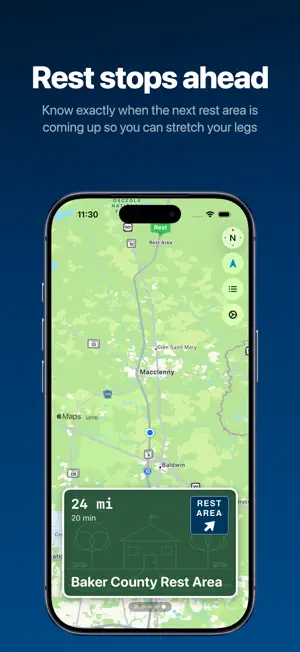
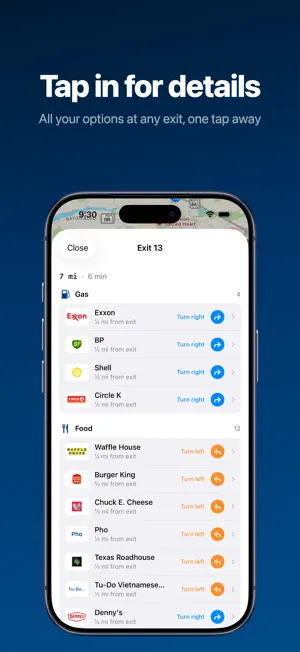
Pike is a highway copilot. Open it on the road and it shows you what's coming down the pike - every upcoming exit's gas stations, restaurants, hotels, EV chargers, rest areas, parks, and dog parks, complete with real brand logos. Pike figures out which highway you're on and which direction you're headed, then lines up every exit ahead of you like the blue logo signs on the interstate. Swipe through exits, tap a brand to get details and directions. WHAT YOU GET - Every exit at a glance: Gas, food, lodging, EV charging, rest stops, parks, and dog parks, all with brand logos you'll recognize - Turn direction: Know if it's a left or right off the exit before you commit - Detour estimates: See how far each stop is from the exit and how long the round trip takes - List view: Compare every option across all upcoming exits in one scrollable list - One-tap navigation: Open any stop in Apple Maps or Google Maps NO SETUP REQUIRED Pike works the moment you open it. No pins to drop, no addresses to type, no "add a stop" buried in a nav app. Your co-pilot just opens Pike and starts reading off options. Not on the road right now? Take a test drive from the home screen to see Pike in action. BUILT FOR THE PASSENGER SEAT Pike isn't a turn-by-turn nav app. It's the app your co-pilot opens when someone says "I'm hungry" or "we need gas" or "the dog needs a break" and you want a real answer in two seconds, not a detour through Google Maps search results. Pike covers interstate highways across the continental US.
Ratings & reviews
5.0
5 ratings
What’s new
Version 1.2.0 · Updated April 2, 2026
Time to stretch your legs! Pike 1.2 now shows parks and dog parks near highway exits. - New Parks and Dog Parks categories - find green space just off the interstate - Your four-legged co-pilot gets their own category (and filter toggle) - Both categories are off by default - enable them in Settings or the filter bar when you're ready to explore
App privacy
The developer, Thomas Johnell, reported these privacy practices to Apple.
Data Not Linked to You
The following data, which may be collected but is not linked to your identity, may be used for the following purposes:
- Diagnostics: Crash Data
Used for: Other Purposes
Alternatives to Pike: Next Exit Guide
Looking for apps like Pike: Next Exit Guide? Here are 6 similar apps on the App Store. The highest rated is Exit Explorer (5.0/5), and all 6 are free to download.
-
 Exit Explorer
5.0
Exit Explorer
5.0
-
 RoadSnap by the Next EXIT
4.7
RoadSnap by the Next EXIT
4.7
-
 NEXIT
4.5
NEXIT
4.5
-
 Where To? POI Search Around Me
4.7
Where To? POI Search Around Me
4.7
-
 iExit Interstate Exit Guide
4.8
iExit Interstate Exit Guide
4.8
-
 USA Rest Stops
3.3
USA Rest Stops
3.3
| App | Rating | Price | Last updated | Compare |
|---|---|---|---|---|
| Pike: Next Exit Guide | 5.0 / 5 (5 ratings) | Free | April 2, 2026 | |
| Exit Explorer | 5.0 / 5 (3) | Free | Oct 7, 2026 | Compare |
| RoadSnap by the Next EXIT | 4.7 / 5 (9) | Free | Jul 19, 2026 | Compare |
| NEXIT | 4.5 / 5 (187) | Free | May 2, 2026 | Compare |
| Where To? POI Search Around Me | 4.7 / 5 (304) | Free | Sep 25, 2026 | Compare |
| iExit Interstate Exit Guide | 4.8 / 5 (37,614) | Free | Oct 20, 2026 | Compare |
| USA Rest Stops | 3.3 / 5 (257) | Free | Sep 21, 2026 | Compare |