

Budget Planner: Expenses
Mustafa BILGIC Productivity iPhoneiPadiPod touch
Budget Planner: Expenses is a free Productivity app for iPhone and iPad by Mustafa BILGIC. Requires iOS 15.0. Updated October 24, 2026.
- Price
- Free
- on the App Store
- Size
- 23 MB
- Age 4+
- Updated
- Oct 24
- 2026 · v1.0.13
Screenshots



About Budget Planner: Expenses
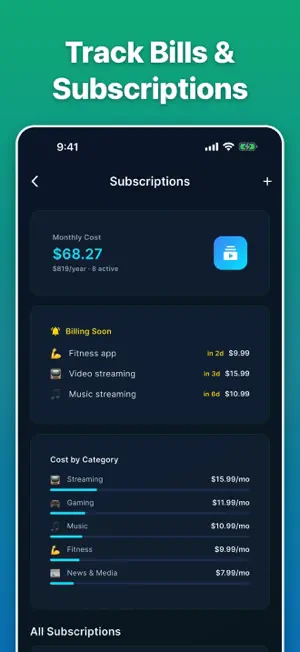
Log what you spend. See where it goes. Stay on budget. Budget Planner is a private, offline expense tracker: you enter your own spending, and the app keeps it organized, categorized, and easy to review. No bank login. No signup. Your entries stay on this device — only your messages to the assistant and a short summary of your own totals are sent, once you agree, to an AI service (Google Gemini, or our backup provider Agnes AI) to be answered. TRACK YOUR SPENDING - Log an expense in seconds and tag it to your own category - Add notes so you remember what a charge actually was - Browse a clean history by day, week, or month - Choose your display currency from 32 options STAY ON BUDGET - Set a monthly limit for each category - Get a gentle heads-up at 80% and 100% of a limit - Watch your remaining balance for the month at a glance - Optional daily reminder and weekly summary BILLS AND SUBSCRIPTIONS - Keep every recurring bill, subscription, and paycheck in one list - See your total monthly subscription cost in one number - Spot which subscriptions are billing soon SAVINGS GOALS AND JARS - Create goals for a trip, a laptop, a rainy-day cushion - Track progress visually and celebrate the milestones - Split money into purpose-based jars, the classic envelope method - Log round-ups on your purchases to nudge small amounts into a goal - Take on optional savings challenges when you want a push THE BIGGER PICTURE - Debt planner with an estimated payoff date; snowball or avalanche strategy with Premium - Net worth view: what you own against what you owe (trend chart: Premium) - Weekly and monthly charts with a category-by-category breakdown - Daily check-in and a streak, for people who like keeping the chain going YOUR DATA, YOUR DEVICE - Everything you enter is stored locally, and tracking works fully offline - Back up to your own iCloud when you want a copy (Premium) - Export everything to CSV for a spreadsheet (Premium) - No account, no sign-up, no bank connection ON YOUR HOME SCREEN - An iOS widget puts your goal progress in front of you without opening the app - Light and dark themes ASK ABOUT YOUR OWN NUMBERS - A built-in assistant answers questions about the spending you have logged and explains general budgeting ideas in plain language. With your permission, your question, recent chat messages and a short summary of your own totals are sent to Google's Gemini service — or, if it is unavailable, to our backup provider, Agnes AI — to be answered. Once a month it can also write a short summary of your budget from a questionnaire (Deep Assessment); your answers are sent the same way. It is a writing and explanation helper, not an advisor. Budget Planner does not provide financial, investment, tax, or legal advice, and it does not connect to any bank or move any money. It is a personal organization and productivity tool for keeping track of your own spending. Questions or feedback? https://cinderspire.github.io/support/budget-planner.html — BUDGET PLANNER PREMIUM (optional) — • Weekly: $0.99/week • Monthly: $4.99/month, after a 7-day free trial • Annual: $29.99/year, after a 7-day free trial • Lifetime: $59.99 one-time purchase (not a subscription) Premium unlocks: up to 100 assistant chats a day instead of 5, the debt payoff strategy and net worth trends, unlimited savings goals and jars (free plan: 3 goals and 2 jars), unlimited budget categories and recurring entries (free plan: 6 categories and 5 recurring entries), CSV export of your own data, and iCloud backup and restore. Prices in USD; your local price is shown at checkout. Subscriptions renew automatically (a free trial turns into a paid subscription when it ends) unless cancelled at least 24 hours before the end of the current period. Manage or cancel anytime in your App Store account settings. Privacy Policy: https://cinderspire.github.io/support/privacy-budget-planner.html Terms of Use (EULA): https://www.apple.com/legal/internet-services/itunes/dev/stdeula/
What’s new
Version 1.0.13 · Updated October 24, 2026
Small housekeeping update. Your budgets, goals and settings stay exactly as they are.
App privacy
The developer, Mustafa BILGIC, reported these privacy practices to Apple.
Data Linked to You
The following data, which may be collected and linked to your identity, may be used for the following purposes:
- Financial Info: Other Financial Info
- Identifiers: User ID
Used for: App Functionality
Data Not Linked to You
The following data, which may be collected but is not linked to your identity, may be used for the following purposes:
- Identifiers: Device ID
- Usage Data: Product Interaction
- Diagnostics: Crash Data, Performance Data
Used for: Analytics, App Functionality
Alternatives to Budget Planner: Expenses
Looking for apps like Budget Planner: Expenses? Here are 6 similar apps on the App Store. The highest rated is Income Ultra (5.0/5), and all 6 are free to download.
-
 X-Sheets
-
 Income Ultra
5.0
-
 Meadova: Planner & Journal
-
 Calendar Pro - Daily Planner
5.0
-
 One Click Translate
-
 DemacLenko toolBOX
| App | Rating | Price | Last updated | Compare |
|---|---|---|---|---|
| Budget Planner: Expenses | – | Free | October 24, 2026 | |
| X-Sheets | – | Free | Aug 27, 2026 | Compare |
| Income Ultra | 5.0 / 5 (6) | Free | Mar 16, 2026 | Compare |
| Meadova: Planner & Journal | – | Free | Jul 16, 2026 | Compare |
| Calendar Pro - Daily Planner | 5.0 / 5 (2) | Free | Oct 24, 2026 | Compare |
| One Click Translate | – | Free | Dec 20, 2025 | Compare |
| DemacLenko toolBOX | – | Free | Oct 17, 2026 | Compare |