

Business Card Scanner OCR
Caetano Spuldaro Neto Business iPhoneiPadiPod touch
Business Card Scanner OCR is a free Business app for iPhone and iPad by Caetano Spuldaro Neto. Requires iOS 18.0. Updated October 31, 2026.
- Price
- Free
- on the App Store
- Size
- 346 MB
- Age 4+
- Updated
- Oct 31
- 2026 · v2.0
Screenshots



About Business Card Scanner OCR
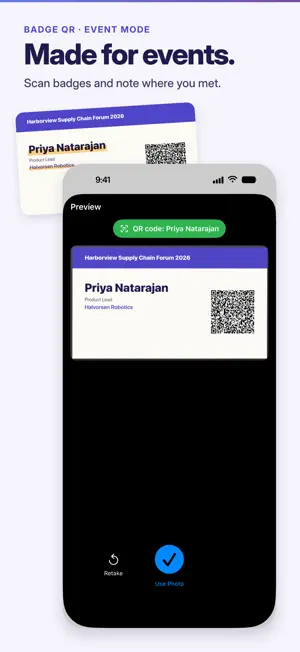
Business Card Scanner OCR turns business cards into contacts in seconds. The app reads cards on your iPhone or iPad with on-device OCR in 56 languages, so it works offline. SCAN & EXTRACT - Scan with the camera or import a photo - On-device AI finds names, job titles, companies, phone numbers, emails, websites and addresses - 56 OCR languages, including English, Spanish, Portuguese, Japanese, Chinese, Arabic and Hindi - Scan the back in review, right after the front, even when it is in another language. Both sides go into one contact - Scan the QR code on event badges - Review and edit every field before saving - Batch scan: up to 20 cards per session with Premium, up to 50 with Pro FOLLOW UP - Premium: set a follow-up reminder for Tomorrow, In 2 days or In 1 week at 09:00 local time, or choose a date and time - Premium: get a message ready to send by email, WhatsApp, SMS or Telegram. You edit it and send it yourself - Premium: record a voice note of up to 2 minutes. The app transcribes it on your iPhone and saves it with the card - Pro: Event mode fills in "Where we met" on every card you scan at a trade show or event ORGANIZE & FIND - Tags, favorites and 12 built-in categories, such as Business, Personal, Lead and Client - Search by name, company, job title or any text on the card - Filter by tags, categories, favorites and date - Spot a card you already scanned and merge the duplicates into one card in the app. A merged card keeps one voice note YOUR DIGITAL CARD - Create your own digital business card and save it to iPhone Contacts on any plan - Add it to Apple Wallet and share it by QR from Wallet or a widget - Share it with a QR code, AirDrop, Messages or Mail EXPORT & SYNC - Export one card as vCard, JSON, CSV or Markdown - Export several cards as CSV or as CSV for Excel - Premium: save cards to iPhone Contacts, export CSV files for HubSpot, Salesforce, Pipedrive and Google Contacts, and use iPhone Shortcuts - Pro: iCloud sync across your devices, plus backup and restore with a file PRIVACY FIRST - Scanning and reading happen on your device. The app does not send scanned cards or their images to our servers - For Apple Wallet, your own card's details go to our pass service only to sign the pass. The service keeps nothing - With Pro, your cards and voice notes, audio included, sync through your own private iCloud account. Backup files include the audio too - Usage analytics only, never your cards PLANS Free: up to 10 scans per month, digital card with Apple Wallet, single-card export, export all or selected cards to CSV, search, tags and filters. Premium, US$3.99/month or US$29.99/year: unlimited scans, batch scan up to 20 cards, save to iPhone Contacts, follow-up reminders and messages, voice notes transcribed on your iPhone, CRM exports and iPhone Shortcuts. Pro, US$8.99/month or US$69.99/year: everything in Premium, batch scan up to 50 cards, iCloud sync, backup and restore, Event mode, priority support with a reply within 24 hours. Both annual plans include a 7-day free trial for eligible new subscribers. Prices are in US dollars; local prices may vary and are shown before purchase. Payment is charged to your Apple ID account at confirmation of purchase. Subscriptions renew automatically unless cancelled at least 24 hours before the end of the current period. Manage or cancel them in your Apple ID account settings. Terms of Use: https://myquickcardscanner.com/terms.html Privacy Policy: https://myquickcardscanner.com/privacy.html Support: https://myquickcardscanner.com/support.html
What’s new
Version 2.0 · Updated October 31, 2026
Version 2.0 - Scan the back of a card in review, right after the front. Both sides go into one contact. - Follow-up reminders for Tomorrow, In 2 days or In 1 week at 09:00 local time, or a date and time you choose, with a message ready to send. Premium. - Voice notes of up to 2 minutes, transcribed on your iPhone. Premium. - Event mode fills in "Where we met" on every card you scan at an event. Pro. - Add your own card to Apple Wallet and share it by QR. - Spot a card you already scanned and merge the two in the app. A merged card keeps one voice note. - CRM exports and iPhone Shortcuts. Premium.
App privacy
The developer, Caetano Spuldaro Neto, reported these privacy practices to Apple.
Data Not Linked to You
The following data, which may be collected but is not linked to your identity, may be used for the following purposes:
- Usage Data: Product Interaction
Used for: Analytics, App Functionality
Alternatives to Business Card Scanner OCR
Looking for apps like Business Card Scanner OCR? Here are 6 similar apps on the App Store. The highest rated is CardKeep AI (5.0/5), and all 6 are free to download.
-
 CardKeep AI
5.0
-
 HayScan
-
 Arc Business Card Scanner
-
 Farvision Construction Hub
-
 Zyncify: Business Card Scanner
-
 Admin Smart Society
| App | Rating | Price | Last updated | Compare |
|---|---|---|---|---|
| Business Card Scanner OCR | – | Free | October 31, 2026 | |
| CardKeep AI | 5.0 / 5 (1) | Free | May 27, 2026 | Compare |
| HayScan | – | Free | Sep 22, 2026 | Compare |
| Arc Business Card Scanner | – | Free | Oct 10, 2026 | Compare |
| Farvision Construction Hub | – | Free | Sep 23, 2026 | Compare |
| Zyncify: Business Card Scanner | – | Free | Oct 12, 2026 | Compare |
| Admin Smart Society | – | Free | Sep 24, 2026 | Compare |