

Untap: Screen Time App Blocker
Vishal Pawar Productivity iPhoneiPadiPod touch
Untap: Screen Time App Blocker is a free Productivity app for iPhone and iPad by Vishal Pawar. Rated 4.6/5 from 8 ratings. Requires iOS 17.0.
- Rating
- 4.6
- 8 ratings
- Price
- Free
- on the App Store
- Size
- 59 MB
- Age 4+
- Updated
- Oct 25
- 2026 · v1.7.2
Screenshots
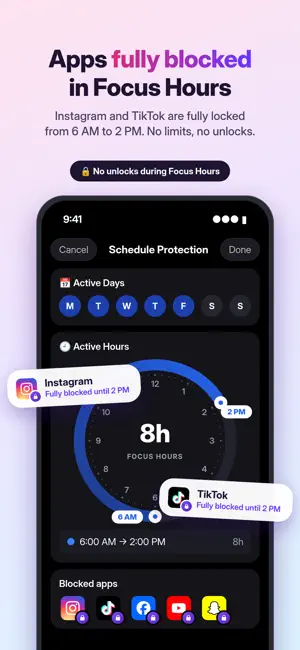

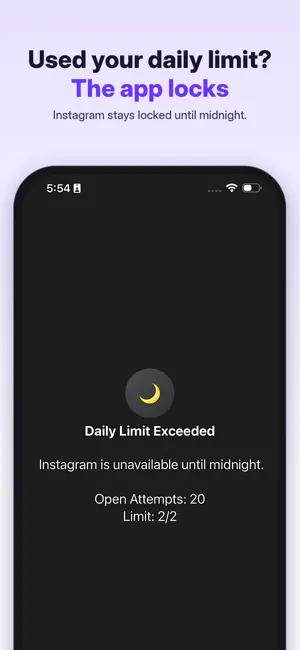

About Untap: Screen Time App Blocker
Make space for studying, work and life beyond your phone. Untap helps you limit screen time, block distracting apps and choose more deliberately when to open social media. PROTECT YOUR FOCUS HOURS Choose the days and times you want to keep for studying, work or reading. Restrict selected apps during those hours. Use the available strict settings when you want a firmer boundary, and review your rules before starting. LIMIT THE REST OF YOUR DAY Set how many times you can open an app each day and how long each session can last. Lock settings to make impulsive changes harder. Combine focus hours with daily opening limits and session caps. QUIZ YOURSELF BEFORE YOU SCROLL Turn an unlock into a study check. Upload a PDF or photos of your notes, or enter a topic, to create quiz questions. Answer a question correctly before opening the selected app. Use the pause to review what you are learning rather than jump straight into a feed. READ A PAGE OR TAKE A PAUSE Choose an available reading passage before opening an app, then decide whether to continue reading or unlock. Or add a short waiting period to interrupt automatic app checking. UNDERSTAND YOUR SCREEN TIME See your daily screen time, most-used apps and protection streak. Review your habits and adjust your limits as your routine changes. FOR STUDY AND EVERYDAY FOCUS Protect revision time, keep social media breaks within a limit and make room for projects, books and offline plans. Untap provides controls for the boundaries you choose; results depend on your settings and use. GET STARTED Select the apps you want to control, authorize the required Screen Time access and set your schedule and limits. Some features require a paid plan; review the options and prices shown in the app. PRIVACY AND QUIZ GENERATION Untap uses Apple’s Screen Time API. App blocking runs on your device. If you upload study files for quizzes, those files are sent to Google’s Gemini AI to generate quiz questions. Quiz generation is separate from on-device app blocking. Privacy Policy: https://www.getuntap.com/privacy Terms: https://www.getuntap.com/terms
Ratings & reviews
4.6
8 ratings
What’s new
Version 1.7.2 · Updated October 25, 2026
Added settings lock, morning routines, mood intervention, answer timer and shield translations.
App privacy
The developer, Vishal Pawar, reported these privacy practices to Apple.
Data Used to Track You
The following data may be used to track you across apps and websites owned by other companies:
- Identifiers: Device ID
- Usage Data: Product Interaction
Data Not Linked to You
The following data, which may be collected but is not linked to your identity, may be used for the following purposes:
- Identifiers: Device ID
- Usage Data: Product Interaction
- Diagnostics: Crash Data
Used for: Developer’s Advertising or Marketing, Analytics
Alternatives to Untap: Screen Time App Blocker
Looking for apps like Untap: Screen Time App Blocker? Here are 6 similar apps on the App Store. The highest rated is Photo Gallery - Photo Recovery (5.0/5), and all 6 are free to download.
-
 LockedIn: Earn Screen Time
4.6
LockedIn: Earn Screen Time
4.6
-
 Waddles: Unrot Your Brain
4.7
Waddles: Unrot Your Brain
4.7
-
 Blocus: Earn Screen Time
4.5
Blocus: Earn Screen Time
4.5
-
 Unglue: Screen Time Friend
4.7
Unglue: Screen Time Friend
4.7
-
 Photo Gallery - Photo Recovery
5.0
Photo Gallery - Photo Recovery
5.0
-
 Handy Clean
4.2
Handy Clean
4.2
| App | Rating | Price | Last updated | Compare |
|---|---|---|---|---|
| Untap: Screen Time App Blocker | 4.6 / 5 (8 ratings) | Free | October 25, 2026 | |
| LockedIn: Earn Screen Time | 4.6 / 5 (130) | Free | May 20, 2026 | Compare |
| Waddles: Unrot Your Brain | 4.7 / 5 (73) | Free | Feb 4, 2026 | Compare |
| Blocus: Earn Screen Time | 4.5 / 5 (226) | Free | Sep 10, 2026 | Compare |
| Unglue: Screen Time Friend | 4.7 / 5 (2,678) | Free | Oct 27, 2026 | Compare |
| Photo Gallery - Photo Recovery | 5.0 / 5 (2) | Free | Oct 16, 2026 | Compare |
| Handy Clean | 4.2 / 5 (5) | Free | Feb 12, 2026 | Compare |