

GifMaker - Video to GIF Editor
Penghui Zhao Photo & Video iPhoneiPadiPod touch
GifMaker - Video to GIF Editor is a free Photo & Video app for iPhone and iPad by Penghui Zhao. Requires iOS 15.0. Updated August 22, 2026.
- Price
- Free
- on the App Store
- Size
- 2 MB
- Age 4+
- Updated
- Aug 22
- 2026 · v1.2
Screenshots

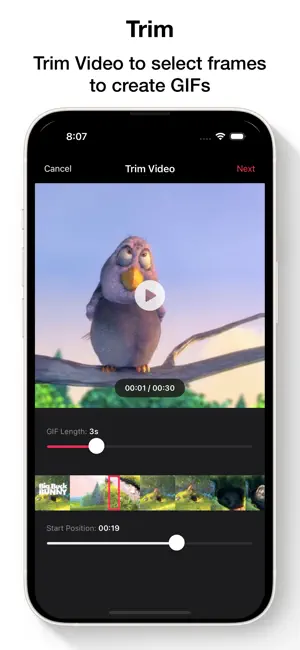
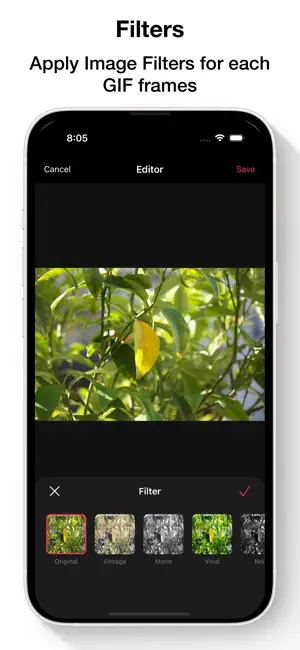
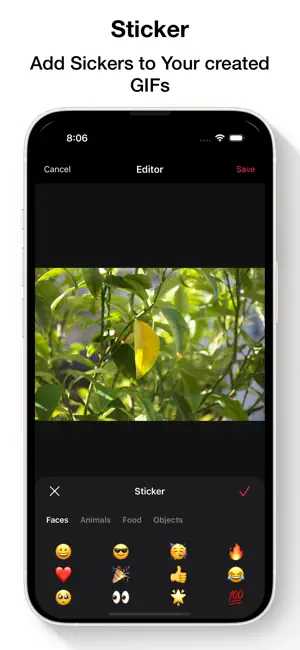
About GifMaker - Video to GIF Editor
Create, edit, and share stunning GIFs — no watermarks, no signup, 100% private. GIF Maker is the #1 all-in-one GIF editor for iPhone and iPad. Turn any video, photo, or Live Photo into a perfect animated GIF in seconds. Millions of users trust GIF Maker to create memes, reaction GIFs, tutorials, and more — all processed locally on your device. KEY FEATURES: Create GIFs from Anything: - Video to GIF: Trim and convert any video clip into a high-quality GIF. - Photo to GIF: Combine multiple photos into a smooth animation or collage. - Live Photo to GIF: Convert Apple Live Photos to GIFs with one tap. - Camera to GIF: Capture moments with the built-in burst camera and convert instantly. Professional GIF Editor: - Frame-by-Frame Editing: Full control over every frame of your animation. - Timeline & Trimming: Trim videos or rearrange frames with drag and drop. - Speed Control: Slow motion (0.5x) to fast forward (2.0x). - Filters & Effects: B&W, Sepia, Vintage, and more beautiful presets. - Color Adjustments: Fine-tune brightness, contrast, and saturation. - Text & Stickers: Custom fonts and a library of fun stickers. Customize Everything: - Boomerang & Loop: Infinite loop, specific counts, or boomerang-style playback. - Resize & Compress: Optimize file size without losing quality. - Background Options: Transparent, black, white, or custom colors. - Content Modes: Scale to Fill, Aspect Fit, Aspect Fill, or Center. - Dark Mode: A sleek interface that's easy on the eyes. - Advanced Engines: Pro users can configure generation pipelines and color quantizers. Save & Share Instantly: - My Projects: Save drafts and re-edit anytime. - History & Favorites: Track and bookmark your best creations. - One-Tap Sharing: Share to iMessage, Instagram, WhatsApp, WeChat, or Camera Roll. - Files App: Import and edit GIFs directly from the Files app. - Auto-Save: Automatically save new GIFs to your photo library. WHY CHOOSE GIF MAKER? - 100% Private: All processing happens on-device. No data leaves your phone. - No Watermarks: Clean, professional GIFs every time. - No Account Required: Start creating immediately. - Modern iOS Design: Built natively with a fluid, intuitive interface. Download GIF Maker now — the best free GIF creator and editor for iOS!
What’s new
Version 1.2 · Updated August 22, 2026
- Bug fixes and performance improvements.
App privacy
The developer, Penghui Zhao, reported these privacy practices to Apple.
Data Not Collected
The developer does not collect any data from this app.
Alternatives to GifMaker - Video to GIF Editor
Looking for apps like GifMaker - Video to GIF Editor? Here are 6 similar apps on the App Store. The highest rated is PicMate Collection Manager (5.0/5), and all 6 are free to download.
-
 Montaj - Video Editor
3.0
Montaj - Video Editor
3.0
-
 PicMate Collection Manager
5.0
PicMate Collection Manager
5.0
-
 Photo Collage Maker - Sehory
5.0
Photo Collage Maker - Sehory
5.0
-
 Redact — Censor & Blur Photos
3.0
Redact — Censor & Blur Photos
3.0
-
 Video 2 GIF - Simple & Fast
5.0
Video 2 GIF - Simple & Fast
5.0
-
 Flashback: Sports Replay Cam
5.0
Flashback: Sports Replay Cam
5.0
| App | Rating | Price | Last updated | Compare |
|---|---|---|---|---|
| GifMaker - Video to GIF Editor | – | Free | August 22, 2026 | |
| Montaj - Video Editor | 3.0 / 5 (2) | Free | May 28, 2026 | Compare |
| PicMate Collection Manager | 5.0 / 5 (2) | Free | Jul 26, 2026 | Compare |
| Photo Collage Maker - Sehory | 5.0 / 5 (1) | Free | Aug 12, 2026 | Compare |
| Redact — Censor & Blur Photos | 3.0 / 5 (2) | Free | Sep 29, 2026 | Compare |
| Video 2 GIF - Simple & Fast | 5.0 / 5 (1) | Free | Mar 28, 2026 | Compare |
| Flashback: Sports Replay Cam | 5.0 / 5 (3) | Free | Mar 16, 2026 | Compare |