

inZono: App Lock & Blocker
DMM DEV Utilities iPhoneiPadiPod touch
inZono: App Lock & Blocker is a free Utilities app for iPhone and iPad by DMM DEV. Requires iOS 26.0. Updated October 19, 2026.
- Price
- Free
- on the App Store
- Size
- 36 MB
- Age 4+
- Updated
- Oct 19
- 2026 · v4.1
Screenshots

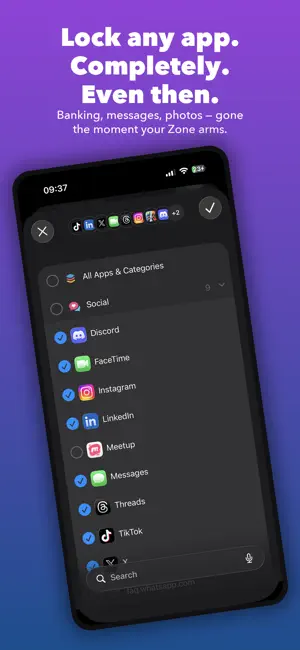


About inZono: App Lock & Blocker
Your phone gets snatched while you're using it, still unlocked. How long before a thief is in your banking app? With most phones: instantly. inZono locks the apps that matter behind Face ID — so even with your phone unlocked in someone else's hands, your banking, wallet, messages, and photos stay sealed. Create a Zone, choose the apps to protect, and arm it. While active, those apps are locked at the OS level — not hidden, not disguised, genuinely unopenable. No fake calculator icon, no gimmick vault. inZono uses Apple's own Screen Time framework — the same system behind parental controls — reviewed and approved by Apple, not a shady lookalike app. LOCKED DOWN, FOR REAL • Lock banking, wallet, messaging, photo, and social apps • Blocked at the OS level — apps can't be opened, not just hidden • Require Face ID to disable a Zone — a thief can't turn it off without your face • Block app deletion while a Zone is active ARMED WHEN YOU NEED IT • Activate instantly with one tap, or set it to arm itself • Schedule Zones for your commute, nights out, or travel • Auto-activate by location — arm the moment you leave home BUILT FOR HOW YOU ACTUALLY MOVE THROUGH YOUR DAY • Create multiple Zones for different risk moments • Choose any app from your device using Apple's Screen Time system • Name and personalize each Zone with icons and schedules inZono uses Apple's Family Controls framework to lock apps at the system level. Apps can't send notifications. They can't be opened. Whoever has your phone hits a wall. Download inZono and lock down what matters. FREE TO START • One Zone with Face ID protection, free forever • Block app deletion while it's active INZONO PRO • Unlimited Zones • Automatic activation by schedule or location • Advanced Lock for maximum discretion • Alerts when a Zone switches on ——— inZono is free to download and use. inZono Pro is optional: • Monthly: $3.99/month • Yearly: $29.99/year • Lifetime: $49.99, one-time purchase Prices may vary by region. Subscriptions renew automatically unless canceled at least 24 hours before the end of the current period. Privacy Policy: https://dmmdev.store/inzono/privacy-policy/ Terms of Use: https://www.apple.com/legal/internet-services/itunes/dev/stdeula/
What’s new
Version 4.1 · Updated October 19, 2026
inZono is now free! • Protect one Zone for free: lock any apps behind Face ID and block app deletion. • inZono Pro unlocks unlimited Zones, automatic activation by schedule or location, Advanced Lock and activation alerts. Choose monthly, yearly or a one-time lifetime purchase. • Already subscribed? Everything keeps working exactly as before.
App privacy
The developer, DMM DEV, reported these privacy practices to Apple.
Data Not Linked to You
The following data, which may be collected but is not linked to your identity, may be used for the following purposes:
- Identifiers: Device ID
- Usage Data: Product Interaction
- Diagnostics: Crash Data
Used for: Analytics, App Functionality
Alternatives to inZono: App Lock & Blocker
Looking for apps like inZono: App Lock & Blocker? Here are 6 similar apps on the App Store.
-
 Nbox _ 软件应用加密-隐私保护App加密-计算器应用锁
-
 App Lock: Secret photo Vault
-
 AppLock - FocusLock
-
 情侣吵架不分手-倒数复合记事本
-
 Focus Guard +
-
 摄像头扫描-隐藏摄像头探测器
| App | Rating | Price | Last updated | Compare |
|---|---|---|---|---|
| inZono: App Lock & Blocker | – | Free | October 19, 2026 | |
| Nbox _ 软件应用加密-隐私保护App加密-计算器应用锁 | – | Free | Sep 30, 2026 | Compare |
| App Lock: Secret photo Vault | – | Free | Sep 28, 2026 | Compare |
| AppLock - FocusLock | – | Free | May 31, 2026 | Compare |
| 情侣吵架不分手-倒数复合记事本 | – | Free | Aug 29, 2026 | Compare |
| Focus Guard + | – | Free | May 13, 2026 | Compare |
| 摄像头扫描-隐藏摄像头探测器 | – | Free | Jun 19, 2026 | Compare |