

Austin Traffic Cams
YOURFULLSTACK, LLC Navigation iPhoneiPadiPod touch
Austin Traffic Cams is a paid Navigation app for iPhone and iPad by YOURFULLSTACK, LLC. Requires iOS 26.5. Updated October 18, 2026.
- Price
- 3.99 USD
- on the App Store
- Size
- 10 MB
- Age 4+
- Updated
- Oct 18
- 2026 · v2.5.7
Screenshots


About Austin Traffic Cams
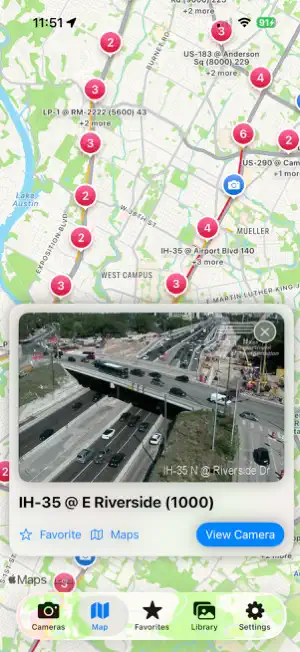
Austin Traffic Cams gives you quick access to publicly available traffic camera images across the Austin area. Check current road conditions, explore nearby cameras, and plan your route with a clear view of what traffic looks like before you leave. Browse Austin-area cameras in a compact list or adaptive grid, search by highway or camera location, and save your favorite cameras for fast access. Use the map to explore camera locations, view camera images, see distance information, and open a location directly in Apple Maps. Camera images are requested directly from the Texas Department of Transportation from your device. The app does not use a third-party camera proxy or require an account. Camera locations are loaded from the Austin catalog, while images are decoded and displayed locally on your iPhone or iPad. Features include: • Austin traffic camera images • List, grid, and map views • Search by highway or camera location • Favorite cameras for quick access • Distance sorting using your device location • Apple Maps integration • Manual image refresh • Save camera images to a private local library • Add notes to saved images • Share camera images and location details • iPhone and iPad layouts • Optional local notification support • No account or sign-in required Location access is optional. If enabled, your location is used on your device to sort cameras by distance and position the map. Location data is not sent to our servers. Austin Traffic Cams is not affiliated with, endorsed by, or associated with the Texas Department of Transportation. Traffic camera imagery is publicly available and provided by TxDOT. Camera availability and image freshness depend on the TxDOT traffic camera service.
What’s new
Version 2.5.7 · Updated October 18, 2026
- Direct TxDOT camera catalog loading - Direct TxDOT image requests from the phone - On-device Base64 image decoding - Local camera catalog caching - Austin catalog validation to prevent wrong-city data - Support for cameras temporarily reporting no snapshot - Austin-specific map center and radius - Austin highway route matching - Compact iPhone camera list rows - Two-column iPhone grid layout - Adaptive iPad camera grid - Tablet-scale camera cards and typography - Responsive map camera preview layouts - Large iPad camera-detail presentation - Compact iPhone camera-detail presentation - Saved image Library with iPad grid layout - Saved-image detail view with notes - Main-actor share preparation - iPad-safe sharing sheet - Austin-specific storage and favorites namespaces - Austin branding, app icon, logo, and App Store links - APNs environment handling for Debug and Release - No yourfullstack.com runtime dependency - Austin UI launch test coverage - Corrected Austin camera JSON test data and validation
App privacy
The developer, YOURFULLSTACK, LLC, reported these privacy practices to Apple.
Data Not Collected
The developer does not collect any data from this app.
Alternatives to Austin Traffic Cams
Looking for apps like Austin Traffic Cams? Here are 6 similar apps on the App Store. The highest rated is Float Travis (5.0/5), and 4 of the 6 are free to download.
-
 Float Travis
5.0
-
 Austin Tour: Self-Guided Drive
5.0
-
 How Much In
-
 hello austin
5.0
-
 Live Traffic Ottawa
-
 Traffic Cam+ Pro
2.1
| App | Rating | Price | Last updated | Compare |
|---|---|---|---|---|
| Austin Traffic Cams | – | 3.99 USD | October 18, 2026 | |
| Float Travis | 5.0 / 5 (1) | 2.99 USD | Apr 11, 2026 | Compare |
| Austin Tour: Self-Guided Drive | 5.0 / 5 (1) | Free | Aug 14, 2026 | Compare |
| How Much In | – | Free | May 11, 2026 | Compare |
| hello austin | 5.0 / 5 (1) | Free | Apr 13, 2024 | Compare |
| Live Traffic Ottawa | – | Free | May 12, 2026 | Compare |
| Traffic Cam+ Pro | 2.1 / 5 (36) | 1.99 USD | Oct 6, 2026 | Compare |