

Prompts Studio
Juraj Macak Productivity iPhoneiPadiPod touch
Prompts Studio is a free Productivity app for iPhone and iPad by Juraj Macak. Requires iOS 26.0. Updated September 14, 2026.
- Price
- Free
- on the App Store
- Size
- 11 MB
- Age 4+
- Updated
- Sep 14
- 2026 · v1.1.0
Screenshots



About Prompts Studio
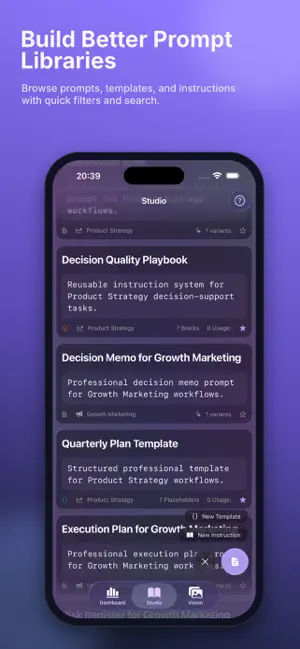
Use AI every day but still lose time rewriting prompts? Prompts gives you a practical system to create, organize, and reuse high-quality prompts. Draft your original idea, save it with optional style variants, and keep everything in a searchable library built for real workflows. Whether you write, design, code, or manage projects, Prompts helps you move from random one-off prompts to repeatable results. What you can do in Prompts: Build in Studio Draft prompts quickly and save them with optional variant generation based on your enabled styles. Keep your best versions ready for reuse. Turn one-offs into systems Create templates with placeholders like {{audience}} and {{goal}}. Add instruction blocks to lock in role, constraints, and output format. Organize and retrieve faster Use categories, favorites, search, and filters across prompts, templates, and instructions so you can find what you need in seconds. Save visual prompt workflows in Vision Store image + prompt pairs, tag them, and refine them over time. Share prompts the way you work Copy to clipboard, system share, generate QR for quick transfer, or compose image + prompt share flows for AI app workflows. Track usage in Dashboard View total prompts, templates, variants, weekly activity, top copied prompts, and category/style distribution to understand what actually works. Sync and transfer your library With Pro unlock, sync via iCloud across iPhone, iPad, and Mac. Export or import prompts, templates, instructions, and gallery items when needed. Personalize your workspace Choose appearance mode, accent templates, and gradient background settings. Pro unlock also enables premium accent themes. Prompts is designed to help you produce better prompts with less friction and more consistency. Download Prompts and build your repeatable AI workflow.
What’s new
Version 1.1.0 · Updated September 14, 2026
Apple Intelligence now reads your images directly. When you build a prompt from an image, the on-device model can look at the picture itself instead of working from a written description of it. Prompts come back closer to what is actually in the frame — subject, composition and mood — rather than colour and contrast alone. Requires iOS 27 on an Apple Intelligence capable device. Everywhere else, prompts are still built from measured image signals exactly as before, so nothing you rely on changes.
App privacy
The developer, Juraj Macak, reported these privacy practices to Apple.
Data Not Collected
The developer does not collect any data from this app.
Alternatives to Prompts Studio
Looking for apps like Prompts Studio? Here are 6 similar apps on the App Store. The highest rated is Prompt Studio AI (5.0/5), and all 6 are free to download.
-
 Prompt Studio AI
5.0
-
 Ai Prompts Pro
-
 BLOKO Tag
-
 GitMe Fast
-
 KlugVault - AI Image Prompts
-
 Donna - Best AI Second Brain
| App | Rating | Price | Last updated | Compare |
|---|---|---|---|---|
| Prompts Studio | – | Free | September 14, 2026 | |
| Prompt Studio AI | 5.0 / 5 (1) | Free | Sep 1, 2026 | Compare |
| Ai Prompts Pro | – | Free | Jul 9, 2026 | Compare |
| BLOKO Tag | – | Free | Sep 7, 2025 | Compare |
| GitMe Fast | – | Free | Oct 22, 2026 | Compare |
| KlugVault - AI Image Prompts | – | Free | Aug 13, 2026 | Compare |
| Donna - Best AI Second Brain | – | Free | Aug 10, 2026 | Compare |
Compare Prompts Studio with the top alternatives: ratings, updates, ASO score and keyword gaps →