

QR Tools - Scan & Create
TUFAN VATANDOST Utilities iPhoneiPadiPod touch
QR Tools - Scan & Create is a free Utilities app for iPhone and iPad by TUFAN VATANDOST. Requires iOS 17.0. Updated February 13, 2026.
- Price
- Free
- on the App Store
- Size
- 6 MB
- Age 4+
- Updated
- Feb 13
- 2026 · v1.0.0
Screenshots

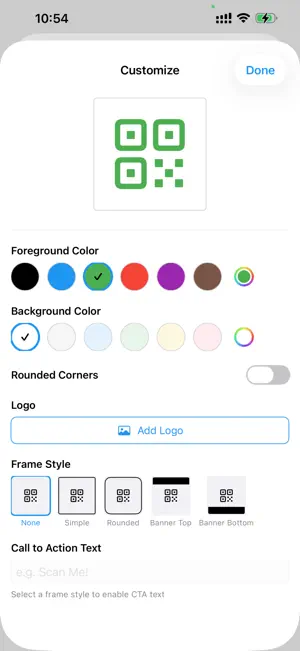


About QR Tools - Scan & Create
The all-in-one QR code scanner and creator you've been looking for. Fast, private, and packed with smart features that save you time. SCAN INSTANTLY • Lightning-fast camera scanning powered by advanced recognition • Scan QR codes from images in your gallery • Batch mode — scan multiple codes in a row without stopping • Supports QR codes, EAN, UPC, Code 128, and more barcode formats SMART SAFETY PROTECTION • Built-in URL safety analyzer warns you about suspicious links • Detects URL shorteners, non-HTTPS links, IP-based URLs, punycode domains, and suspicious TLDs • Custom domain allowlist and blocklist — you control what's trusted • All scanning happens on-device. Your data never leaves your phone. CREATE QR CODES FOR EVERYTHING • URL — Share any website link • Wi-Fi — Select from nearby networks, no manual SSID typing needed • Contact — Pick directly from your phone contacts • Phone Number — Choose a contact or type manually • Location — Search any address, use your GPS, or enter coordinates • Calendar Event — Import events straight from your calendar • Email, SMS, and Plain Text SMART PICKERS — NO MORE MANUAL INPUT • Wi-Fi: Tap "Scan Nearby Networks" to see available WiFi and select one • Contacts: Tap "Pick from Contacts" to auto-fill name, phone, email & organization • Phone: Optionally pick a number from your contacts • Location: Search addresses with built-in geocoding or tap "Use My Location" • Events: Import upcoming events from your device calendar with one tap CUSTOMIZE YOUR QR CODES • Choose foreground and background colors • Rounded corner style for a modern look • Add your logo or brand image to the center • Decorative frames — Simple, Rounded, Banner Top, Banner Bottom • Add call-to-action text like "Scan Me!" EXPORT & SHARE • Export as PNG in 256px, 512px, 1024px, or 2048px • Export as SVG — scalable vector format for print • Export as PDF — A4 page, business card, or sticker sheet presets • Save directly to your gallery • One-tap sharing to any app • Export scan history as CSV or JSON HISTORY & ORGANIZATION • Full scan and creation history with search • Filter by scanned, created, or favorites • Tag your codes for easy organization • Track scan counts and timestamps • Bulk export your history YOUR PRIVACY MATTERS • All data stays on your device • No cloud uploads, no tracking, no accounts required • Camera is used only for scanning — never recorded or shared • Open and transparent about every permission we use
App privacy
The developer, TUFAN VATANDOST, reported these privacy practices to Apple.
Data Not Collected
The developer does not collect any data from this app.
Alternatives to QR Tools - Scan & Create
Looking for apps like QR Tools - Scan & Create? Here are 6 similar apps on the App Store. The highest rated is Maner (2.4/5), and all 6 are free to download.


| App | Rating | Price | Last updated | Compare |
|---|---|---|---|---|
| QR Tools - Scan & Create | – | Free | February 13, 2026 | |
| AEConnect | – | Free | Aug 26, 2026 | Compare |
| QR Scanner: Scanner | – | Free | Aug 26, 2024 | Compare |
| Select Conductor Wire PRO | – | Free | Feb 15, 2024 | Compare |
| Petromoc Card | – | Free | Sep 22, 2026 | Compare |
| i-tecc+ BMS | – | Free | Feb 13, 2025 | Compare |
| Maner | 2.4 / 5 (5) | Free | Oct 15, 2024 | Compare |