

Crankshaft
Crankshaft LLC Music iPhoneiPadiPod touch
Crankshaft is a free Music app for iPhone and iPad by Crankshaft LLC. Rated 5.0/5 from 4 ratings. Requires iOS 17.5. Updated October 20, 2026.
- Rating
- 5.0
- 4 ratings
- Price
- Free
- on the App Store
- Size
- 7 MB
- Age 12+
- Updated
- Oct 20
- 2026 · v1.8
Screenshots


About Crankshaft
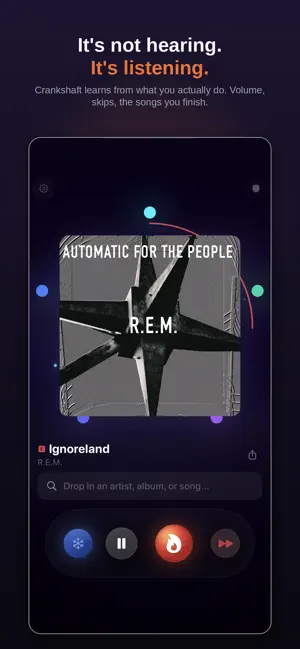
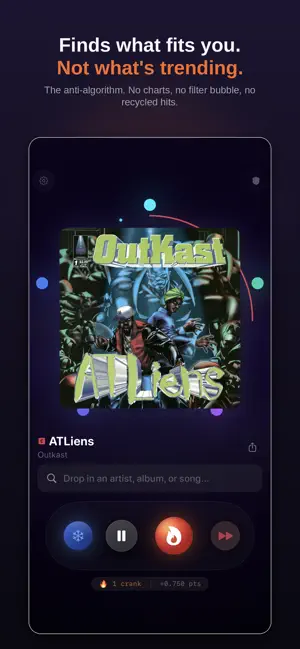
Crankshaft learns your taste from how you actually listen — how you move the volume, when you skip, what you let run to the end. Full CarPlay support, which is where it makes the most sense: hands busy, eyes on the road, so what you do to a song actually means something. Requires an active Apple Music subscription — Crankshaft plays through your existing Apple Music library. No separate account, no sign-up, and Crankshaft never sends your listening data anywhere. It stays on your device unless you choose to export it. Most music apps only know what you tell them. Crankshaft takes that too — crank a song you love, freeze one you never want to hear again — and then it reads everything else: the volume you reach for, the song you kill at four seconds, the one you let run all the way to the end. Those signals cost you nothing to give, and nearly every other app throws them away. Every session shapes a living profile of your taste that gets sharper over time. Give it real sessions and you'll feel the difference within a week. The app is free, you just bring your own Apple Music. The data is all yours, so there's no risk to you. HOW IT WORKS Crankshaft sits on top of your Apple Music library. Hit Ignite and it plays from your personal affinity ledger: a behavioral map of every song, scored by how you actually interacted with it. Crank the volume on a song you love and it learns. Skip something in the first ten seconds and it learns that too. Let a song play to the end and that quiet signal counts. Five behavioral zones, from instant skip to full completion, score every track on a curve. Buttons when you want them, physics the rest of the time. IT PLAYS LIKE A STATION YOU CAN STEER Crankshaft doesn't shuffle. It holds a mood — an era, a genre, an energy — the way a great radio station does, and keeps it there until you signal you want to move. Skip to steer: nudge it toward a different sound and it follows you down the rabbit hole; leave it alone and it holds the vibe. It's built to walk you around your own library, not loop your ten favorites. REACH BEYOND WHAT YOU OWN Declare the artists you love — even ones your library never captured — and Crankshaft opens their catalog and works them into your rotation. A single discovery dial sets how adventurous the engine gets, from comfortable and familiar to wide-open exploration. FEATURES The Crank — Turn up the volume with intent and Crankshaft feels it. That one gesture tells it more than a like ever could. Affinity Ledger — Every song earns a score from real listening behavior. Scores rise and fall with your habits, not just your clicks. CarPlay — Full CarPlay integration with Crank, Freeze, Up Next and Parent Mode controls on the dash. Station & Drift — Crank a song and Crankshaft builds a station around that vibe, holding it and drifting naturally through your library and the Apple Music catalog. Declared Artists — Name the artists you love and Crankshaft reaches their whole catalog, even music you don't own yet. Discovery Dial — Blend new and unfamiliar music into your rotation at exactly the level you choose. Pick an Album — On-demand album picks drawn from your affinity ledger, weighted toward what you love with a wildcard from deep in your library. Parent Mode — A completely separate universe with its own ledger, scoring, and visual theme. Your kids' listening never touches your profile. Road Trip Mode — A pre-cached 60-track queue built for long drives. Works offline. PRIVACY BY DESIGN Your data stays on your device. Crankshaft has no cloud sync, no ad targeting, no social graph, and no tracking pixels. Your affinity ledger lives in your app's local storage and never leaves your phone. Built on Apple MusicKit.
What’s new
Version 1.8 · Updated October 20, 2026
Playlists, all in one place. New Playlists screen in Settings. What the engine reads from and what Crankshaft writes back now live together, instead of sitting three taps apart in two different sections. New switch: tell Crankshaft not to write playlists at all. Your cranks still teach the engine. Nothing lands in your library. Road Trip Mode is gone. It could never really download music, because Apple does not let other apps do that, and while it ran it quietly switched the engine off. The knob should be steering. Especially in the car. Fixed: saving recent picks created a brand new playlist every time. There is one Crankshaft Saves list now, and it gets added to. Fixed: with more than a hundred playlists, Crankshaft could only see the first hundred. It sees all of them now. Fixed: Crankshaft could count its own playlists as music you curated. It no longer reads its own output back as your taste. Fixed: No Remix forgot itself on every launch.
App privacy
The developer, Crankshaft LLC, reported these privacy practices to Apple.
Data Not Collected
The developer does not collect any data from this app.
Alternatives to Crankshaft
Looking for apps like Crankshaft? Here are 6 similar apps on the App Store. The highest rated is AlgoRythm for Apple Music (5.0/5), and all 6 are free to download.
-
 AlgoRythm for Apple Music
5.0
-
 Jelly Music — by JellyLabs
5.0
-
 Setto Studio: Rediscover Music
5.0
-
 Muse: Music Discovery
4.3
-
 Side B: Music Album Library
5.0
-
 Fasttrak Music
5.0
| App | Rating | Price | Last updated | Compare |
|---|---|---|---|---|
| Crankshaft | 5.0 / 5 (4 ratings) | Free | October 20, 2026 | |
| AlgoRythm for Apple Music | 5.0 / 5 (4) | Free | Oct 19, 2026 | Compare |
| Jelly Music — by JellyLabs | 5.0 / 5 (5) | Free | Sep 24, 2026 | Compare |
| Setto Studio: Rediscover Music | 5.0 / 5 (1) | Free | Oct 1, 2026 | Compare |
| Muse: Music Discovery | 4.3 / 5 (11) | Free | Feb 10, 2026 | Compare |
| Side B: Music Album Library | 5.0 / 5 (1) | Free | Oct 18, 2026 | Compare |
| Fasttrak Music | 5.0 / 5 (1) | Free | Jun 23, 2026 | Compare |
Compare Crankshaft with the top alternatives: ratings, updates, ASO score and keyword gaps →