

Berean: Audio Bible & AI
Blockd, Inc. Book iPhoneiPadiPod touch
Berean: Audio Bible & AI is a free Book app for iPhone and iPad by Blockd, Inc. Rated 5.0/5 from 2 ratings. Requires iOS 17.0. Updated October 18, 2026.
- Rating
- 5.0
- 2 ratings
- Price
- Free
- on the App Store
- Size
- 75 MB
- Age 4+
- Updated
- Oct 18
- 2026 · v2.5.0
Screenshots



About Berean: Audio Bible & AI
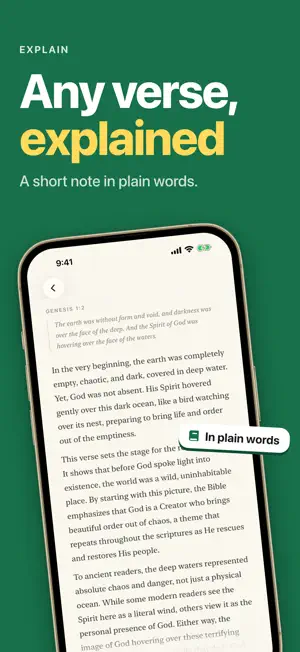
Listen to the Bible read aloud by a full cast, and ask questions out loud as you go. Berean answers in seconds, then keeps reading where you stopped. HEAR A FULL CAST Each person who speaks has their own voice, and a narrator reads the rest. To hear one voice for every chapter, open Settings, then choose One narrator under Voices. ASK ABOUT ANY VERSE Tap the sparkle button and ask your question in the middle of a chapter. Speak it, and Berean sends it when you stop talking, or type it instead. To study one verse, select it and tap Explain. You get a short note in plain words: what the verse says, why it matters, and how it fits the whole story. Tap Ask to type a question, or use the question that Berean suggests for the passage. Every note and answer stays with its verse, and Bookmarks lists them all. TWO WAYS TO READ Listen & Interact: a natural voice reads aloud, and the text follows word by word. Read: a quiet page with no menus, for focused study. READ THE BIBLE IN A YEAR Follow the Life Journal Daily Reading by Wayne Cordeiro: 365 days of Old Testament, Psalms and New Testament. A calendar shows each day that you read. Your pace shows how many days ahead or behind you are. If you read a chapter on your own, the plan counts it, and the next day is ready when you open the app. LISTEN OFFLINE Download one book or the whole Bible, and Listen & Interact plays with no connection, on a plane or a train. Each book shows its size before you download it. Offline audio is part of Berean Pro. ON YOUR HOME SCREEN Verse of the Day shows a new verse each day, set beside a painting by James Tissot. Today's Reading shows your plan for the day, or the chapter where you stopped. Both widgets also fit on your Lock Screen. BUILT LIKE A BOOK Serif type, real margins, and light and dark themes on iPhone and iPad. No banners and no clutter between you and the text. FEATURES - The complete ESV Bible, all 66 books - A full cast reads every chapter, with word-by-word sync - One narrator instead, if you prefer - Ask questions out loud or by typing, mid-chapter - Short study notes for any verse or passage - Comments, highlights and bookmarks - A daily reading plan with a streak and a calendar - Offline audio for any book, or the whole Bible (Berean Pro) - Home Screen and Lock Screen widgets - Light and dark themes for iPhone and iPad BEREAN PRO Reading is free, forever. Berean Pro unlocks Listen & Interact and follow-up questions, and it is free for your first three days. - Berean Pro Monthly: $9.99 per month - Berean Pro Yearly: $79.99 per year Prices are in U.S. dollars and may vary by region. Payment is charged to your Apple Account at confirmation of purchase. A subscription renews automatically unless it is turned off at least 24 hours before the end of the current period, and your account is charged for renewal within 24 hours before the period ends. You can manage or cancel your subscription in your Apple Account settings after purchase. Terms of Use (EULA): https://www.apple.com/legal/internet-services/itunes/dev/stdeula/ Terms of Service: https://berean.io/terms-of-service Privacy Policy: https://berean.io/privacy-policy
What’s new
Version 2.5.0 · Updated October 18, 2026
Explain and Ask now open on the same clear page as the sparkle button. The passage stays in view behind it, and each answer writes itself in as one smooth line. Comments have a new look. A comment thread opens like a chapter: the book, the verse number, and the verse itself. To see the verses around it, tap Verses around it. To cite one of those verses in your comment, tap it. Your comments sit on their own cards. When you ask Berean from a comment thread, your question and the answer read as a conversation. When you ask several questions about a chapter, scroll up to read the earlier answers. Your reading plan lists each chapter on its own line, with the book named every time. Profile is now called Settings. We fixed a bug that showed a section heading as part of a poem and skipped the first words of the next verse, as in Matthew 15.
App privacy
The developer, Blockd, Inc., reported these privacy practices to Apple.
Data Not Linked to You
The following data, which may be collected but is not linked to your identity, may be used for the following purposes:
- Contact Info: Email Address
Used for: App Functionality
Alternatives to Berean: Audio Bible & AI
Looking for apps like Berean: Audio Bible & AI? Here are 6 similar apps on the App Store. The highest rated is Traverse Bible (5.0/5), and all 6 are free to download.
-
 Light of Mine: Bible + Audio
-
 Every Bible
-
 Traverse Bible
5.0
-
 Sojourn: Bible & Sermon Study
5.0
-
 World Bible Guide
-
 NASB Bible (Audio & Book)
4.5
| App | Rating | Price | Last updated | Compare |
|---|---|---|---|---|
| Berean: Audio Bible & AI | 5.0 / 5 (2 ratings) | Free | October 18, 2026 | |
| Light of Mine: Bible + Audio | – | Free | May 9, 2026 | Compare |
| Every Bible | – | Free | Sep 29, 2026 | Compare |
| Traverse Bible | 5.0 / 5 (5) | Free | Sep 21, 2026 | Compare |
| Sojourn: Bible & Sermon Study | 5.0 / 5 (8) | Free | Oct 17, 2026 | Compare |
| World Bible Guide | – | Free | Sep 18, 2026 | Compare |
| NASB Bible (Audio & Book) | 4.5 / 5 (179) | Free | May 31, 2026 | Compare |