

Fleet Tasks
Fleet Software Productivity iPhoneiPadiPod touch
Fleet Tasks is a free Productivity app for iPhone and iPad by Fleet Software. Requires iOS 15.1. Updated October 20, 2026.
- Price
- Free
- on the App Store
- Size
- 40 MB
- Age 4+
- Updated
- Oct 20
- 2026 · v1.0.13
Screenshots


About Fleet Tasks
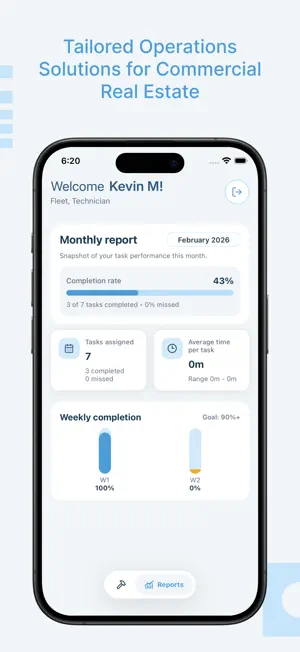
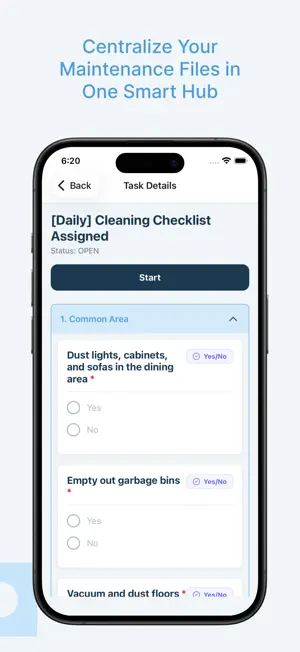
The Fleet Mobile App is a powerful extension of the Fleet ecosystem, designed to transform how field technicians, and vendors interact with their operational data. The app provides a high-performance, native experience on your mobile device, ensuring that critical tasks are handled efficiently, regardless of location. Key Features for Technicians 1. Real-Time Task Management The heart of the mobile experience is the Technician Dashboard. Technicians can view a prioritized list of assigned tasks, including work orders, inspections, and maintenance requests. - Claim & Start: Technicians can "Claim" unassigned tasks from a shared pool and "Start" them to track active work time. - Draft Support: For long inspections or complex repairs, technicians can save their progress as a draft and return to it later, ensuring no data is lost during a busy shift. 2. Smart Digital Forms & Checklists Fleet replaces paper clipboards with dynamic digital forms. These forms are fully customizable via the web dashboard and rendered natively on mobile. - Conditional Logic: Forms only show relevant questions based on previous answers, reducing clutter and speeding up completion. - Rich Data Capture: Technicians can upload photos directly from the camera, select from dropdowns, and provide detailed text resolutions. - Validation: Required fields and data validation ensure that every submission is complete and accurate before it can be resolved. 3. Work Order Resolution The app provides a dedicated interface for Work Orders, displaying critical metadata such as: - SLA Tracking: Clear visibility into due dates and remaining time based on Service Level Agreements. - Asset Context: View details about the specific asset or location requiring service, including history and descriptions. - Resolution Workflow: A streamlined process to mark tasks as "Closed" once work is verified. 4. Performance Insights Technicians can track their own productivity through the Reports section. Metric Cards: View total tasks completed, pending tasks, and average resolution times. Progress Tracking: Visual progress bars help technicians stay on top of their daily and weekly goals.
What’s new
Version 1.0.13 · Updated October 20, 2026
Vendors can upload additional file attachments to the Work Order
App privacy
The developer, Fleet Software, reported these privacy practices to Apple.
Data Not Linked to You
The following data, which may be collected but is not linked to your identity, may be used for the following purposes:
- Identifiers: Device ID
- Usage Data: Product Interaction, Other Usage Data
- Diagnostics: Crash Data, Performance Data, Other Diagnostic Data
- Location: Precise Location
- Contact Info: Email Address, Name, Phone Number
- User Content: Photos or Videos, Other User Content
Used for: Analytics, App Functionality
Alternatives to Fleet Tasks
Looking for apps like Fleet Tasks? Here are 6 similar apps on the App Store. The highest rated is Japer AI - AIQuanta (4.8/5), and all 6 are free to download.
-
 FleetX.com Driver App
-
 Whispr: Voice to Text Keyboard
4.4
Whispr: Voice to Text Keyboard
4.4
-
 NapCat -Offline GitHub Client
3.7
NapCat -Offline GitHub Client
3.7
-
 Janus Lock
2.2
Janus Lock
2.2
-
 ArrayCalc Viewer
4.1
ArrayCalc Viewer
4.1
-
 Japer AI - AIQuanta
4.8
Japer AI - AIQuanta
4.8
| App | Rating | Price | Last updated | Compare |
|---|---|---|---|---|
| Fleet Tasks | – | Free | October 20, 2026 | |
| FleetX.com Driver App | – | Free | Oct 17, 2026 | Compare |
| Whispr: Voice to Text Keyboard | 4.4 / 5 (7) | Free | Oct 19, 2026 | Compare |
| NapCat -Offline GitHub Client | 3.7 / 5 (7) | Free | Aug 11, 2026 | Compare |
| Janus Lock | 2.3 / 5 (4) | Free | Jun 28, 2026 | Compare |
| ArrayCalc Viewer | 4.1 / 5 (8) | Free | Jan 7, 2026 | Compare |
| Japer AI - AIQuanta | 4.8 / 5 (80) | Free | May 5, 2026 | Compare |
Compare Fleet Tasks with the top alternatives: ratings, updates, ASO score and keyword gaps →