

OneCost - AI Expense Tracker
希 陈 Finance iPhoneiPadiPod touchApple Watch
OneCost - AI Expense Tracker is a free Finance app for iPhone and iPad by 希 陈. Rated 5.0/5 from 1 ratings. Requires iOS 18.0. Updated October 14, 2026.
- Rating
- 5.0
- 1 ratings
- Price
- Free
- on the App Store
- Size
- 13 MB
- Age 12+
- Updated
- Oct 14
- 2026 · v1.0.11
Screenshots



About OneCost - AI Expense Tracker
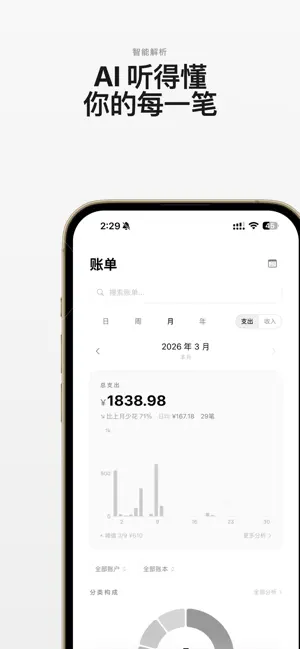
Track spending in one line. OneCost is a minimalist, AI-powered expense tracker. Just say or type what you spent, and AI figures out the amount, time and category. Or snap a receipt or payment screenshot and it extracts the total automatically. ■ Effortless entry · Text: type "lunch 28" to record it · Voice: say "taxi 35" and it's logged · Photo: snap a receipt or payment screenshot — AI reads the amount and merchant ■ Asset accounts · Manage cash, bank cards, credit cards, e-wallets and investments · Transfers and balance calibration; see your net worth anytime · Entries link to accounts automatically so money flow stays clear ■ Multi-currency · Support for USD, EUR, JPY, KRW, CNY and more · Automatic exchange rates; summaries convert to your base currency ■ Insights · AI analyzes your spending trends, timing and emotional patterns · Spending persona, anomaly alerts and impulse-spending hints ■ Widgets & Apple Watch · Home / Lock Screen / StandBy widgets for today's spending · Quick entry on Apple Watch ■ Privacy first · Your data stays on your device and in your iCloud; text/images are forwarded to a third-party AI service through our server only when you use AI recognition · No ad tracking, no personal data collection ■ And more · iCloud sync across devices · Import & export, trash, multiple ledgers Privacy Policy: https://plums-look-mpw.craft.me/dqFvtDnyTIAIfn Terms of Use (EULA): https://www.apple.com/legal/internet-services/itunes/dev/stdeula/
What’s new
Version 1.0.11 · Updated October 14, 2026
What's new in OneCost 1.0.11: 1. Multi-currency: track spending in USD, EUR, JPY, KRW and more, with exchange rates updated automatically. 2. Now available in English, Japanese and Korean - switch the app language in Settings. 3. Faster, more reliable photo/receipt capture, with clear reasons if recognition fails. 4. Bug fixes and a smoother experience.
App privacy
The developer, 希 陈, reported these privacy practices to Apple.
Data Not Linked to You
The following data, which may be collected but is not linked to your identity, may be used for the following purposes:
- User Content: Photos or Videos, Audio Data, Other User Content
Used for: Analytics
Alternatives to OneCost - AI Expense Tracker
Looking for apps like OneCost - AI Expense Tracker? Here are 6 similar apps on the App Store. The highest rated is 闪记宝-快捷指令极速记账 (5.0/5), and 5 of the 6 are free to download.


| App | Rating | Price | Last updated | Compare |
|---|---|---|---|---|
| OneCost - AI Expense Tracker | 5.0 / 5 (1 rating) | Free | October 14, 2026 | |
| Momiq | – | 1 USD | Sep 7, 2026 | Compare |
| 闪记宝-快捷指令极速记账 | 5.0 / 5 (1) | Free | Jun 27, 2025 | Compare |
| Empowered Life Financial Inc. | – | Free | Mar 4, 2026 | Compare |
| FinPulseAI | – | Free | Feb 10, 2026 | Compare |
| Foryt T-Vaultix | – | Free | Feb 3, 2026 | Compare |
| Coin Focus | – | Free | Mar 3, 2026 | Compare |