

School Notes
Brian Foutty Education iPad
School Notes is a free Education app for iPad by Brian Foutty. Rated 1.0/5 from 1 ratings. Requires iOS 18.6. Updated August 6, 2026.
- Rating
- 1.0
- 1 ratings
- Price
- Free
- on the App Store
- Size
- 4 MB
- Age 4+
- Updated
- Aug 6
- 2026 · v1.6
Screenshots


About School Notes
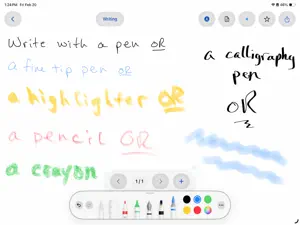
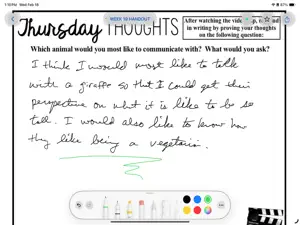
School Notes was born in the classroom. As a teacher, I needed a simple, reliable way for staff and students in my district to take notes, annotate handouts, and stay organized — without the complexity (or cost) of apps that try to do everything. I built SchoolNotes to solve that problem, and now I'm sharing it with educators and students everywhere. Three ways to take notes, one place to keep them: • Handwrite with Apple Pencil — A full drawing canvas with multi-page support, zoom, and all the tools you'd expect from PencilKit. Great for math, science diagrams, or just jotting things down. • Annotate PDFs — Import worksheets, handouts, or articles and draw right on top of them. Grab PDFs from Files, Safari, or any app using the built-in Share Extension. • Type text notes — For outlines, study guides, or anything that's faster on a keyboard. Stay organized with Classes: Create color-coded classes that match your schedule. Assign notes to one or more classes, drag to reorder, and find what you need fast with search and flexible sorting. Switch between list and grid views to browse your notes the way you prefer. Sync across your iPads with iCloud: Turn on iCloud sync and your notes follow you between devices. Works with personal Apple IDs — and if your school uses managed Apple IDs, SchoolNotes works great offline too. Share your work: Export any note as a PDF or image. Need everything at once? Batch-export your entire notebook with a single tap. Features at a glance: ◦ Apple Pencil drawing with full tool picker ◦ Multi-page drawing notes ◦ PDF import and annotation ◦ Text notes ◦ Color-coded class organization ◦ Assign notes to multiple classes ◦ Favorites for quick access ◦ Search across all notes ◦ Sort by date modified, date created, or title ◦ List and grid views ◦ Export as PDF or image ◦ Batch export all notes ◦ Share Extension for quick PDF import ◦ Optional iCloud sync ◦ No account required — your data stays on your device ◦ No ads. No subscriptions. Just notes. School Notes is free to use with all features included. If you find it helpful, there's an optional tip jar in Settings to support continued development. I'd love to hear how you're using School Notes in your classroom. Feedback and feature requests are always welcome!
What’s new
Version 1.6 · Updated August 6, 2026
Added continuous scrolling note creation. Users can now choose, in the app's Settings screen, to have all notes scroll rather than using the next and previous buttons for note navigation. Thanks for the suggestion Lisa K!!
App privacy
The developer, Brian Foutty, reported these privacy practices to Apple.
Data Not Collected
The developer does not collect any data from this app.
Alternatives to School Notes
Looking for apps like School Notes? Here are 6 similar apps on the App Store. The highest rated is McBain Public School (5.0/5), and all 6 are free to download.
-
 Multiplication Math Facts
-
 School Excuse Note - Excuso
-
 McBain Public School
5.0
-
 Yomu – Japanese Reader
-
 Edutechs
-
 Lecture Note Taker: Note Genie
5.0
| App | Rating | Price | Last updated | Compare |
|---|---|---|---|---|
| School Notes | 1.0 / 5 (1 rating) | Free | August 6, 2026 | |
| Multiplication Math Facts | – | Free | Apr 22, 2026 | Compare |
| School Excuse Note - Excuso | – | Free | Jan 26, 2026 | Compare |
| McBain Public School | 5.0 / 5 (6) | Free | Apr 3, 2024 | Compare |
| Yomu – Japanese Reader | – | Free | Oct 19, 2026 | Compare |
| Edutechs | – | Free | Oct 19, 2026 | Compare |
| Lecture Note Taker: Note Genie | 5.0 / 5 (1) | Free | Aug 27, 2026 | Compare |
Compare School Notes with the top alternatives: ratings, updates, ASO score and keyword gaps →