

Nuxbe PoS
Team Nifty GmbH Business iPhoneiPadiPod touchMac
Nuxbe PoS is a free Business app for iPhone and iPad by Team Nifty GmbH. Requires iOS 15.0. Updated October 25, 2026.
- Price
- Free
- on the App Store
- Size
- 32 MB
- Age 4+
- Updated
- Oct 25
- 2026 · v1.3.1
Screenshots


About Nuxbe PoS
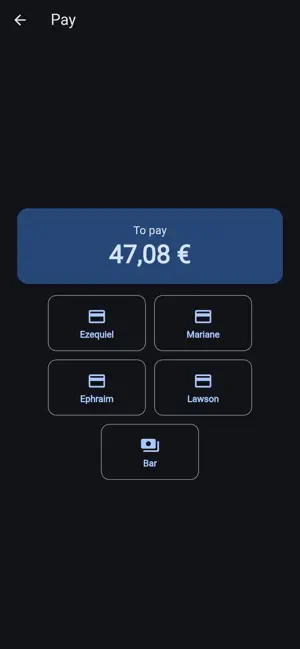
Nuxbe POS turns your iPad into a powerful, reliable point-of-sale terminal. Designed for retail businesses of all sizes, it connects seamlessly to your FluxErp backend and keeps working even when your internet goes down. FAST CHECKOUT Browse products by category or find them instantly with search and barcode scanning. Add items to the cart with a single tap, apply discounts, and assign customers. The intuitive interface means minimal training for your staff. FLEXIBLE PAYMENTS Accept cash, card, and other payment methods. The cash payment screen calculates change automatically and supports quick-select denomination buttons. Connect a payment terminal for seamless card transactions. OFFLINE-FIRST Every sale is stored locally and synced automatically when connectivity returns. Your business never stops, even without internet. Products, prices, and customer data are cached on-device for instant access. RECEIPT PRINTING Print professional receipts on compatible thermal printers via network connection. Configure auto-print after each sale or print on demand. Receipts can also be viewed and downloaded as PDF. SESSION MANAGEMENT Open your register with a counted opening amount. View X-reports during the day for interim totals. Close with a Z-report that summarizes revenue, payment types, and cash balance — complete with variance tracking. TRANSACTION HISTORY Review past sales, filter by date, and drill into individual transactions. Process refunds and voids with manager PIN approval when needed. BARCODE SCANNING Scan product barcodes using the built-in camera or connect a Bluetooth barcode scanner for hands-free operation. TAX COMPLIANT Integrated with Fiskaly cloud TSE for German fiscal compliance (KassenSichV). Every transaction is signed and audit-ready. MULTI-LANGUAGE Available in English and German. The app follows your device language automatically. DARK MODE Full dark mode support for comfortable use in any lighting environment. SECURE PIN-based authentication for each cashier. Manager approval required for sensitive operations like refunds and voids. REQUIREMENTS Nuxbe POS requires a FluxErp backend with the Nuxbe POS module. Contact us at team-nifty.com for setup and licensing.
What’s new
Version 1.3.1 · Updated October 25, 2026
A fresh look for the whole till. New figures: report tiles with sales, receipts and payment mix, the expected cash in the drawer, and an insights page behind the manager PIN. Choose the app language in the settings, independent of your device. Better use on phones in landscape. Various fixes and improvements.
App privacy
The developer, Team Nifty GmbH, reported these privacy practices to Apple.
Data Not Collected
The developer does not collect any data from this app.
Alternatives to Nuxbe PoS
Looking for apps like Nuxbe PoS? Here are 6 similar apps on the App Store.


| App | Rating | Price | Last updated | Compare |
|---|---|---|---|---|
| Nuxbe PoS | – | Free | October 25, 2026 | |
| POS Core | – | Free | Aug 28, 2026 | Compare |
| Dinex - Point of Sale | – | Free | May 28, 2026 | Compare |
| Order Update POS | – | Free | Nov 24, 2025 | Compare |
| Kroon Kiosk Tablet POS & Stock | – | Free | Jul 30, 2026 | Compare |
| Onehive POS | – | Free | Feb 7, 2026 | Compare |
| CBAS | – | Free | Jul 21, 2026 | Compare |
Compare Nuxbe PoS with the top alternatives: ratings, updates, ASO score and keyword gaps →